About 25% of apps are abandoned after a single use. Push notifications are one of the few tools that can change that — reaching users directly on their lock screen, even when the app is closed.
This guide explains what mobile push notifications are, how they work, what types exist, and how to use them effectively. And along the way, you’ll see how Pushwoosh helps you target the right user at the right moment to lift CTR and retention.
What are mobile push notifications?
Mobile push notifications are short, real-time messages sent from an app to a user’s smartphone or tablet — even when the app is not open. They appear on the lock screen, in the notification center, or as a banner at the top of the screen, and are delivered via platform-specific infrastructure: Apple Push Notification Service (APNs) on iOS, and Firebase Cloud Messaging (FCM) on Android.
Unlike email, which sits in an inbox, or in-app messages, which require an active session, push notifications interrupt the user in the moment — making them one of the most immediate channels available to app teams. They work across iOS and Android, require user opt-in (mandatory on iOS; required from Android 13+), and can carry text, images, video, and interactive action buttons.
A well-executed push notification strategy drives engagement, retention, and revenue. A poorly executed one accelerates uninstalls.
How mobile push notifications work
Every push notification passes through a three-part chain: your server, a push gateway (APNs or FCM), and the user’s device.
- User grants permission — on iOS, the app must request explicit opt-in via a system prompt. On Android 13+, the same applies. Without permission, no push can be delivered.
- Device token generated — once the user opts in, the OS issues a unique token for that app-device pair. This token is the delivery address for all future messages.
- Token stored on server — your backend or engagement platform stores tokens and builds a notification payload: a small JSON object with the title, body, media URL, and delivery parameters.
- Payload sent to gateway — the server forwards the payload to APNs (for iOS) or FCM (for Android). The gateway validates it and routes it to the right device.
- Notification displayed — the OS delivers the notification. It appears on the lock screen, in the notification tray, or as a banner — depending on device settings and the user’s notification preferences.
Types of mobile push notifications
Not all push notifications serve the same purpose. Understanding the main types helps you choose the right format for each use case and configure your campaigns accordingly.
Transactional notifications
Triggered by a specific user action or system event. They carry functional information the user expects and typically wants: order confirmed, payment received, password reset, delivery on the way. Transactional pushes have the highest open rates of any notification type because they are inherently relevant.
Examples: “Your order #4821 has shipped.” | “Payment of $49 received.” | “Your ride arrives in 3 minutes.”
Promotional notifications
Marketing messages designed to drive a commercial action: a purchase, a subscription renewal, a return visit. They are opt-in by nature and depend entirely on relevance and timing to perform. A flash sale push to a segmented audience of recent browsers outperforms the same message sent to everyone.
Examples: “20% off all sneakers — 24 hours only.” | “Your wishlisted item is back in stock.” | “Loyalty bonus: free coffee on your next visit.”
Behavioral (triggered) notifications
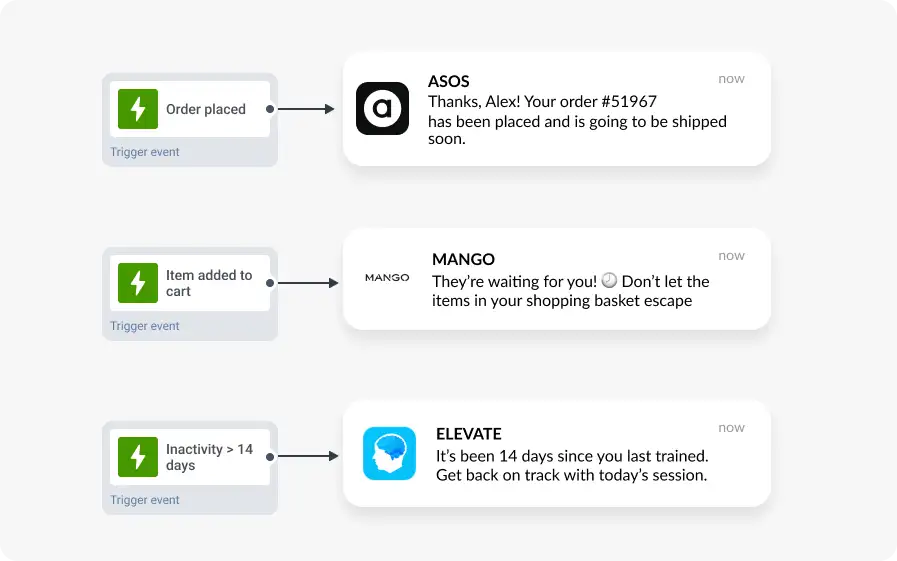
Sent in response to specific in-app events or inactivity. These are the highest-converting push type for most apps because they arrive at the moment of maximum relevance — right when the user’s context makes the message meaningful.
Examples: “You left something in your cart.” | “You haven’t played in 7 days — your streak is at risk.” | “Price dropped on an item you viewed.”
Rich push notifications
Rich push notifications include images, GIFs, video, or audio alongside the standard text. They increase CTR because they communicate more in the notification itself, reducing the cognitive load of deciding whether to tap through. Android supports images up to 10 MB and video up to 50 MB; iOS supports the same via a Notification Service Extension.
Silent (background) notifications
Silent push notifications deliver a data payload to the app without showing any visible alert. They are used to refresh content in the background, sync user state, or pre-fetch data before the user opens the app. Silent pushes require no user interaction and do not count against frequency caps.
Geofenced / location-triggered notifications
Triggered when a user enters or exits a defined geographic area. Used by retail, delivery, and event apps to send contextually relevant messages tied to physical location. Require location permission in addition to notification permission.
Examples: “You’re near our store — here’s 15% off today only.” | “Your order is 2 stops away.”
Benefits of mobile push notifications
Push notifications are one of the few channels that work when the user is not actively using your app. Here is what well-executed push campaigns actually deliver:
- Immediate reach: messages land on the lock screen within seconds of sending. No inbox to check, no tab to open.
- Re-engagement at scale: users who haven’t opened the app in 7+ days can be reached directly with a relevant offer or update. Even a 5-10% re-engagement rate compounds significantly at scale.
- Higher conversion on time-sensitive offers: a flash sale push expiring in 4 hours creates urgency that email in a tabbed inbox doesn’t. Immediacy is the channel’s core advantage.
- Low cost per send: once a user has opted in, the marginal cost of a push is effectively zero. ROI on a well-targeted push campaign is typically higher than paid channels for the same conversion event.
- Improved CLV for retained users: users who receive relevant, personalized push messages over time generate more revenue and stay active longer than users who don’t.
- Measurable, attributable impact: delivery rate, open rate, CTR, and conversion can all be tracked per campaign and per segment — giving you a clear feedback loop for optimization.
| Metric | Good performance benchmark |
|---|---|
| Opt-in rate | 60-70% |
| Direct open rate | 15-25% (higher for rich push) |
| CTR | 20-35% |
| Conversion rate (post-click) | 5-10% |
| Uninstall rate | Below 1% (well-managed programs) |
Highly segmented campaigns can exceed 28% CTR. That number drops fast when targeting isn’t precise.
Anatomy of a mobile push notification
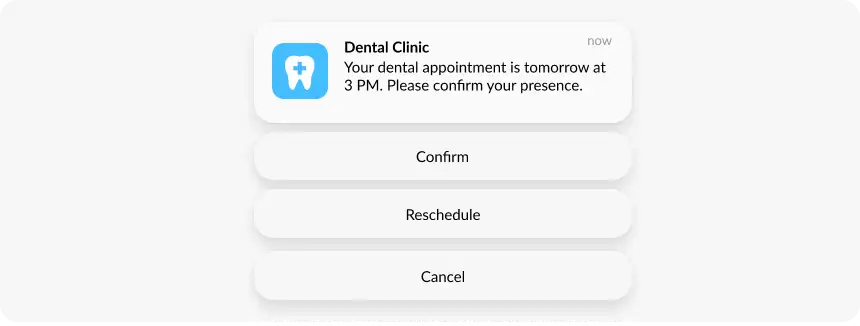
A push notification has five core components. Each one affects whether the message gets seen, read, and tapped.
| Component | What it does |
|---|---|
| Title | First thing the user reads. Keep it under 50 characters and front-load the most important information. |
| Body text | Expands on the title. First 40 characters are most visible. 150 character max before truncation. |
| Rich media | Image, GIF, or video. Increases CTR by giving visual context without requiring a tap. Optional but effective. |
| Action buttons | Up to 3 on Android, 4 on iOS. Give the user a path to act without opening the app first. |
| Deep link | Where the user lands after tapping. Should go directly to the relevant screen, not the home screen. |
iOS vs Android: key differences
Both platforms deliver push notifications, but they differ in permission model, delivery infrastructure, media support, and engagement benchmarks.
| Aspect | iOS | Android |
|---|---|---|
| Delivery gateway | APNs | FCM |
| Opt-in model | Explicit, always required | Explicit from Android 13+ |
| Avg. opt-in rate | ~56% | ~75% |
| Avg. CTR | 1.71% | 2.75% |
| Rich media limit | 10 MB image via NSE, 50 MB video | 10 MB image, 50 MB video |
| Action buttons | Up to 4 | Up to 3 |
| Focus/DND bypass | Time-Sensitive & Critical alerts only | Priority channels only |
Android offers broader reach and higher opt-in rates. iOS users deliver higher CLV and stronger engagement per message once opted in.
Mobile push notification best practices
The difference between a push notification that drives action and one that triggers an uninstall is rarely the channel — it’s the execution. These are the practices that consistently move the metrics.
Ask for opt-in at the right moment
On iOS, you have one shot at the system permission prompt. Don’t waste it on first launch. Show a custom in-app screen first — explaining what the user will receive and why it’s valuable — then trigger the OS dialog after a meaningful action: first purchase, end of onboarding, a milestone achieved. The same approach works on Android 13+.
Segment before you send
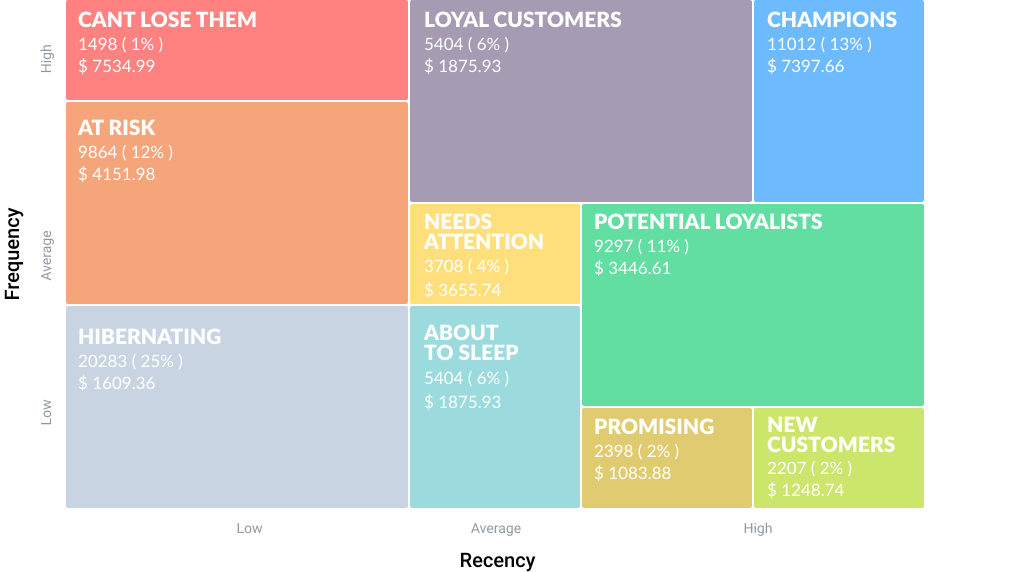
A message to everyone is a message to no one. At minimum, separate new users, engaged users, and dormant users — each needs a different message, offer, and timing. RFM segmentation (Recency, Frequency, Monetary) takes this further, grouping users by behavioral patterns so each segment gets copy and offers calibrated to where they actually are in the lifecycle.
- Champions (High R, F, M): early access, loyalty rewards — don’t burn them with discounts they don’t need.
- At-risk (Low R, Medium F): win-back offer with a specific incentive, not a generic ‘we miss you’.
- New users (High R, Low F): welcome sequence introducing features and a first-purchase nudge.
- Lapsed high-value (High M, Low R): personalized, high-value recovery offer worth the spend.
Personalize beyond the name
‘Hi Alex, your wishlisted jacket is 20% off’ outperforms ‘Hi Alex, check out our sale’ because the item reference is what makes it relevant. Use dynamic content to pull user-specific data — product name, last viewed category, order status, game level — directly into notification copy. The closer the message maps to what the user actually did, the higher the CTR.
Time it right
There is no universal best hour. E-commerce sees spikes at lunch and evening; news apps perform in the morning. Use per-user optimal timing based on historical engagement patterns — Pushwoosh’s Best Time to Send feature does this automatically and consistently lifts open rates by 15-25%. Set silence periods to prevent nighttime delivery regardless of automation logic.
Control frequency
Too many pushes with low relevance is the fastest path to opt-out. Most teams start at 2-3 promotional pushes per week per user and adjust based on uninstall rate and engagement data. Engaged users tolerate higher frequency than dormant ones — segment frequency caps accordingly.
Use automation for high-value sequences
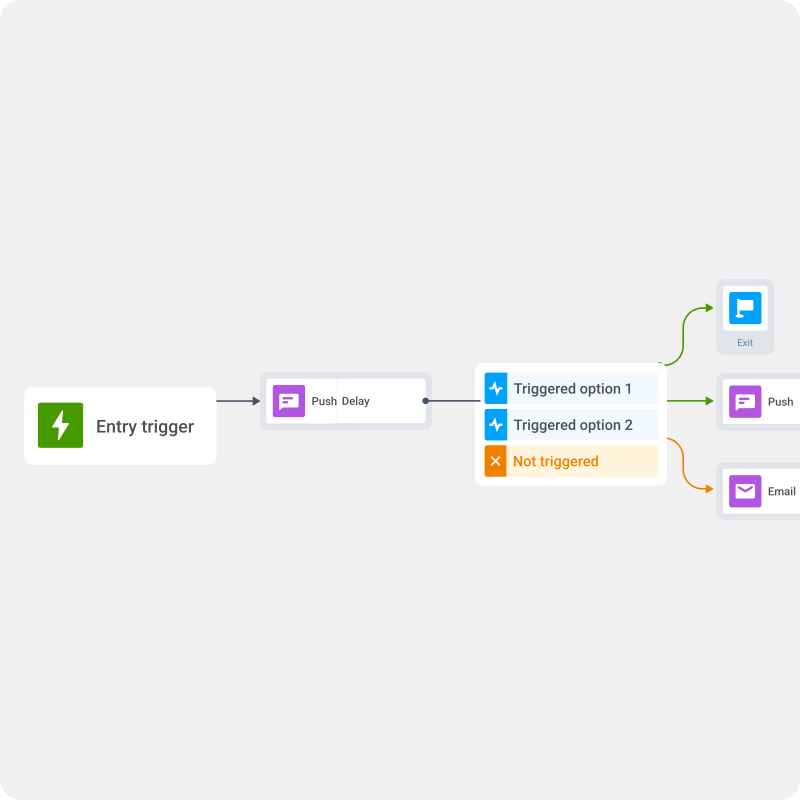
One-off blasts are reactive. Automated journeys run in the background and catch users at the right moment without manual work. The sequences that consistently perform well:
- Abandoned cart: 30 min after abandonment — simple reminder with direct link. 24h later if no purchase — ‘Items selling fast.’ Second message only sends if first didn’t convert.
- Welcome series: Day 1 onboarding push → Day 3 feature highlight → Day 7 first-purchase incentive, conditional on non-conversion.
- Post-purchase upsell: 3 days after purchase — relevant accessories or complementary product. Timing matters: too soon feels pushy, too late loses the moment.
- Re-engagement: no app open in 7 days triggers the sequence. Offer tied to last activity, not generic.
A/B test continuously
Test title copy, body text, rich media, CTA buttons, and send time. Track CTR and conversion, not just opens. Small optimizations compound — a 10% CTR improvement on a re-engagement sequence running at scale is a significant revenue number.
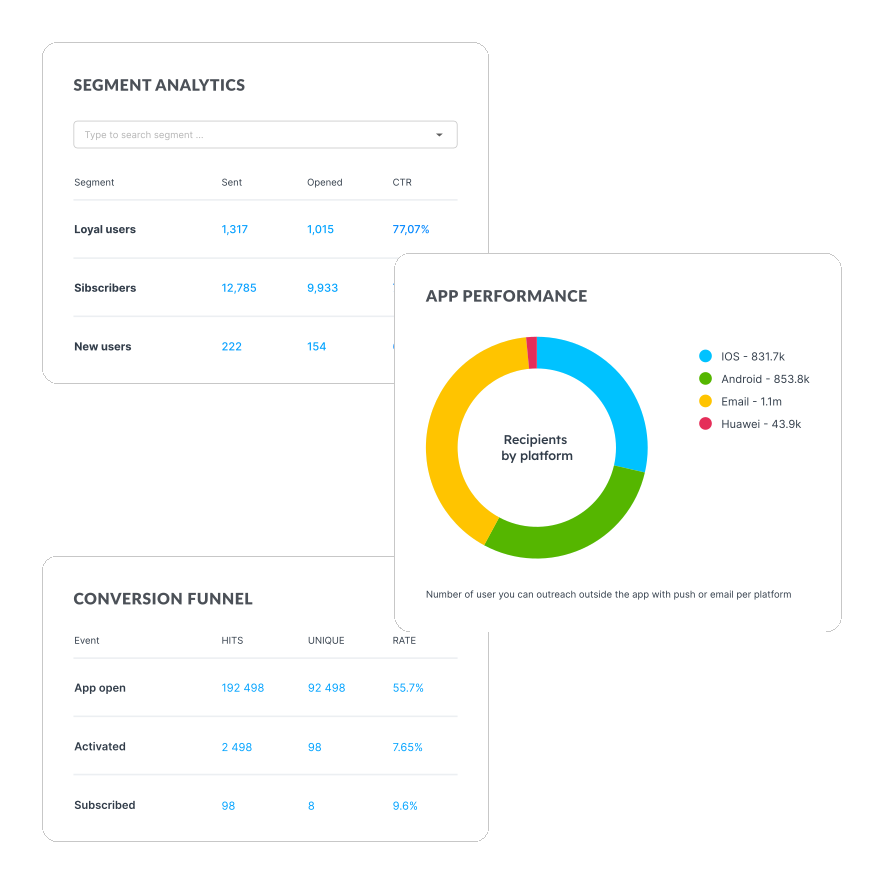
Measuring push notification performance
Define what success looks like before a campaign goes live — purchase, trial activation, feature first-use. Set the conversion event in advance so attribution is clean from the start.
| Metric | What it tells you |
|---|---|
| Delivery rate | Share of sends that reached a device. Low rates signal opt-out accumulation or stale tokens. |
| Open rate | Users who tapped the notification. First signal of whether the message grabbed attention. |
| CTR | Users who clicked through to the app. Primary indicator of message-offer fit. |
| Conversion rate | Users who completed the target action post-click. Measures actual campaign impact. |
| Uninstall rate | If a campaign spike correlates with more uninstalls, it’s a targeting or frequency problem. |
| Revenue attributed | Direct revenue traceable to the push via UTM parameters and conversion events. |
| CLV by segment | How do push campaigns affect long-term value across user groups? Slower to measure, more meaningful. |
ROI (%) = ((Revenue from campaign − Cost of campaign) / Cost of campaign) × 100
Mobile push vs. SMS, email, and in-app messages
Push notifications work best as part of a channel mix. Here is how they compare and when each channel is the right call.
| Channel | Immediacy | Reach | Length | Best for |
|---|---|---|---|---|
| Mobile push | High — lock screen | Opted-in app users | Short | Flash sales, cart recovery, re-engagement |
| SMS | High — direct to phone | Opted-in numbers | Very short | OTPs, critical alerts, expiry reminders |
| Moderate — inbox check | Opted-in emails | Long-form | Newsletters, nurture sequences, detailed offers | |
| In-app | High — in-session only | Active users only | Short-medium | Feature adoption, in-session upsells, onboarding |
The most effective strategies sequence channels based on behavior. One approach that works for cart recovery: push 30 minutes after abandonment → email 1 hour later with more detail and social proof → in-app message next session with a personalized discount.
Send better push notifications with Pushwoosh
Better push results aren’t about sending more notifications. They’re about the right message reaching the right user at the moment they’re most likely to act.
- RFM and behavioral segmentation: target by what users did, not just who they are.
- Customer Journey Builder: visual, no-code automation for multi-step, multi-channel flows.
- Dynamic content personalization: pull user-specific data into every notification automatically.
- Best time to send: per-user timing optimization for up to 50% higher open rates.
- A/B/n testing: test multiple variables simultaneously; auto-allocate traffic to winners.
- ManyMoney AI: autonomous AI that identifies ready-to-buy users and optimizes campaigns for revenue 24/7.
- Real-time analytics: track delivery, CTR, conversions, and CLV impact by segment and campaign.
Or start a free trial now to see it in action.