Effective user onboarding doesn’t have to be complicated, as both mobile app users and product marketers crave a seamless, hassle-free experience. To facilitate your work, we’ve reviewed the best mobile onboarding journeys and put actionable recommendations into this nine-step guide.
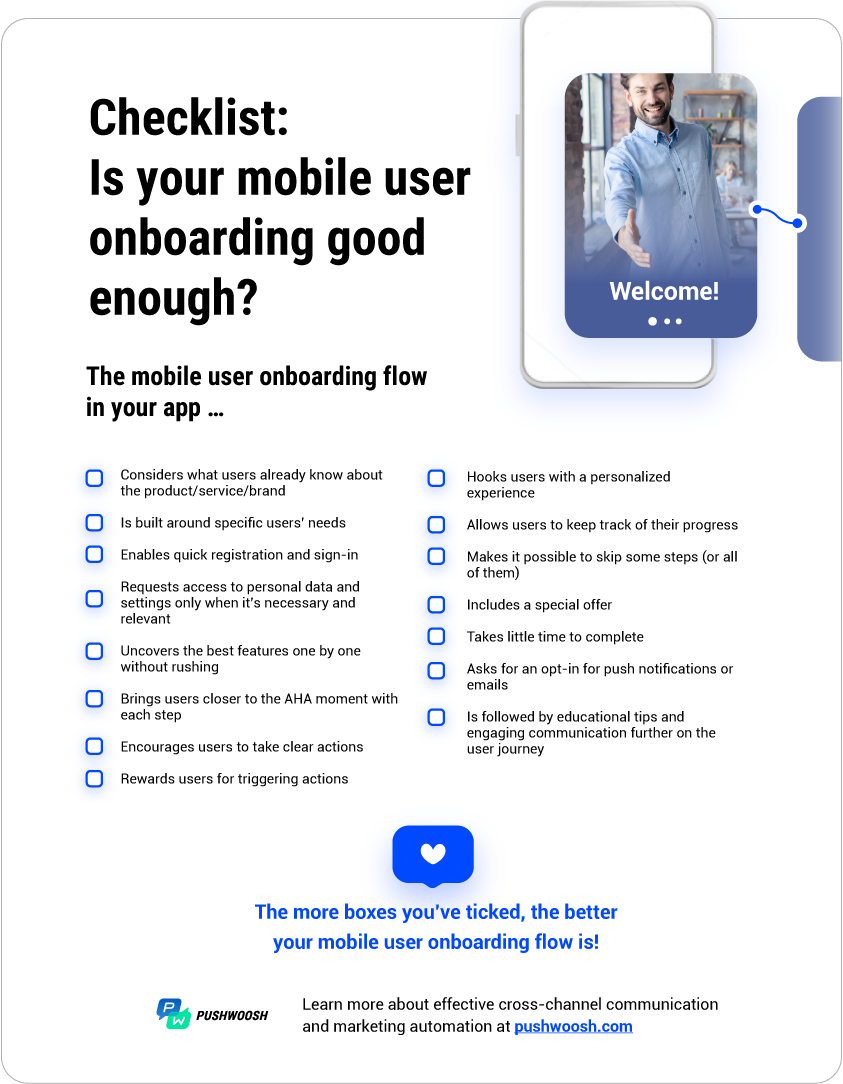
Study the screens of successful Android and iOS apps and prove your onboarding quality by the checklist at the end of this post.
To begin with…
What is user onboarding like in mobile apps?
Broadly speaking, user onboarding is the process of guiding a new user from registration to the so-called AHA moment. This is when they internalize the value your app provides.
In mobile apps, user onboarding is most likely to come in the form of an in-app welcome sequence, accompanied by push notifications and emails. This is what we’ll see as a mobile user onboarding flow in this guide.
Step 1. Put together everything you know about your app users
Define your target segment
Clearly, your onboarding flow will be targeted at new users, but are you going to address all of them at once or communicate with specific segments? A good practice is to create different welcome sequences for those that got acquired organically vs. via paid channels. Organic users may be more engaged in exploring your features as they were actively searching for your app or its alternative. Paid users, in the meantime, may require more encouragement and guidance from your side.
Learn how to segment customers for more effective onboarding
Determine how much your new users know about you
- Are these users completely new to your app or did they previously use your desktop version?
- Are they familiar with your product/service/brand?
- Are they experienced in what your app is intended for?
The answers to these questions will define the scope of your onboarding.
Look at the opening in-app messages in the BodyFast Intermittent Fasting app. They ask users to evaluate their intermittent fasting experience and explain the basics to those unfamiliar with the practice. Then, they talk about how BodyFast can help them stick to a healthy habit.
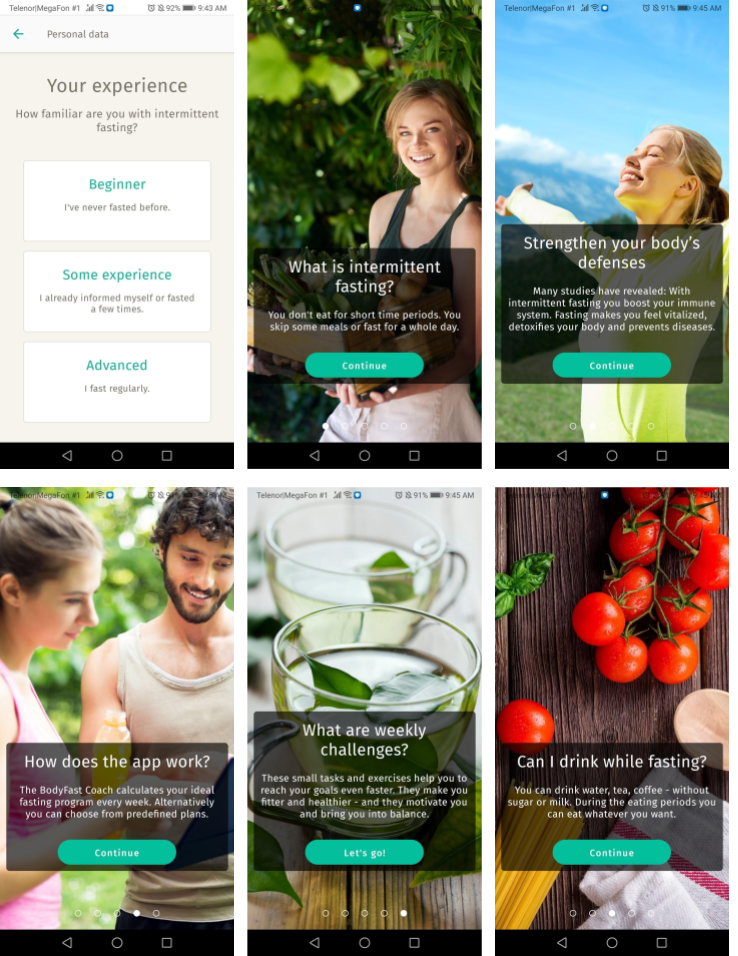
See if you have enough personal and behavioral data on your users to build a personalized welcome flow w. Don’t assume — better ask those missing questions in the first welcome in-app messages.
Step 2. Make your value crystal clear to the user
Effective onboarding should get users ready to take action — make a purchase, get an extended trial, or subscribe for further communication. To arrive at this point, prove that your app helps users to achieve their goals. Which features are the most helpful? Which ones are the most appealing and fun to present? For starters, you have to articulate your app’s value.
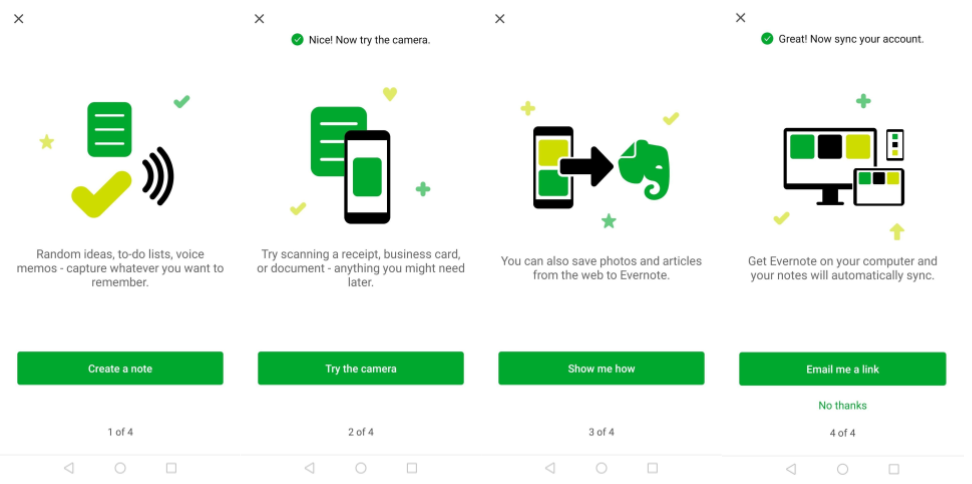
Take a look at how Evernote presents it. Apparently, they know that people don’t take notes just for the sake of it — people take notes to remember something. This is the value Evernote expresses on one of their first screens.
Further comes an extra value: the app helps you keep everything at hand, whether it’s a written paper or a tab on your computer. This makes a seamless connection with another Evernote product — its desktop app, and the first CTA in the sequence suggests downloading it.
To detect the AHA moment in your app, analyze your current customer behavior: what leads users to activate? If it’s unclear or you don’t have a purchase history yet, look at your competitors, find your differentiators, and experiment.
Step 3. Outline an onboarding flow and plan your target metrics
Map out a user onboarding journey for your app
You can do it efficiently with marketing automation software like Pushwoosh Customer Journey Builder.
You can target your onboarding flow at selected audience segments based on trigger events.
This is a unique feature for marketing automation tools, read: your competitors may miss out on this opportunity. The template puts a graphic overview of the entire onboarding journey in front of you, so it is easy to envisage different communication scenarios.
How long is the perfect mobile user onboarding sequence?
There is no one-size-fits-all answer to this question — the right length of a welcome series depends greatly on your app type, user base, and the structure of your onboarding flow.
However, Clutch revealed that 72% of app users preferred the mobile onboarding process to take 60 seconds or less.
The Pushwoosh Welcome Series Template in the Customer Journey Builder has a sequence of six messages by default — quite enough to deliver value and keep users engaged. You can set a shorter or a longer flow if it better fits your needs.
What metrics prove the efficiency of your mobile onboarding flow?
Retention rate is the key indicator of successful onboarding.
In addition to this ultimate measurement, you may want to keep track of some interim metrics:
- how many messages were sent, opened, and clicked;
- how many users have completed each step of the onboarding journey;
- what the conversion rates are for each message.
You can track these interim metrics on the Pushwoosh Customer Journey dashboard. Later on, these metrics will give you an idea of how to improve user onboarding in your app.
You may also want to assess how the introduction of a new welcome sequence affects further user activity in your app. Is there a boost in conversion into purchase? Are there more product views? Is there an engagement increase? Get extra attentive to your internal app analytics.
Now we’re done with the preparation. Let’s get onto the onboarding journey.
Step 4. Get users registered and signed in: have them at hello
Here is a big idea: users don’t realize they are being onboarded. They think they are engaging with your product. So from the very beginning, you want to show that your app is simple and pleasant to use. You want to set the tone of communication on the first screen.
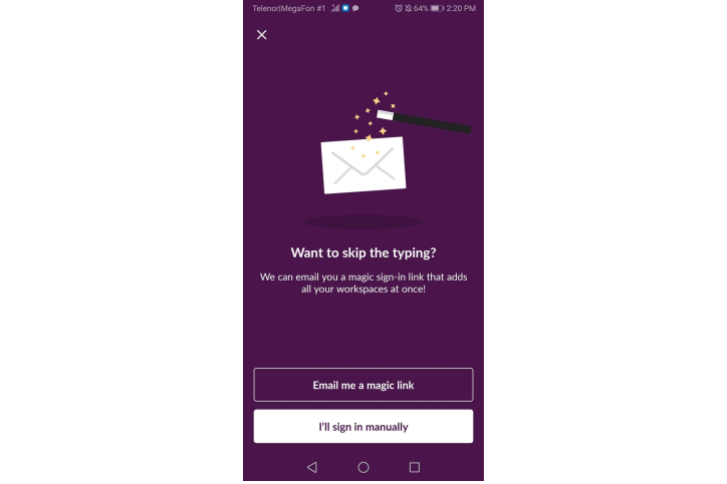
Create a simple sign-up form. Use social logins, email deep links for authorization, and provide secure one-time passwords. Here is an onboarding message example from Slack, whose welcome sequence has been praised more than once. If you already use Slack on your desktop and now you’ve installed the mobile app, you can opt for a simpler authorization with an email link:
Step 5. Engage users in a personalized experience immediately
Start with getting to know your new users
Remember that advice on how to be a nice person to talk to? “Ask the other person what they care about and listen”. The same applies to your in-app welcome communication. You want to get to know your users first to serve them the best experience later.
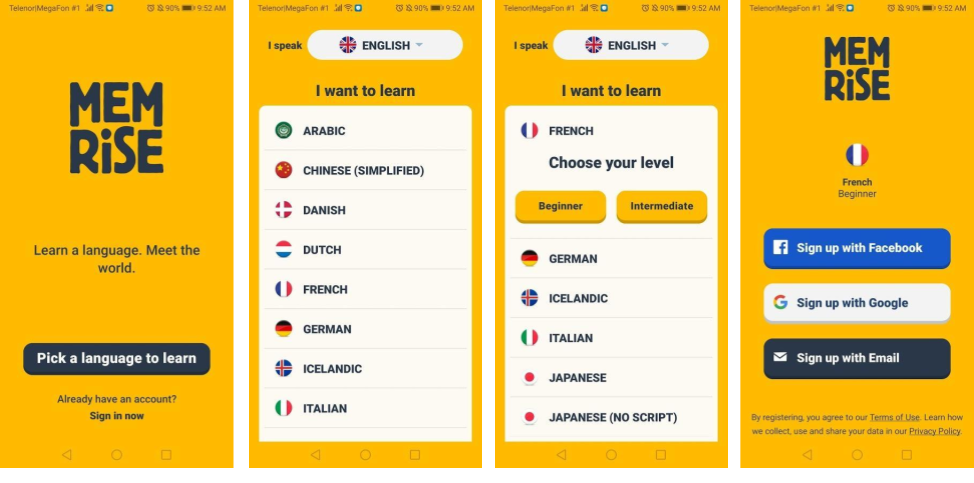
Here is how Memrise, a language-learning app, meets their newcomers: users get to choose their native and target languages even before they sign up.
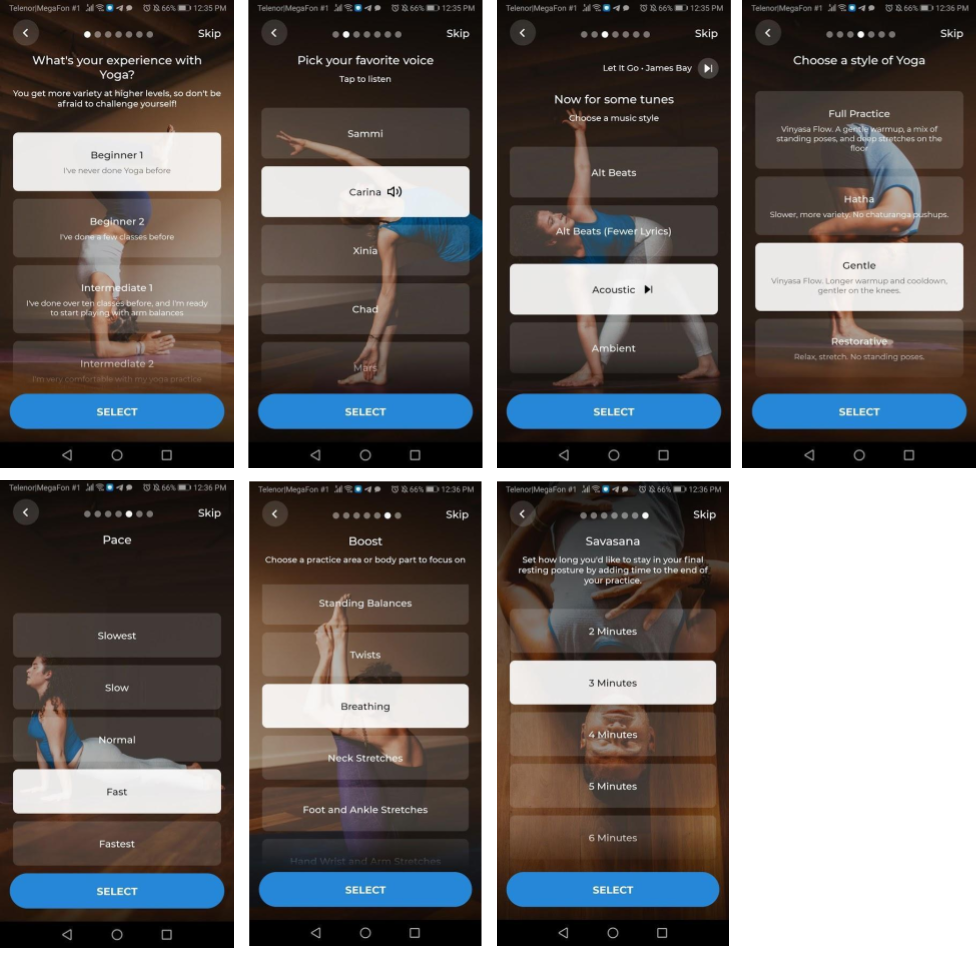
The Down Dog yoga app goes even further: their onboarding sequence is all about personalization. During the first seconds in the app, a user is supposed to install all the needed settings and start engaging with a personalized version of the product.
Create a hook
There is a powerful “hook” technique to get users invested in your app:
- Trigger them to take a simple action: start a new project, connect their contacts, or pick several topics of interest.
- Promise a reward: show how a user will get closer to their goal if they take the needed actions.
- Ensure their investment: users need to contribute something to your app to improve their own experience. Show them they have created their personal space in it.
Take another look at the Evernote onboarding flow. It actually meets all the criteria of a hook.
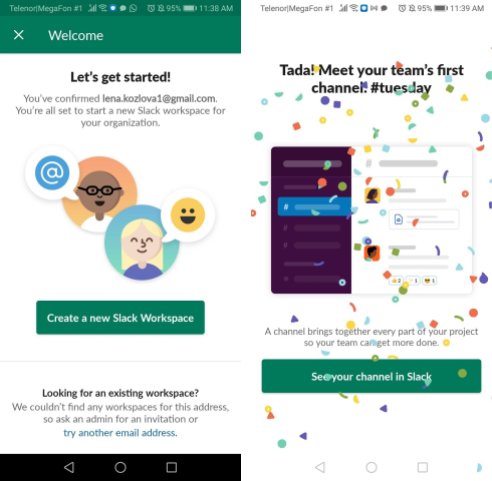
Another bright example is Slack. The app encourages newcomers to create their own workspace, invite their teammates, and start communicating.
Don’t rush with personal data requests
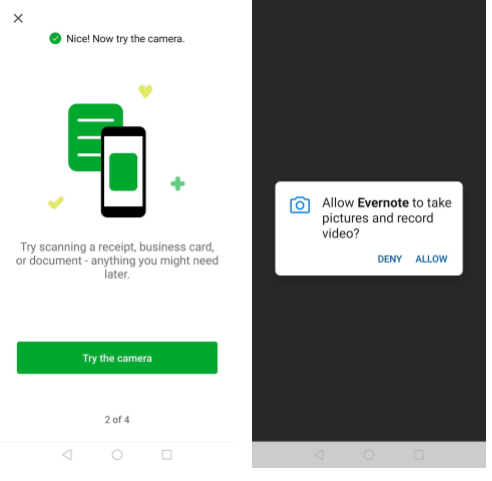
Note that in all of the examples we consider, apps require just the right amount of user data. 82% of users want to see a clear reason behind an app’s information request. So keep your questions relevant to the subject. If you need to obtain some more personal data or user permission, you’d better wait until it’s necessary. Evernote, for example, only asks to access the camera when a user wants to try their scanning feature:
Step 6. Guide users toward their goals at their pace
A great onboarding flow is like a movie trailer. It should tease the audience with the most exciting parts of a future experience, but it shouldn’t reveal all of it too soon. Otherwise, people may leave without purchasing the complete experience.
Let users engage with your app gradually
The challenge is to send the right amount of content with the right frequency. Sometimes, it means delivering a set of in-app messages in a row. Other times, it implies waiting with your next tip until a user triggers an action or passes some time in the app.
You can enable either option easily if you’re creating your onboarding map with the Welcome Series Template in the Pushwoosh Customer Journey.
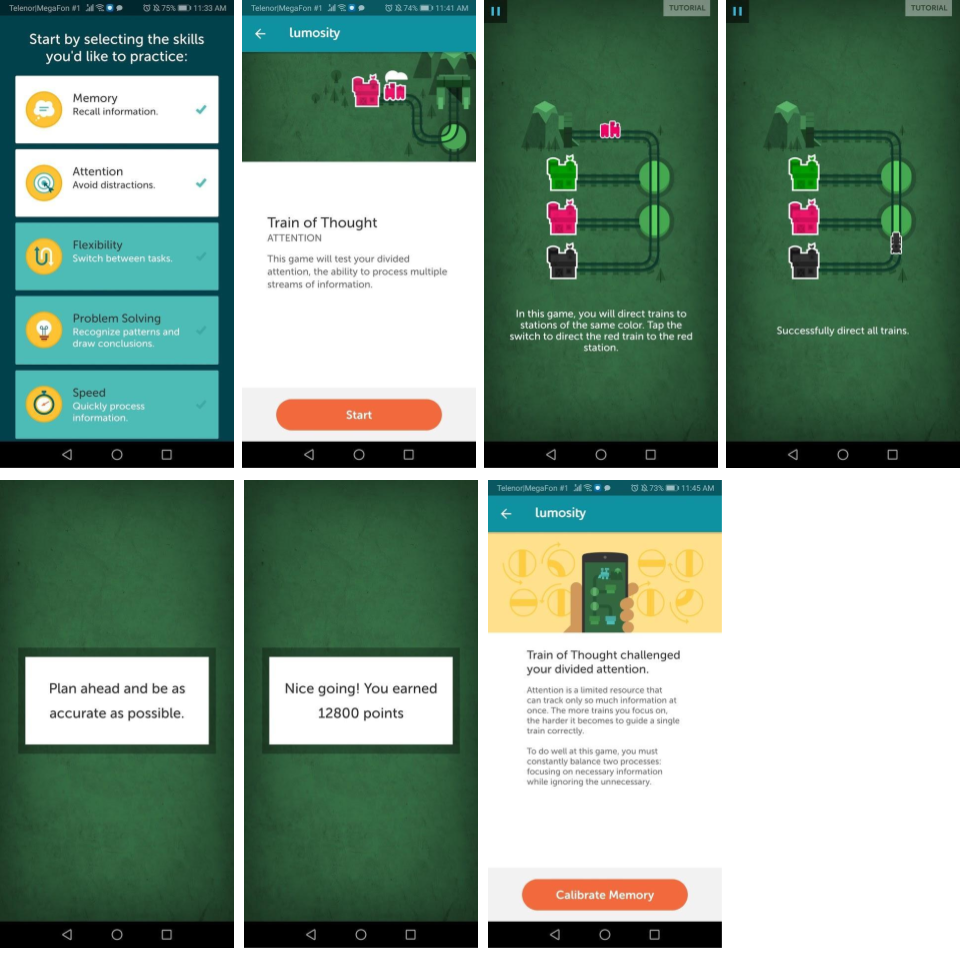
See how Lumosity, an app that combines multiple cognitive games, teaches their users step-by-step. At the start, the app proposes a user to choose several areas of focus. For each of them, a player will take a tutorial. All in all, the onboarding process is lengthy, especially for those users that opt for many skills to practice. However, this is a prime example of how an app can structure its educating flow.
Indicate how many steps there will be
Keeping track of the user onboarding progress is particularly important for a multi-stage flow.
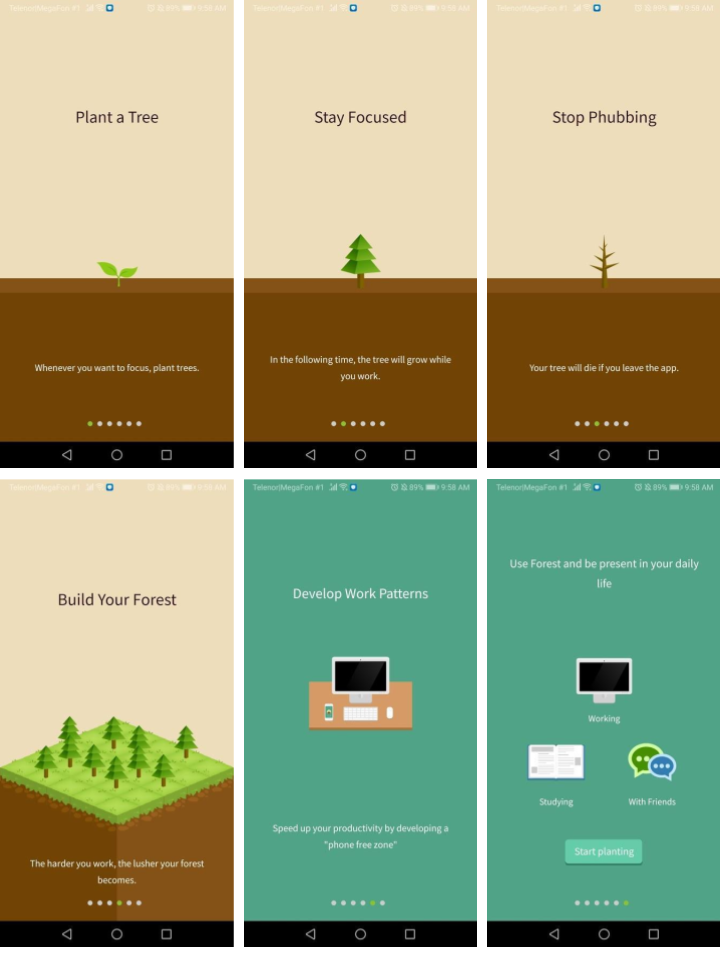
In the Lumosity example above, this part is missing, which makes a user feel a bit lost by the third screen. In comparison, see how easy it is to follow the welcome sequence of the Forest app thanks to the indicators at the bottom of the screen:
Make taking any action easy
- Break down a longer onboarding process into smaller steps. Users love the dopamine rush that comes with an accomplishment!
- Use clear CTAs on every screen.
- Let users easily skip some steps or the entire welcome tour. Envisage the possibility to get back to your welcome tips later if they will.
Step 7. Entice your new audience with a special offer
Imagine mobile customer onboarding like a job interview that is going well.
You have learned the other side’s expectations and highlighted your most valuable features; now you are willing to show that you would be up to proceed. This is the time for compliments, questions on the next steps, and casual mentions of some other opportunities you consider (aka limited-time special offers).
Encourage first-time conversions with a special offer put at the end of your welcome sequence. Add a sense of urgency to activate a user and boost retention before they quit your app. Here are examples from BodyFast, Forest, and Down Dog apps.
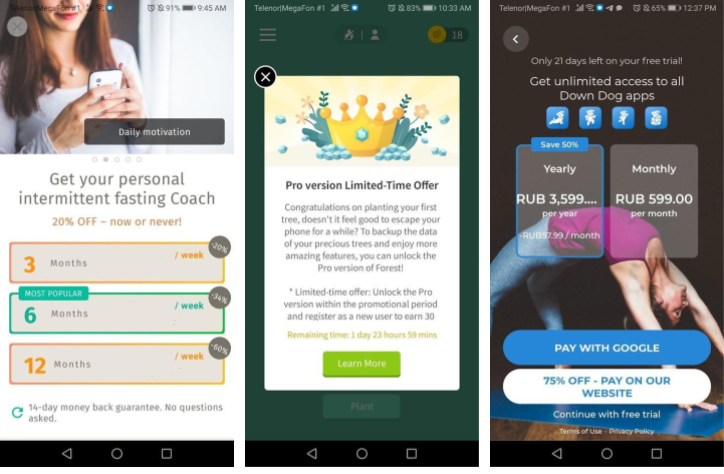
As you’ve gathered enough information on a user by the end of their onboarding, you can make a more personalized offer to them. Sometimes even the slightest hint of personalization can go a long way.
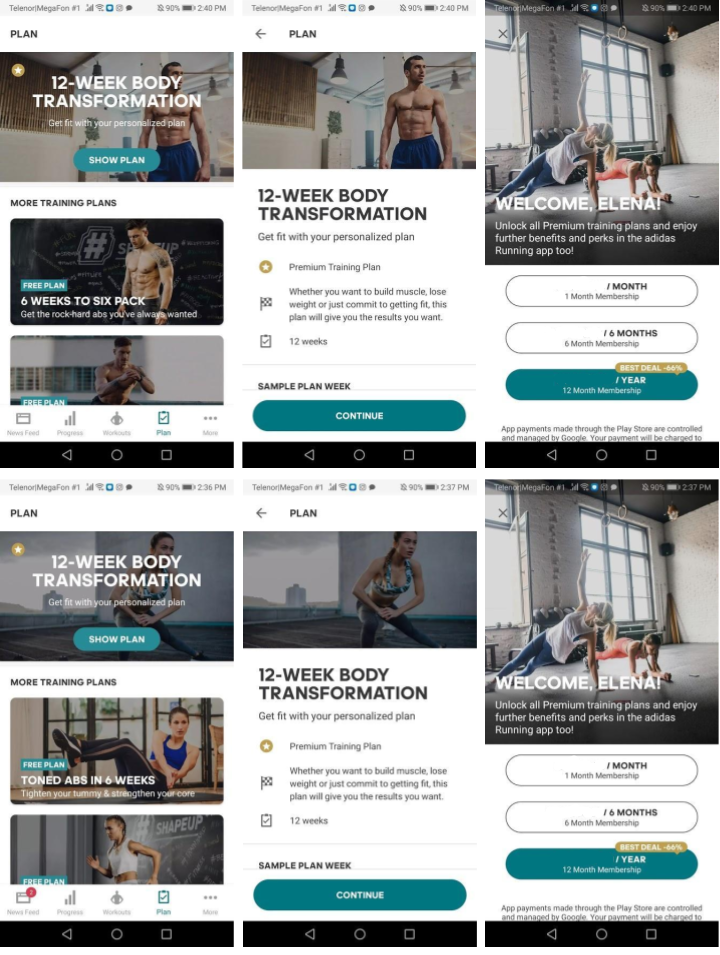
In the example below, the Adidas Training app is making an upgrade offer to a female user named Elena. If she didn’t indicate her gender during the onboarding, she will see a default sequence with male athletes in the pictures (the top row). Elena may get the impression that there is no suitable training type for her and reject the upgrade offer.
However, once she specifies her gender in the settings, the upgrade offer will get a more relevant look to her (the bottom row). She may be more open to the offer now.
Step 8. Leverage multi-channel messaging to foster retention
Get an opt-in for push notifications
It is stated thatusers that opt in to push run 11+ sessions in the app, and only 8% of them abandon the app on the first session. This means an opt-in can help you obtain better retention rates. Even though you don’t have to request permission to send pushes to your Android app users, you can still do it to provide transparency, segment users, and personalize their further experience.
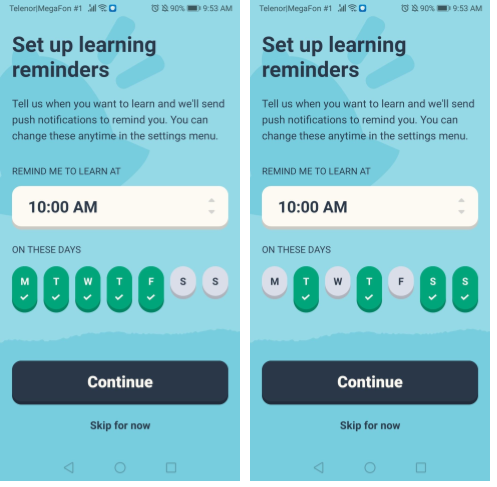
Here is how Memrise introduces an opt-in as a caring gesture. They offer to send a timely reminder that will help a user achieve their goal.
Get connected via email
In the Evernote welcome sequence, the app suggests users connect via email to sync their notes on desktop and mobile devices. You may go for this trick, too, to get new subscribers to your newsletter and gain new users to your app’s desktop version (if you have one).
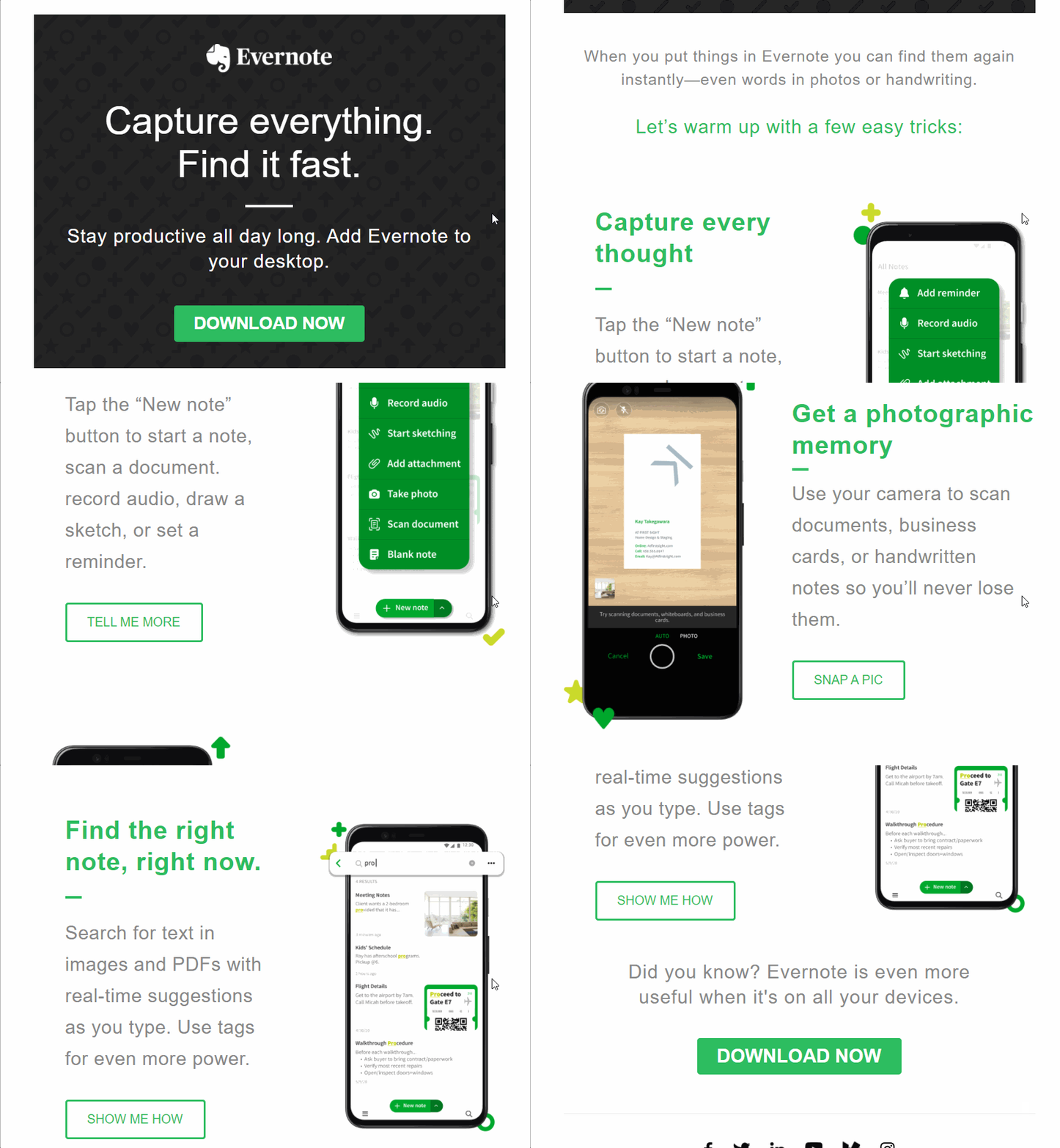
In-app messages, push notifications, and emails are the must-have formats for app user onboarding. If your product is available on the web as well, you may want to onboard users via more channels such as product tours and videos.
Step 9. Keep users engaged after they’ve completed onboarding
Many people start taking piano lessons. Lots of them never get past learning their first chords. The truth may be, they never wanted to learn how to play the piano. They wanted to play the tunes they like, impress their significant others, or become rich and famous.
As an app owner, you want as many new users to get engaged and actually learn to “play your piano”. For this, you may need to go beyond the 60-second initial onboarding. Keep providing tips and reminding users of their motivation further down their way.
Language-learning and training apps are usually the best at cheering users. Duolingo is a prime example with its ever-present gamification and motivational in-app messaging.
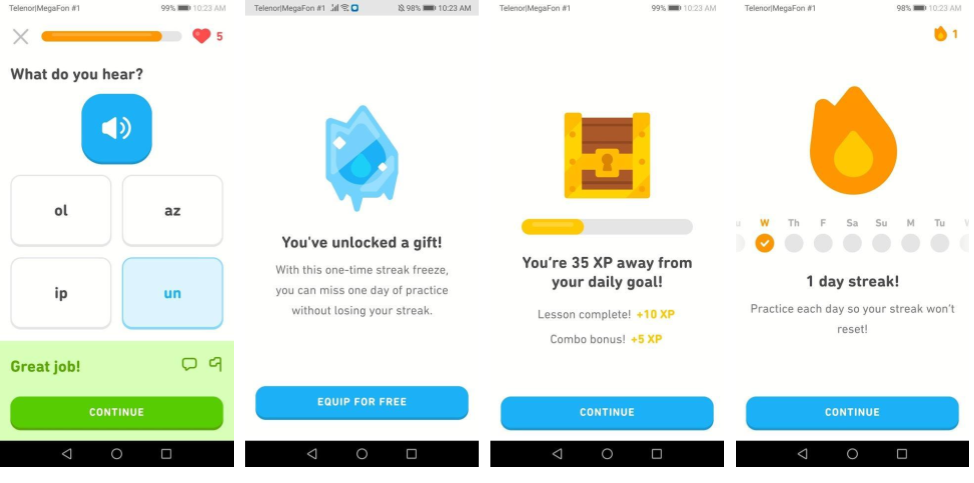
Your onboarding flow may be a never-ending creation as you keep analyzing user activity, optimizing your welcome sequence, and adding new features to your app. There will always be more user engagement mechanics to try, but this should be a whole other story.
🤗Discover 22 ideas for customer engagement in 2022 — download a pocket guide for free!
Now have a look at the summary of all the mobile user onboarding recommendations we’ve collected. Share the checklist on your social media and consult it whenever you launch a new welcome flow.