Show several things in one push
A carousel push puts a set of images inside one iOS notification and lets the user swipe through them. Pushwoosh ships the notification content extension that renders it, and the carousel sends from the same campaign, segment and Journey as any other push.
Trusted by 80,000+ companies to scale their engagement
The format, in full
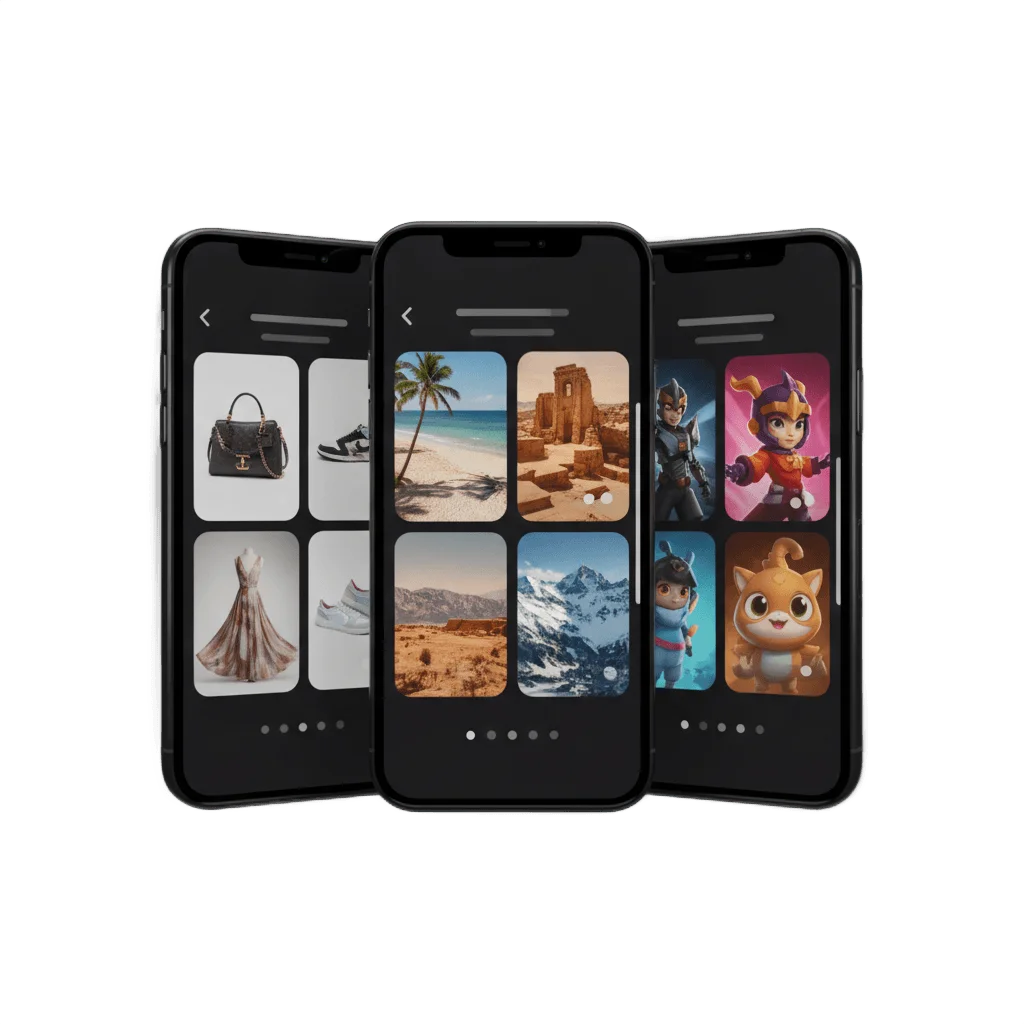
A plain push carries one line of text. A rich push adds one image. A carousel push carries a set of images the iPhone user pages through after pulling the notification down, each slide with its own caption and its own tap target.
Collapsed banner
Before expansion the notification looks like any other push: a title, a line of text and at most one thumbnail.
Expanded gallery
A long press or a pull down opens the gallery. The user swipes left and right through the full set of images.
Per-slide caption
Each image can carry its own text, so a price, a size or a departure date travels with the picture it belongs to.
Per-slide tap action
A tap on a slide opens the screen behind that slide, so each item deep-links to its own page rather than to a shared landing screen.
Paging controls
The app registers a notification category whose actions move to the next and previous slide, alongside the swipe gesture.
Your own layout
A view controller in your app renders the gallery, so its type, colors and spacing follow your design rather than a fixed template.
Where the carousel sits between one image and a full page
| When you have | Send | Where it renders |
|---|---|---|
| One line of text | A plain push | The banner |
| One image or GIF | A rich media push | The expanded notification |
| Several images to page through | An image carousel push | The expanded notification, after the pull down |
| Layout, forms or video | A Rich Media page | A full screen in the app, opened on tap |
The job it does, inside a journey
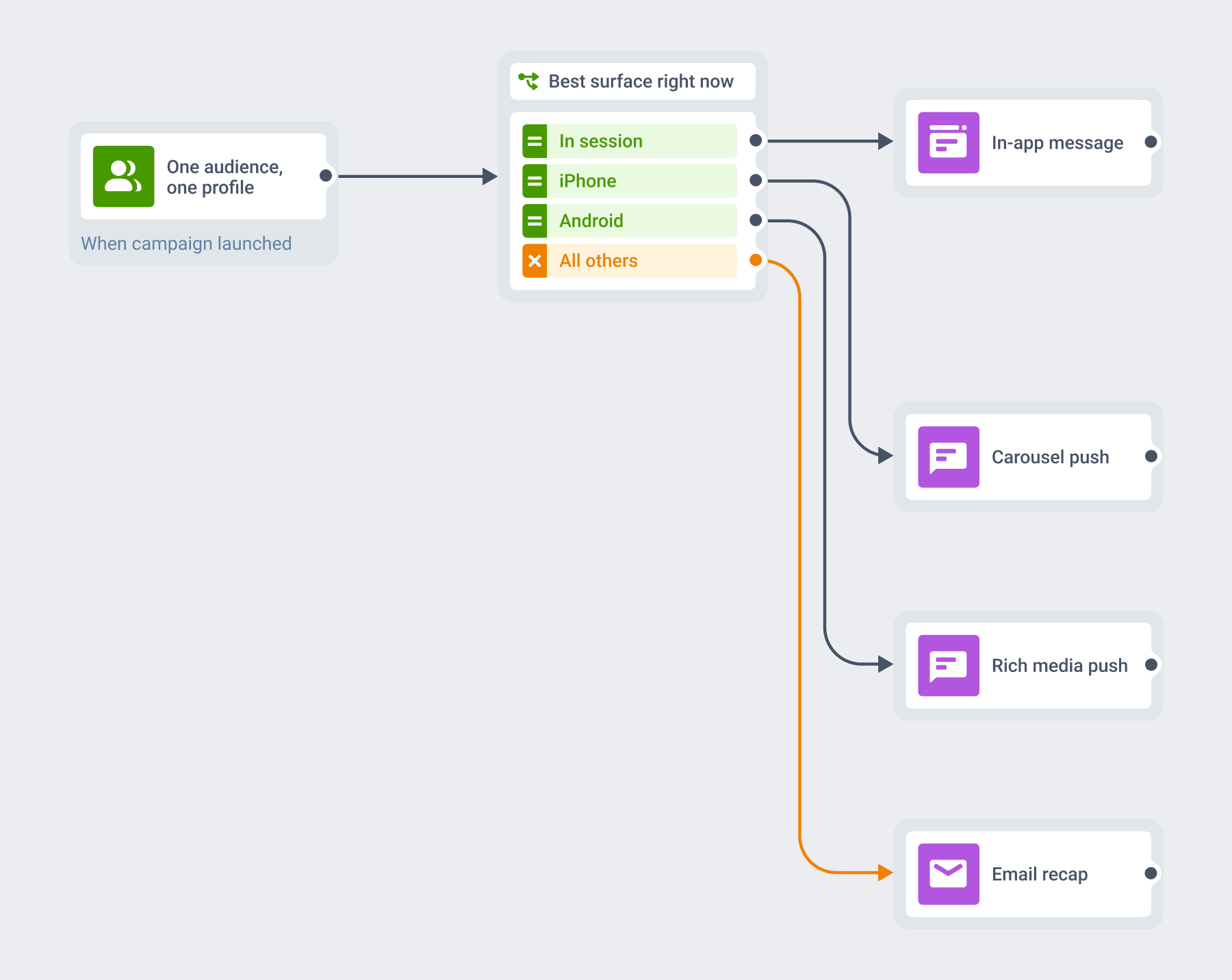
One Journey, many formats
The carousel is an attribute of a message you are already sending. The audience, the trigger, the segment and the customer profile stay where they are, and the format changes what that message looks like when it lands.
You compose it in the same Customer Journey as your push, in-app, email and web push. The integration and the audience are the ones you already have.
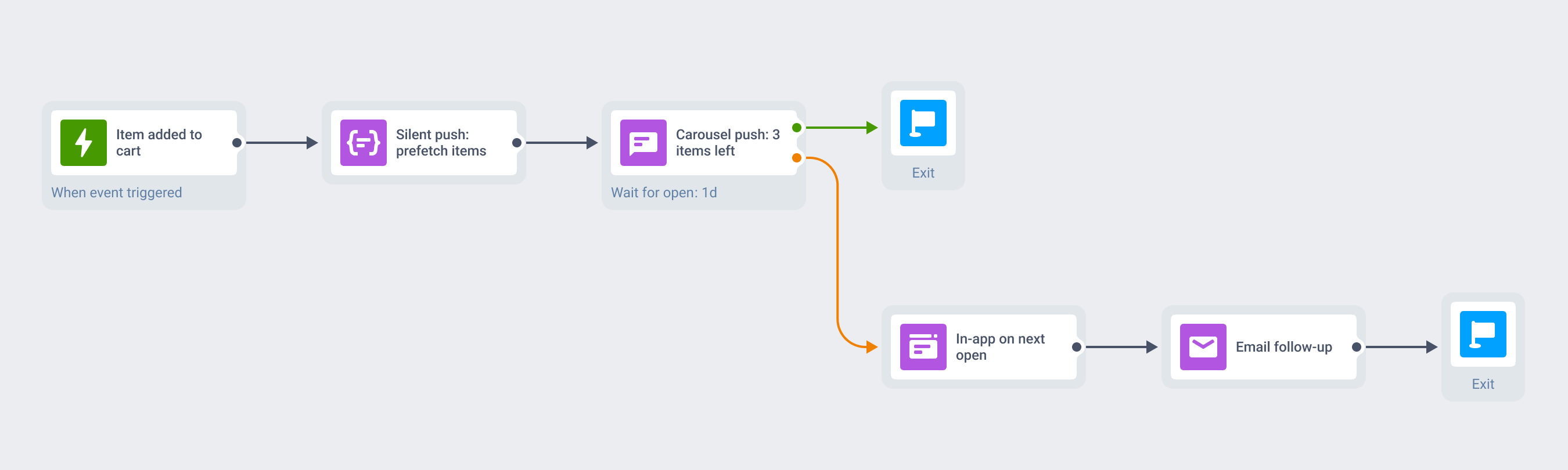
A cart left behind, worked end to end
A shopper adds three items and leaves. A silent push warms the product data in the background, invisible to the user, and the carousel push follows with those three items, one per slide.
The shopper swipes to the pair of shoes, taps, and lands on that product page. If the push goes unopened, the same Journey follows up with an in-app message on the next open and an email the day after.
What to use it for
The carousel is worth the setup when a message has more than one visual thing to say. For a single hero image, a rich media push does the same job with a much lighter build.
| Moment | What the carousel carries | What the user does |
|---|---|---|
| E-commerce · cart abandonment | The items left in the cart, one per slide | Swipes to the one they still want and taps through to its product page |
| Marketplaces · a saved search matches | Several fresh listings, each with its price | Pages through the listings and opens the one worth a closer look |
| Mobile games · a content drop | New characters, skins and bundle offers | Sees the whole drop before opening the store screen |
| Creator apps · re-engagement | New templates and content packs since the last visit | Finds something worth coming back for |
| Travel · a fare drop | Several destinations or deals in one send | Swipes to the trip that fits and opens its fare |
| Events · this weekend's line-up | Multiple shows or artists, each with its date | Picks a night and lands on the ticket page |
| Food delivery · a promo window | Trending dishes or new menu items | Scans the set and orders from the slide they stopped on |
Platform & technical coverage
Carousel support is uneven across operating systems. The last column says where the format is the push itself, and where the push only carries a payload that your app renders.
| Capability | iOS | Android | Web | Delivered by |
|---|---|---|---|---|
| Multi-image swipeable gallery | iOS 10+ | – | – | A notification content extension in your app, rendering the push payload |
| Paging actions on the notification | iOS 10+ | – | – | A notification category the app registers at launch |
| Per-slide caption and tap action | iOS 10+ | – | – | Your extension code, reading the payload |
| Single image in the expanded notification | iOS 10+ | Android 4.1+, single large image | Chrome | The push itself |
| Action buttons on the notification | iOS 10+, up to 4 | Android | Chrome | The push itself |
| Full-screen showcase with layout and forms | Yes | Yes | – | A Rich Media page opened on tap |
Security & hosting
Pushwoosh runs on its own hardware in the US and Germany, under GDPR and BDSG.






How it works
The carousel is a developer build. The first step is a one-time engineering task; after that, marketing composes and schedules the carousel like any other push.
-
Wire the extension once (developer)
Add a Notification Content Extension target to your app, drop in the Pushwoosh example carousel view controller, and register the carousel category at launch. This sits alongside the service extension that single-image rich push already uses.
-
Compose the message (no-code or API)
Build the push in the Control Panel or through the Messages API, attach the images and set the matching category. Every slide downloads on receipt, so host the images on a CDN and keep each one small.
-
Orchestrate it (no-code)
Send it to the same segment, from the same Customer Journey as the rest of your messaging. Deep links, custom data and personalization behave exactly as they do on a plain push.
Limits worth knowing
Show several things in one push
A set of images the user pages through hands them the item they actually wanted, rather than the one you guessed at. Talk to our team about carousel push, or start building on the free tier.
Explore related products
Mobile push notifications by Pushwoosh — every-device reach, rich content, precise targeting, cross-channel Journeys and 99% uptime. Turn notifications into loyal, paying users.
In-app messaging by Pushwoosh — onboard, upsell, announce and collect feedback right when app users are paying attention. No-code editor, native SDK layouts, per-element analytics. Free to start.
Transform abandoned carts into revenue with cart recovery automation. Send timely reminders, personalized offers, and incentives that drive conversions.
Mobile push notification platform for gaming apps. Send personalized alerts, special offers, and event reminders to keep players coming back.
Offload your app and web messaging to Pushwoosh API. We manage push, email, SMS, and data streams — you build successful products without limits.
Message Inbox adds an in-app notification center to your app and website. Silent delivery reaches every user, including the ones who declined push, and saved messages stay available on their own time.