Do you want to optimize your campaigns to send only the most relevant messages to each user, increase conversions, and grow your revenue? We’ll show you how to do it with the new Pushwoosh and AppsFlyer integration.
About AppsFlyer & Pushwoosh
AppsFlyer is a mobile attribution and marketing analytics solution. It gives you insights into user acquisition and engagement. Pushwoosh is a customer engagement platform that allows you to create personalized messaging campaigns with push notifications, in-app messages, emails, and SMS. Leveraging the power of both platforms, you can make better-informed data-driven decisions and build effective customer journeys. This will help you increase conversions and maximize your revenue.
How user acquisition and behavior data can help you drive your app’s success
If you use AppsFlyer to collect user acquisition and behavior data, you can leverage this data to improve your Pushwoosh messaging campaigns with more granular targeting and maximize conversions.
It works like this:
- AppsFlyer collects data about how users behave before they install your app, including acquisition sources. It can also track in-app events if you configured it to do so.
- You can use behavioral data from AppsFlyer to improve your lifecycle messaging campaigns in Pushwoosh. Tailor your marketing strategy to specific acquisition sources and audiences to drive higher conversion and retention rates. This will provide long-term success for your business.
Does dealing with multiple data sources sound horrifying? We feel you: going back and forth with CSV files between your attribution tracking solution and a customer engagement platform is no fun indeed. Everything has become much easier with the new Pushwoosh + AppsFlyer integration. Once it’s configured, you can receive attribution events data directly to your Pushwoosh project. You will be able to use this data in Pushwoosh Customer Journey Builder to create messaging campaigns for any stage of your app user lifecycle.
Below are a few examples of how you can benefit from combining AppsFlyer data with Pushwoosh functionality.
1. Drive quicker conversions by optimizing campaigns based on the acquisition source
Should you refer to attribution data as early as at the onboarding stage of the user lifecycle? Absolutely!
Let’s say you have two primary acquisition sources: organic traffic and advertising. Users who encountered your app through organic search are normally more acquainted with your solution than those who became aware of it through paid ads. Based on the information on acquisition sources, you can customize your Pushwoosh messaging campaigns to best suit each level of user awareness, catering to their needs better and thus driving higher and quicker conversions.
For example, users with the organic traffic source may require fewer onboarding steps before they’re ready to consider your paid subscription offer.
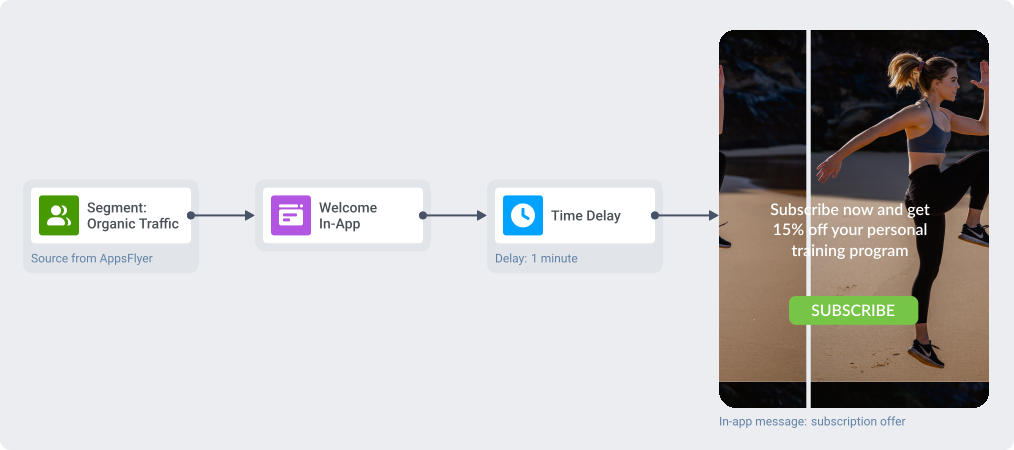
Customer journey in Pushwoosh optimized for the “Organic Traffic” segment
On the other hand, users with the advertising source in their attribution Tag may only be ready to convert after a more detailed onboarding. Tell them more about the advantages of your app and convince them to buy a subscription:
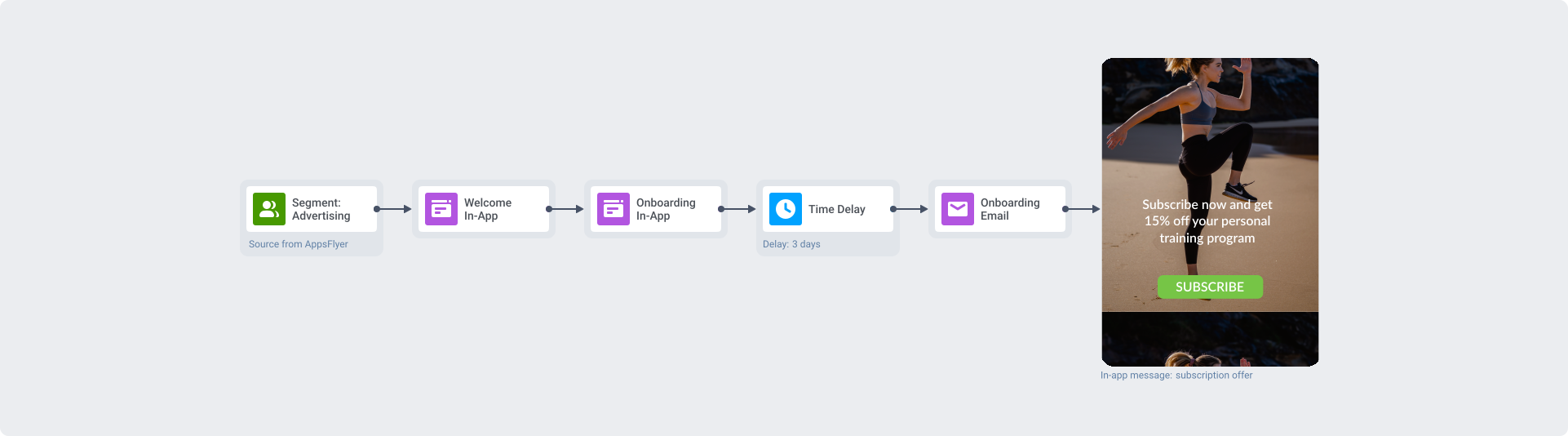
Customer journey in Pushwoosh optimized for the “Advertising” segment
2. Get more paying customers by making personalized offers related to the ad a user clicked on
Relevant recommendations make new users more loyal to your product from the very beginning of their journey in your app. Use the theme, location, and other parameters of your acquisition campaigns to make offers that are most likely to attract and convert your audience.
For example, if you aim at getting more paid subscribers for your fitness app, you may acquire a bunch of new users through an advertising campaign. Let’s say you targeted the Australian market in September, suggesting new users from the Southern Hemisphere use your app to get fit by the upcoming summer.
AppsFlyer will send information about each new user from Australia who clicked on the “Get fit by summer” ad to Pushwoosh. Using this detailed information from the attribution event, you can follow up with a deeply personalized messaging campaign for this user:
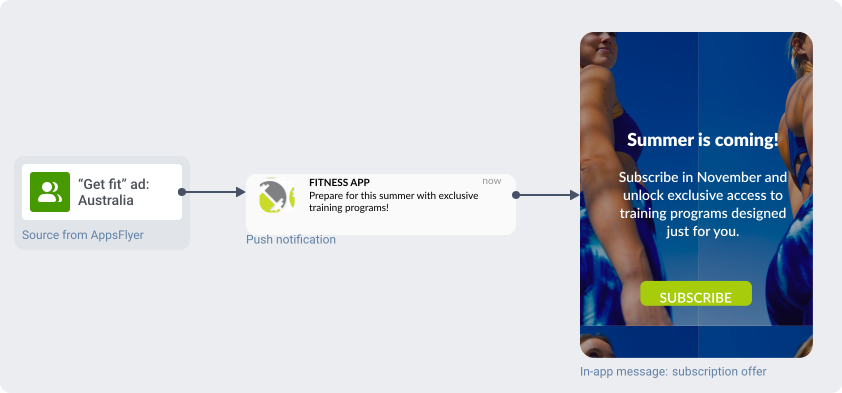
Customer journey for a fitness app with a personalized in-app message
Another example, this time for a game app: imagine you’ve got new players to install your fantasy-themed game after seeing an ad that offered them a unique experience as a medieval warrior. To maintain their interest in your app at a high level, you can go on referring to them as knights or sworders in your engaging in-game messages and offer exclusive items and power-ups related to this theme:
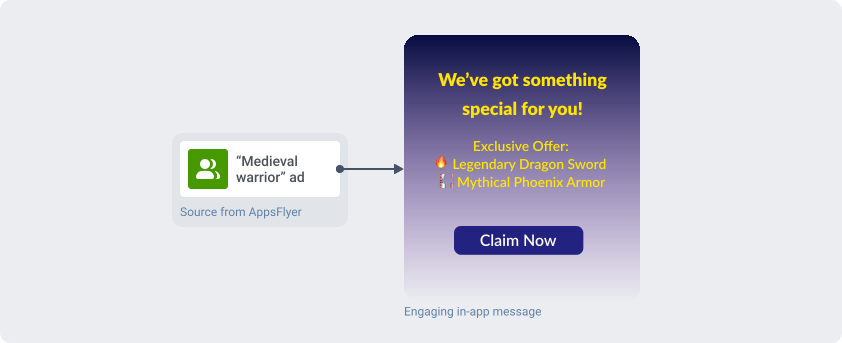
Customer journey for a game app with a personalized in-app message
3. Boost purchases by personalizing messages according to users’ in-app behavior
Personalized messages are known to have higher open rates and are more likely to convert users into paying customers. If you’ve collected behavioral data with AppsFlyer, you can use it to create highly relevant personalized campaigns in Pushwoosh.
💡You can also track in-app behavior using Pushwoosh Events: 10 default Events for the most important in-app actions and an infinite number of custom Events.
Suppose AppsFlyer tracks adding certain products to a wishlist in your online shop app. You can make a push preset offering a discount on a product a user has added to their wishlist:
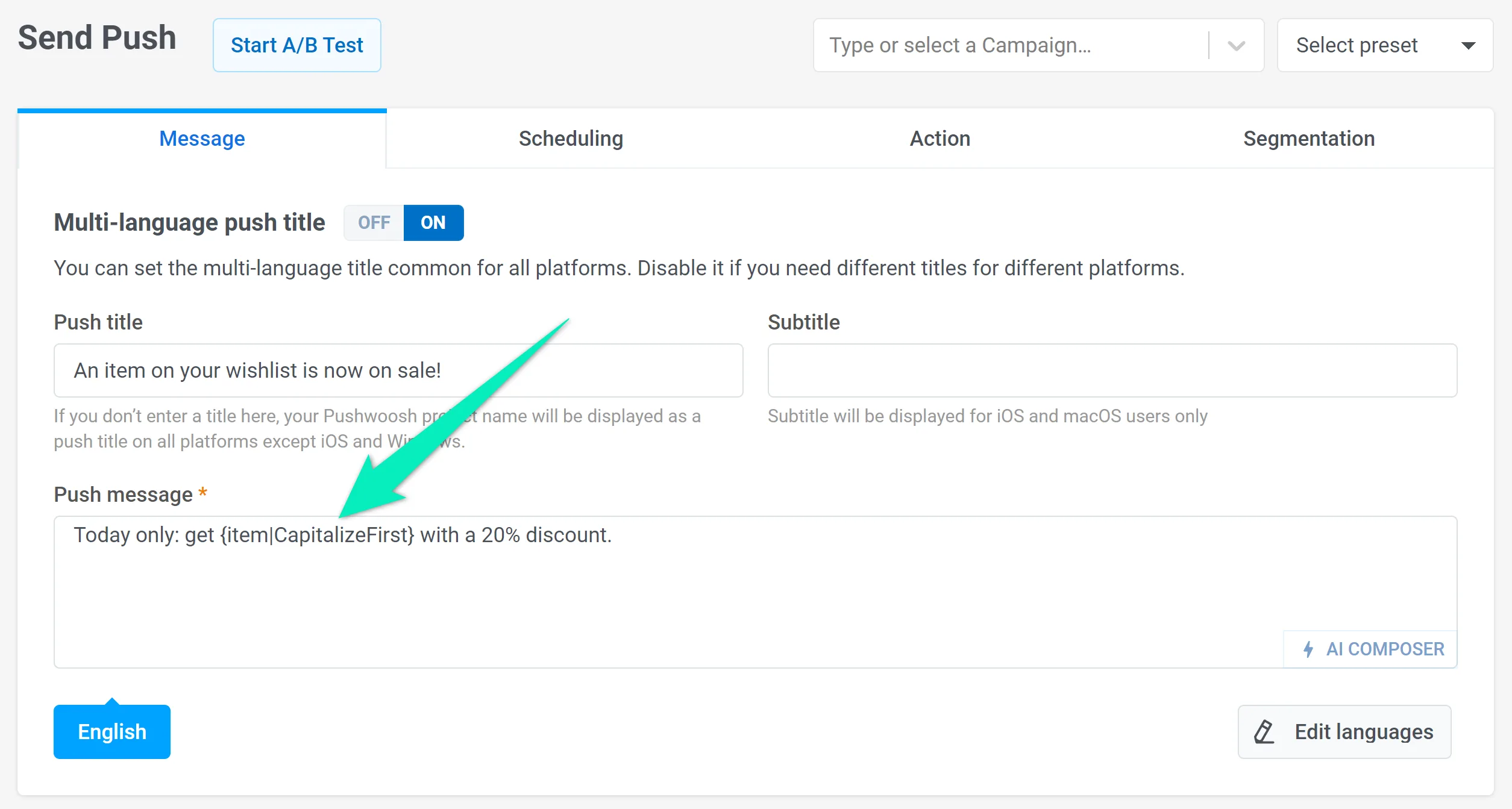
Setting up personalization in a push preset
For example, those who have added the iPhone 14 Pro Max to their wishlist will see this message:
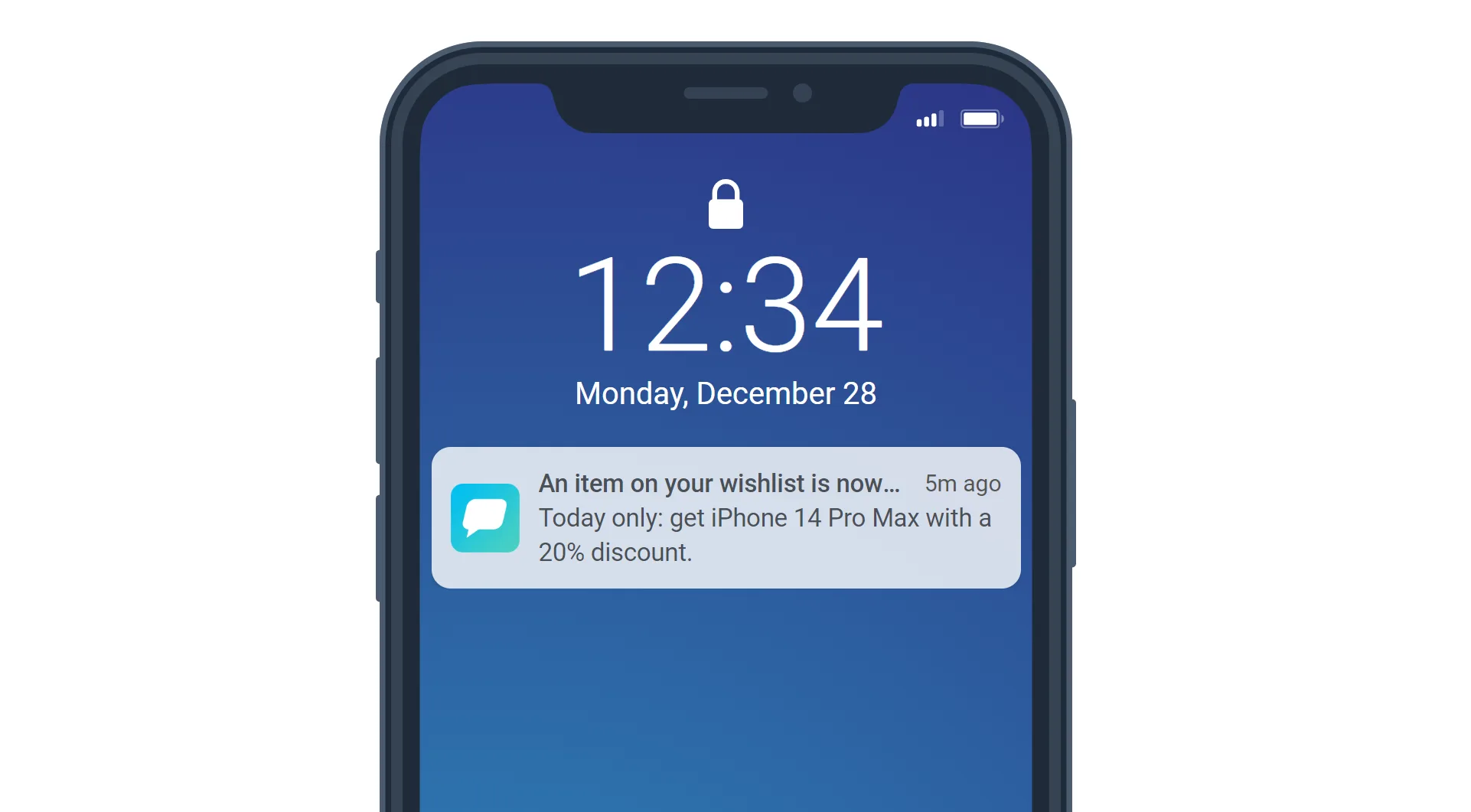
Personalized push example
You can use personalized messages to create retention, engagement, and re-engagement campaigns that actually work.
Extra: Combine the analytical capabilities of both platforms to gain deeper insights into your marketing strategies
Here are two ways you can combine AppsFlyer data and Pushwoosh analytics tools to get valuable insights:
1. Launch campaigns for segments based on AppsFlyer data and follow their performance
Once AppsFlyer sends attribution data to Pushwoosh, you can create separate campaigns for each attribution source. Customer journey statistics will help you analyze the performance of the entire campaign. At the same time, conversion tracking will allow you to evaluate the effectiveness of each sent message, including conversion rate, revenue, and other key metrics. This way, you can find out which channels bring you the most profit.
2. Evaluate the effectiveness of acquisition sources by RFM criteria
You can also combine AppsFlyer’s acquisition data with Pushwoosh’s RFM segments and understand how well each acquisition source is performing in terms of driving revenue to your app:
- Create user segments for each acquisition source.
- Calculate RFM segments for a desired purchase event: Pushwoosh will automatically rank your users from the most loyal ones to those at risk of churning.
- Create a series of customer journeys consisting of two steps: an Audience-based Entry (a segment based on a source from AppsFlyer) and a Segment Split with one of the RFM segments. After launching the journey, you will see the number of users from the selected source who also fall into the selected RFM segment. This will show you how specific advertising campaigns and sources work for certain categories of customers.
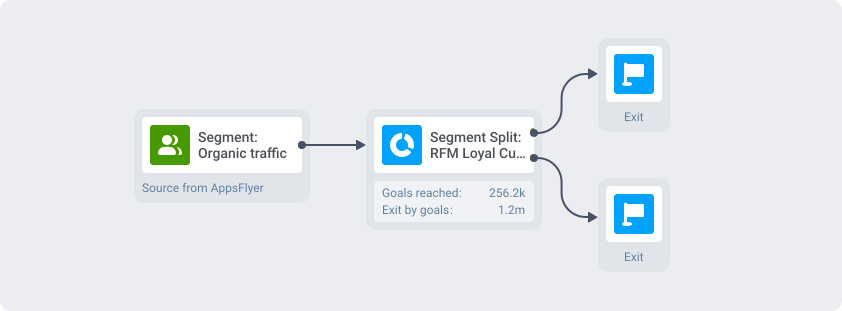
Customer journey showing the number of loyal customers from the “Organic traffic” source
As a result, you will understand how advertising sources affect your business performance and customer interactions. Use this information to optimize your marketing strategy further.
Configure the Pushwoosh + AppsFlyer integration to start gaining more revenue sooner
Integrating AppsFlyer and Pushwoosh may require assistance from your developer. The instructions in our documentation will help you set up the integration:
Learn how to integrate Pushwoosh and AppsFlyer
Please feel free to contact our Support Team if you have any questions.
Related articles
View all