So, you’ve heard about the potential behind web communications, and now you’re in the market for the best web push notification service. By now, you’ve probably realized that finding the tool of your dreams is easier said than done – after all, plenty of noteworthy solutions offer this functionality and then some.
In this post, we look at the specific criteria that could help you choose the best solution for you and provide an extensive comparison of the top web push notifications services.
How to choose the best web push notification service for your brand
Some solutions available on the market will be dedicated to web pushes alone, while others will give you a more comprehensive platform for enabling your messaging strategy. We like to categorize web push notification platforms into three distinct groups:
- Software providing solely web push notifications;
- Specialized services that offer web pushes as well as dedicated industry solutions, such as Shopify integrations for e-commerce or automated content distribution channels for media publishers;
- Multi-channel communication tools offering other forms of messaging but primarily dedicated to web-push services.
This distinction alone might be enough to help you decide on the direction you want to go. Suppose your audience primarily interacts with your brand from a desktop and pays little attention to mobile traffic. In that case, web pushes may be enough to keep them updated and engaged.
If, however, you’re interested in building an omnichannel communication strategy for your brand, you may need to invest in a more holistic solution. For example, you could pass on urgent and sensitive information via SMS notifications, improve your user onboarding flow with in-app messaging, or regain lost MAUs with timely mobile pushes – in some situations, the web alone is simply not enough!
Must-have features for web push notifications software in 2025
We firmly advise you to choose a vendor equally well-versed in web and mobile push notifications and clearly understands each channel’s specifics. After all, the world is firmly set on the idea that the future is mobile-first. As such, even if you don’t have a mobile app yet, it may be a necessary step in a few years if you choose to scale your product fast.
With that in mind, here are the features you should look for in your next web push notifications platform.
Pricing
The sad truth about marketing is that we all have our budgets we need to adhere to. Regardless of how amazing a solution may be, it must fit into your realistic financial brackets.
That’s why many fantastic options are unavailable to SMBs and solopreneurs just starting with messaging. Make sure you find a web push notifications provider that fits your pricing expectations and leaves room for experiments if you choose to change the software.
Segmentation and personalization
You should be able to customize your messaging according to the topics your end-user is most interested in, including the most relevant news categories on your media platform or recently browsed products on your e-commerce storefront.
You can personalize the content of your messages, images, links, and final CTA buttons – all to ensure a user-centric approach for as many people as possible.
Automated campaign orchestration
It’s not enough to be sending out your web push communications. Instead, you need them to go out at the right time (which may very well be outside of your working hours), in the right language (you may not be familiar with), to the right segment of people (you need quality zero-party data to do that efficiently).
That’s where automation steps in and takes a load off of your shoulders. It’s paramount that your next web push notifications service supports automation and allows you to build intricate customer journeys.
Web and mobile push integration
The best web push notification provider will support multiple browsers (Google Chrome, Mozilla Firefox, Safari, etc.) as well as operation systems (Windows, Mac, iOS, and Android) to ensure smooth coordination of your campaigns across various devices. So that your audience would be able to check their updates from Chrome installed on their iPhones if that’s what they need.
Send speed
Whether you want to send timely Super Bowl updates to your subscribers or it’s time to announce your big Black Friday sale – speed can truly make or break your campaign. In the messaging world, even a millisecond can make a huge difference. You must ensure the selected web push notification platform can handle large amounts of data and deliver the relevant message on time, regardless of complexity.
Additional relevant messaging channels
Web and mobile notifications are the basis of a messaging strategy. If you want to get ahead of the competitors and truly connect with your audience, you need to anticipate where they’d expect your brand to pop up and be there.
For some industries, the most prominent channel will be email; for others – SMS. There’s no one-size-fits-all kind of solution here. Instead, you need to analyze your audience, identify the most relevant channels for them, and ensure your new web push notification provider supports those as well.
Multi-language web push notifications
This is optional since some brands are very happy operating in the local market. If that’s the case – feel free to skip this section. If, however, you’re dreaming of conquering the global scene, you need your web push notifications software to support multiple languages to tailor and personalize your campaigns even further.
6 top web push notification tools
1.Pushwoosh–web push notifications provider with advanced automation and personalization features
- Pricing: from $0
- High-speed notifications supported: yes, Pushwoosh comes with a 100x faster speed of push notification delivery than an average provider and has successfully delivered even 500,000 web pushes per second.
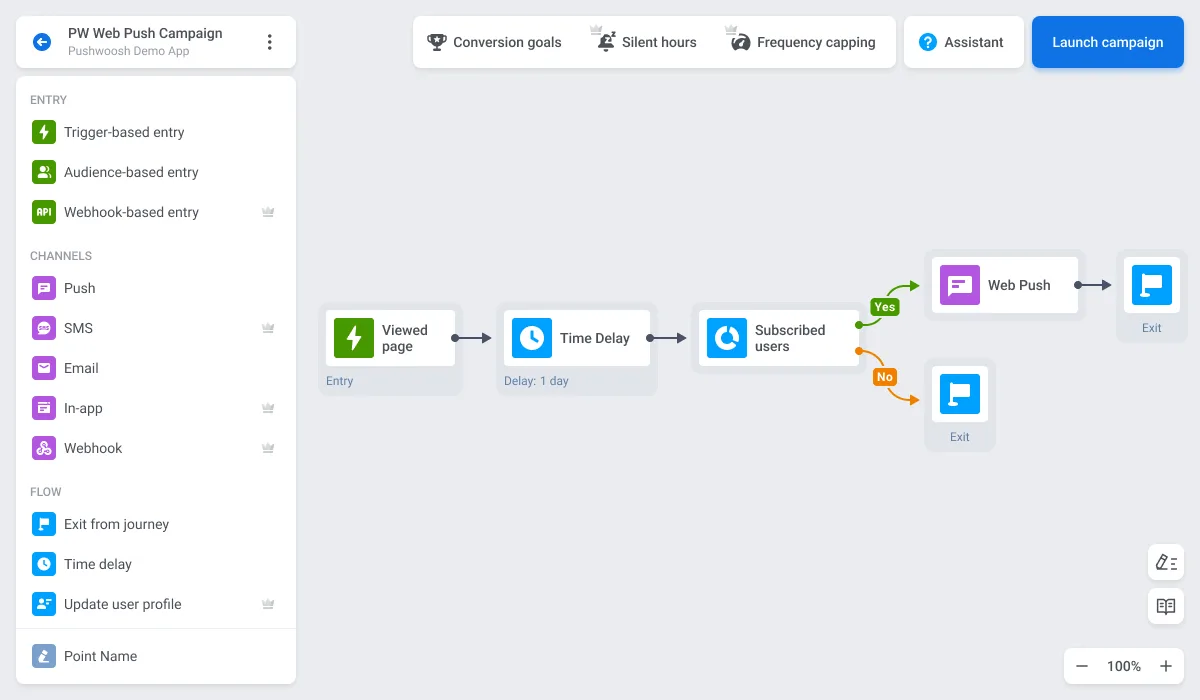
- Automation: yes, via Pushwoosh Customer Journey Builder. With this intuitive yet powerful engine, you can automate user opt-in, customer onboarding, or all of your retention campaigns and personalize the contents of your web pushes even further:
- Multiple languages: yes, with Pushwoosh, you can send multi-language messages from a single push. Our solution will deliver your global campaign and automatically suggest the most popular language for a specific user based on their device information. Not everyone does that, so this feature may become essential when making your final decision.
- Browsers & OSs supported: Pushwoosh users can leverage Customer Journey Builder to set up both mobile and web notifications for the same campaign, reaching different audience segments easier.
- Segmentation & personalization: Pushwoosh allows you to set up a single message that will automatically tailor its content based on user preferences and personal data with Dynamic Content and Liquid Templates – a technology that adapts the content of your web push notification based on user behavior or custom triggers, automatically.

- Omnichannel: yes, Pushwoosh offers a unified platform for managing web and mobile push notifications, in-app messages, emails, SMS, and WhatsApp—all in one place.
2.OneSignal–web pushes with basic customization
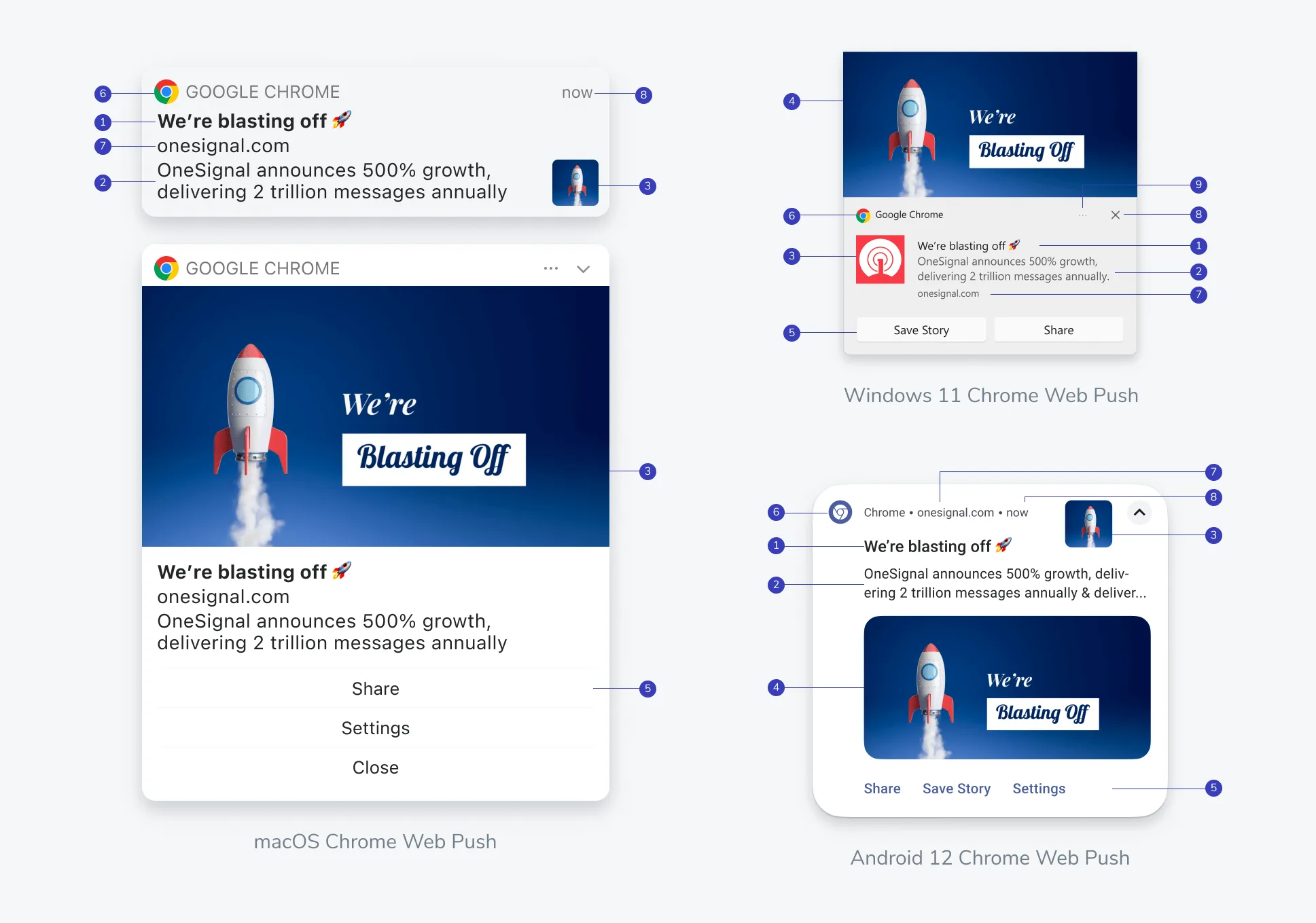
Image source: OneSignal
OneSignal is a solid provider of both mobile and web pushes popular for its low-entry pricing model. It lets you quickly create and deliver basic web push notifications to end users.
- Pricing: from $13/mo for 1,000 web push subscribers
- High-speed notifications supported: yes
- Automation: yes, yet their web push notification editor is much more rigid than the one offered by Pushwoosh.
- Multiple languages: yes
- Browsers & OSs supported: OneSignal supports all major browsers with some limitations. Namely, you won’t be able to send web push notifications for Chrome, Firefox, or Yandex browsers on mobile iOS devices (iPhone and iPad). In turn, you most definitely can with Pushwoosh!
- Segmentation & personalization: OneSignal allows you to personalize the title and the body of your web push notification. It is sufficient for quick media updates, but hyper-personalized industries like e-commerce may find it lacking, as it doesn’t support image or button customization, requiring additional image or button personalization.
- Omnichannel: OneSignal supports major messaging channels like mobile push, in-app, or SMS. Pushwoosh, in turn, also accesses WhatsApp and provides out-of-the-box SMS services (no need to integrate with a third-party provider, as is the case with OneSignal). Just like in Pushwoosh, OneSignal allows you to deliver the same notification for mobile and web browsers.
What Pushwoosh does better: With Pushwoosh, you can achieve better results thanks to more advanced event-based segmentation and save money on dormant contacts due to reachability checks embedded into our Customer Journey Builder. With these, you can rest assured that you won’t be paying for trying to reach inactive customers, thus significantly cutting your spending.
🌟More reasons to choose Pushwoosh over OneSignal
2. Braze – web pushes for teams with larger budgets
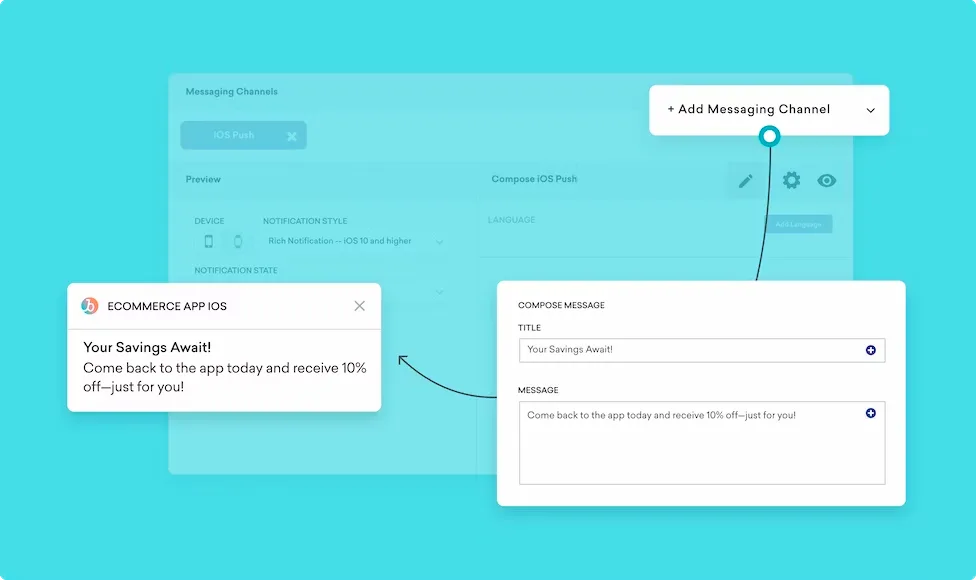
Image credit: Braze
Braze is a popular choice, with marketers operating on a larger scale with larger campaign budgets, making it a less prominent solution for startups. Moreover, Braze doesn’t offer a free plan with basic functionalities, only a 7-day free trial.
- Pricing: Braze doesn’t offer public pricing for its services, but it’s generally considered to be 3-4x times more expensive compared to Pushwoosh for similar functionalities
- High-speed notifications supported: yes, depending on the browser and automation settings
- Automation: yes
- Multiple languages: yes
- Browsers & OSs supported: Braze supports all major web browsers and allows mobile web notifications via Safari for mobile, Android Chrome, and Firefox Mobile.
- Segmentation & personalization: With Braze, you can use dynamic segmentation to change the content of your push notifications and add multiple messaging channels to a single campaign based on the users’ preferences.
- Omnichannel: Braze supports essential messaging channels like mobile push, in-app messaging, SMS & MMS, email, and WhatsApp.
What Pushwoosh does better: Thanks to its more affordable pricing model, Pushwoosh is a better alternative for marketers willing to experiment with different features, such as web push notifications, without committing to a platform long-term. Our web push notification editor is also a lot more flexible than the one offered by Braze, making it easy to master even for complete beginners.
🌎Compare Pushwoosh with Braze beyond web push notifications
3. Firebase Cloud Messaging – web pushes for developers
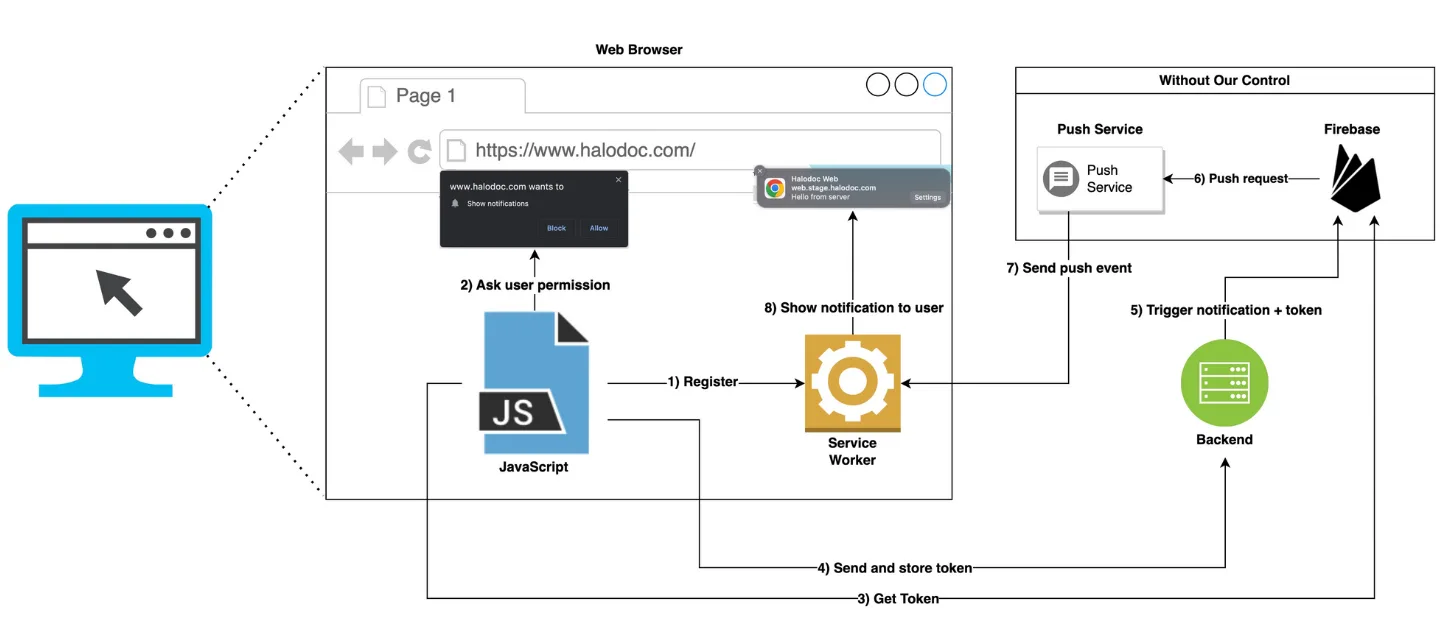
Image credit: Halodoc
As is always the case with Firebase messaging solutions, Firebase Cloud Messaging (FCM) is perfect for development teams heavily integrated into the Firebase ecosystem, yet absolutely terrifying for non-technical marketers searching for a simple drag-and-drop web push notification provider.
- Pricing: free (with extra costs for segmentation)
- High-speed notifications supported: no, while with Pushwoosh, you can send even 500k web push notifications per second!
- Automation: limited to subscribed topics and device types, plus it requires coding experience to set up;
- Multiple languages: no, unless pre-written in JavaScript;
- Browsers & OSs supported: FCM for web notifications only works with Push API-supported browsers (this does include the latest versions of the most popular ones, like Chrome, Safari, Firefox, or Opera). Safari on iOS is only offered partial support as of 2023, yet Chrome and Samsung Internet for Android are fully supported.
- Segmentation & personalization: You can leverage your existing code to coordinate some of the custom-imported segments with FCM. Yet, once again, it would require a professional developer to set up. If you’re looking for a low – or better yet, no-code – solution, Firebase will not be a good option.
- Omnichannel: You can technically set up several complementary channels for your communications strategy within the Firebase ecosystem. However, it won’t be all done through the FCM directly. For example, you’ll need a Firebase In-App Messaging dedicated tool to send out in-app messages. At the same time, you will still be limited when it comes to SMS or WhatsApp notifications.
What Pushwoosh does better: Pushwoosh is a no-code platform for web pushes and other messaging channels that allows any marketer to send out timely communications with no development experience required. On top of that, it offers a simple yet highly effective automation engine that leverages direct customer data to build dedicated segments, personalize the content of the notification, and convert faster.
💡Pushwoosh vs. Firebase complete comparison
4. MoEngage – web push notification solution for non-demanding marketers
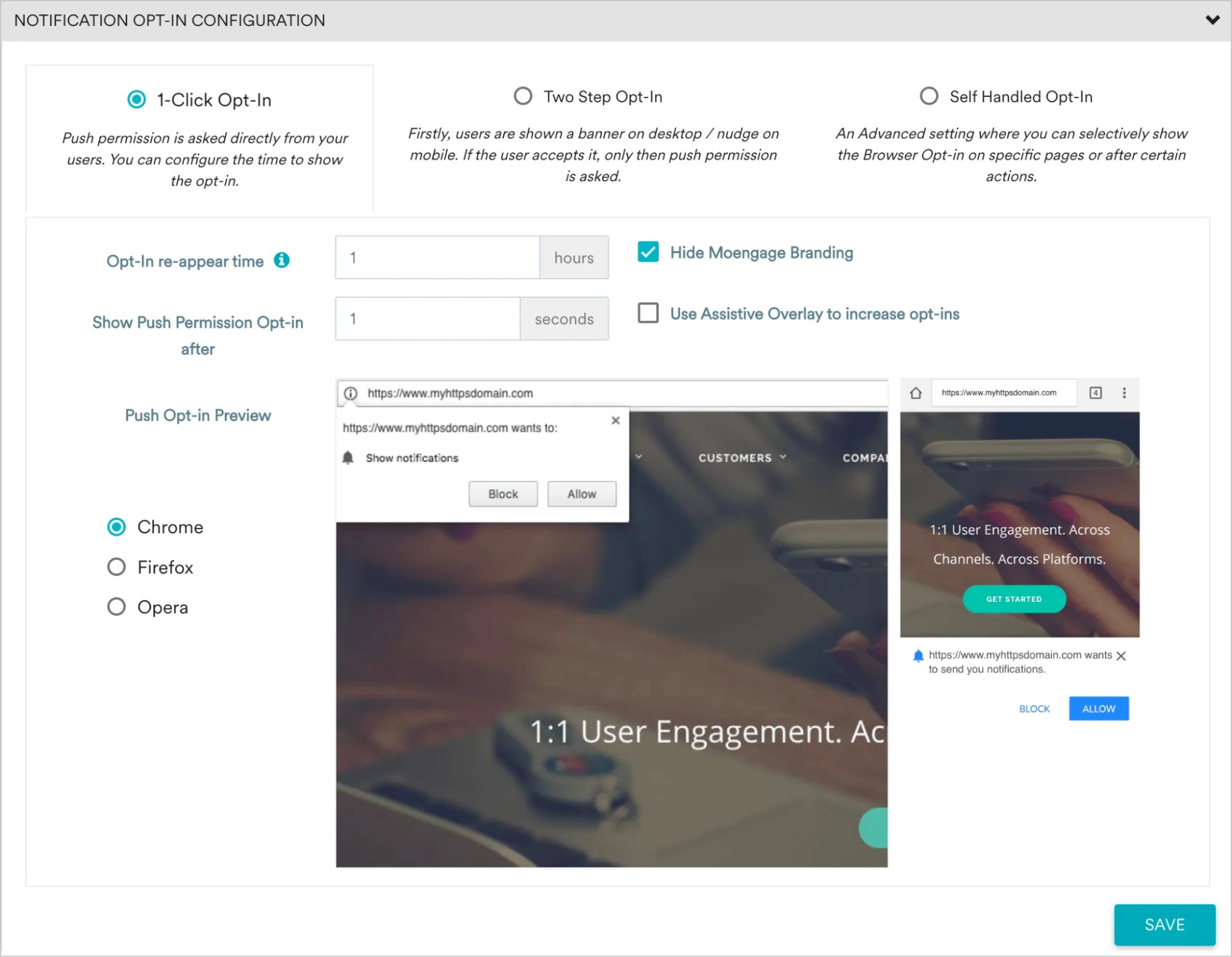
Image credit: MoEngage
MoEngage is a powerful omnichannel messaging solution, yet it tends to leave web push notifications on the bylines. The feature doesn’t come with a dedicated editor, which significantly limits its customization options, and is generally perceived as an additional distribution channel for more prominent mobile pushes.
- Pricing: MoEngage doesn’t provide exact pricing figures on its website, but third-party sources indicate that the basic web push functionality is free for up to 10,000 Monthly Tracked Users. From there, you’ll have to opt for paid add-ons or upgrade to custom pricing, depending on your needs.
- High-speed notifications supported: No
- Automation: Yes
- Multiple languages: Yes
- Browsers & OSs supported: MoEngage introduces surprisingly many limitations for their web push notifications’ distribution. As such, you can send your communications to the most popular browsers (Chrome, Firefox, Opera, and Edge). Yet, there are numerous limitations for MacOS and Safari users and those trying to reach customers using different browsers from their Android or iOS mobile devices.
- Segmentation & personalization: MoEngage allows users to rely on customers’ behavior and custom properties to build dedicated segments. You can later personalize your campaign further by setting trigger events for automation and enabling control groups to evaluate the effectiveness of your campaign.
- Omnichannel: With MoEngage, you can access all the crucial messaging channels even though not all are available for the free Starter plan. As such, to unlock WhatsApp, for example, you’d have to purchase an extra add-on.
What Pushwoosh does better: Pushwoosh pays more attention to web pushes, presenting them as more than just another variant of mobile pushes. Moreover, we facilitate message segmentation and personalization. Essentially, MoEngage requires you to build separate web push campaigns for each segment. While with Pushwoosh, you can customize your campaign’s dedicated parts for various audiences more efficiently.
🏅What makes Pushwoosh a better alternative to MoEngage? Find it out.
5. Leanplum – web push notification tool in beta
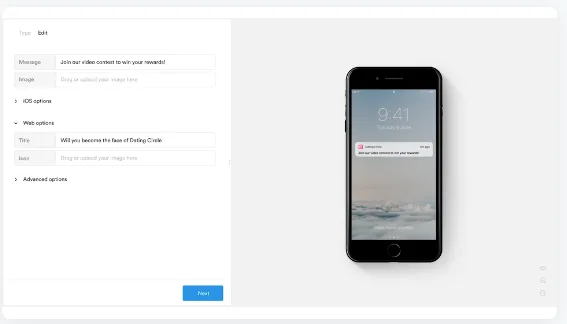
Image credit: Leanplum
Leanplum is a new messaging platform acquired by CleverTap that offers web pushes as a subset of its primary focus – email and mobile communications. Leanplum remains a mobile-first channel, where desktop web push notifications are presented as a less popular option for truly demanding marketers.
- Pricing: Leanplum doesn’t provide exact pricing figures on its website, but third-party sources indicate that plans start at $75/month for basic functionality, supporting up to 5,000 MAUs.
- High-speed notifications supported: No
- Automation: Yes, but limited – you won’t be able to build intricate workflows for now
- Multiple languages: Yes
- Browsers & OSs supported: The biggest limitation of the platform is that currently, you will not be able to reach your iOS users through web pushes in any browser. If most of your customers are using mobile Apple devices, this may not be your best option.
- Segmentation & personalization: Basic personalization is available for creating customized messages (e.g., you can include the customer’s first name, refer to their device model, or segment by browser or OS version). Leanplum also enables activity segmentation, where you can group customers based on recent on-site behavior or time spent on your application.
- Omnichannel: Leanplum specializes in mobile notifications and email marketing, making it possible to integrate your web push campaigns into a larger communication strategy. It doesn’t support SMS or WhatsApp messaging, though.
What Pushwoosh does better: Leanplum still has web push notifications in beta, making it an unreliable provider for this specific kind of service. Pushwoosh, in turn, has been providing web pushes for over a decade and knows exactly what customers can gain from those. Pushwoosh’s segmentation engine is also more developed compared to Leanplum’s, allowing our users to build advanced customer journeys with both web pushes and other forms of messaging like SMS or in-app communications with ease.
Which web push notification platform is right for you?
If after carefully evaluating your options you’re still firmly set on sticking just to web pushes for now – kudos for boldness! You’ll have more opportunities to experiment with different vendors until you find the perfect match you’ll be ready to scale with.
Yet, let us warn you: you will have to scale. Soon sticking to just one channel – no matter how prominent – will simply not be enough. So it may be a worthy long-term investment to choose a solution that can handle multiple channels and understands your audience from the start.
Grow with Pushwoosh – a reliable expert in web push notifications and beyond!