E-commerce customers crave personalized experiences. In fact, personalization makes buyers 110% more likely to add extra items to the cart and 40% more likely to spend more than they initially planned, BCG reports. It appears to be that growing your customer lifetime value is as simple as catering perfectly to each shopper’s needs. But how simple is this?
Tosee your customer LTV growth, you have to ensure perfect personalization. How do you achieve it? We at Pushwoosh can help you with personalized mobile messaging. Read this detailed guide on how to send precisely targeted communications to grow conversion rates and sales and retain customers in your e-commerce app.
1. Process the data you’ve gathered so far
As an e-commerce app marketer, you are lucky to have general information about registered users:
- Name
- Gender
- Age
- Geolocation/Preferred shipping address
In addition to this data, pull any information you can from other online and offline resources:
📱 Data from your mobile e-commerce app:
- In-app purchases
- Product and product category views
- Products added to favorites
- Products added to cart
- Last app open
- The date of the last app version update
🖥️ Data from your e-commerce website:
- Purchase history and the same behavioral data as in the e-commerce app
- Website behavior metrics: average time on page, clicks on links, user flow, and shared content
🍪 Third-party data:
- Websites visited
- Survey responses
- Any anonymized tracked data
🏬 Offline data:
- Purchases in brick-and-mortar stores (if your business has them)
- Search behaviors from digital display kiosks
- Communication with the support service/call center
2. Collect more data needed for profound personalization
Create a segment of all of your e-commerce app users, including those who haven’t made any purchases in the app yet.
Think about the data and permissions you have from these customers. Is it enough to provide them with a relevant, personalized experience?
If the answer is no:
Obtain zero-party data through customer-beneficial polls
Just ask your e-commerce app users directly about their preferences. The information you’ll obtain from them is called zero-party data. Once you’ve got it, personalizing your customer shopping experiences will be quite simple.
For example, an e-commerce app selling hair care cosmetics might ask its customers about their hair type, length, and color. Customers will be willing to share this information if the e-commerce app uses it to send more personalized recommendations and communications.
Collect first-party data via custom trigger events
Unlike zero-party data, which you collect by directly engaging with your customers, first-party data provides you with deeper insights through analysis of user behavior.
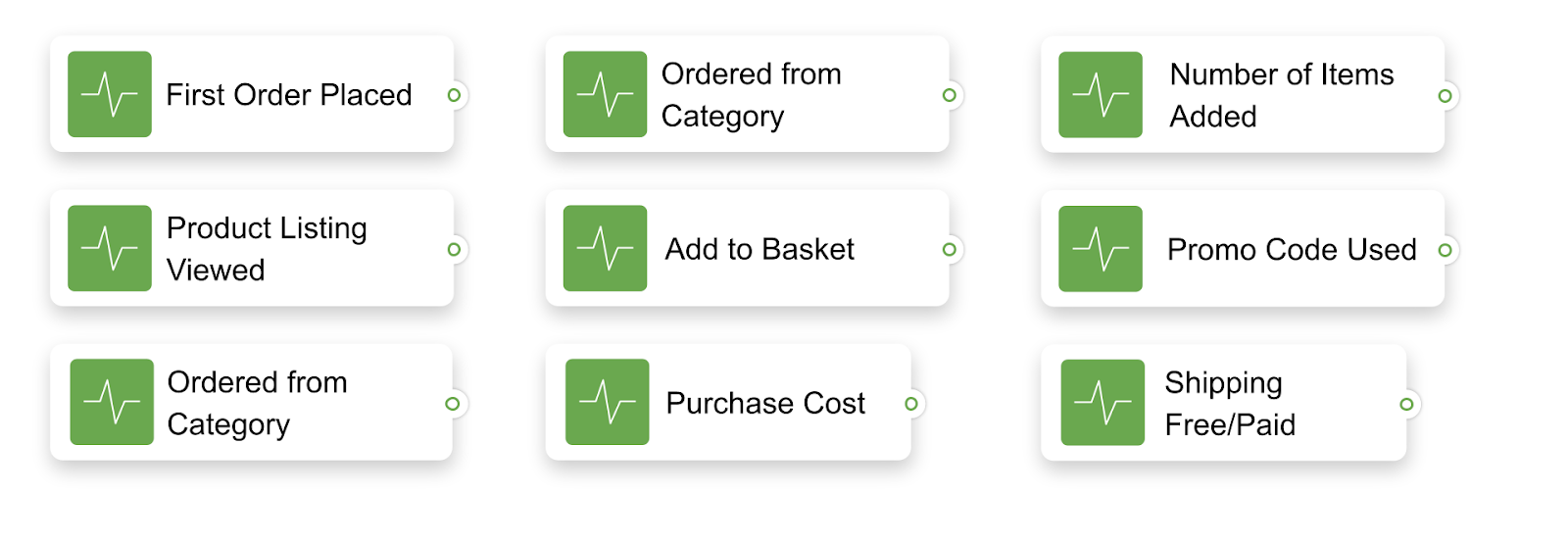
In addition to the in-app events you’ve collected, set more triggers to track and analyze customer activity in your e-commerce app.
To give you an idea, here are the custom trigger events our customers like to set:
3. Segment your e-commerce customers
Customer segmentation is the first step to enjoying the benefits of personalization in e-commerce.
From Pushwoosh’s recent research on e-commerce mobile messaging, we know that a segmented push notification gets 7 times more clicks than a broadcast one. And the conversion rates of messages sent to behavior-based segments multiply by hundreds.
E-commerce apps can segment their audience based on:
- User preferences
- Expressed and observed interests of your customers (aka zero- and first-party data we mentioned above)
- Completed purchases
- RFM analysis (Recency, Frequency, and Monetary analysis)
For personalized messaging, a marketer may want to put together:
- Dynamic segments
These are based on the set Tags and updated once a specific event is triggered.
- Static, attribute-based segments
A bright example: adjusting your communications to the customer’s geolocation. In e-commerce messaging, it may prevent you from sending a winter sales announcement to customers from another hemisphere who enjoy summer at the very same time.
It is essential to dedicate time and effort to customer segmentation because it will help you to:
✓ Estimate the size of your target group of customers;
✓ Evaluate the potential benefits of targeting a particular segment;
✓ Allocate your creative resources properly.
For example, you may find out that you have five times as many push recipients as email subscribers. Knowing that your push notifications reach a larger audience, you may decide to invest more in push content creation and experiments.
4. Reach out via all the messaging channels your customers prefer
Having done the segmentation, you know:
- The audience that has opted in for push notifications;
- The size of your email subscriber base;
- The percentage of your app users that don’t open your push notifications — although they do trigger AppOpen events, meaning you can still reach them with your in-app messages.
📬 For those clients who don’t engage with your push notifications but engage in your promo offers, a Message Inbox is a great channel to have. For example, if you push a long-term special offer, you may save it to the Message Inbox. Your app users will get a chance to view and seize it later.
To convey your messages to all these customer segments, you will want to apply a consistent omnichannel approach. Connect all the channels available so you can leverage the most relevant one at any moment.
5. Create personalized (and personalizable) marketing content
Personalization in e-commerce is so much more than calling customers by their names, as you may have guessed by now. Any criteria you’ve based your customer segments on are all applicable to the content of your messages.
For more advanced (and less complicated) personalization, you can apply marketing automation features:
- Dynamic contentthat enriches your message copy with automatically entered customer attributes: from their current location to the name of the product a user put in their favorites.
- Multilanguage messaging that allows you to address your customers in their local languages. All you have to do is prepare local versions of the copy in advance.
Now let’s have a look at some live examples of e-commerce apps using personalization:
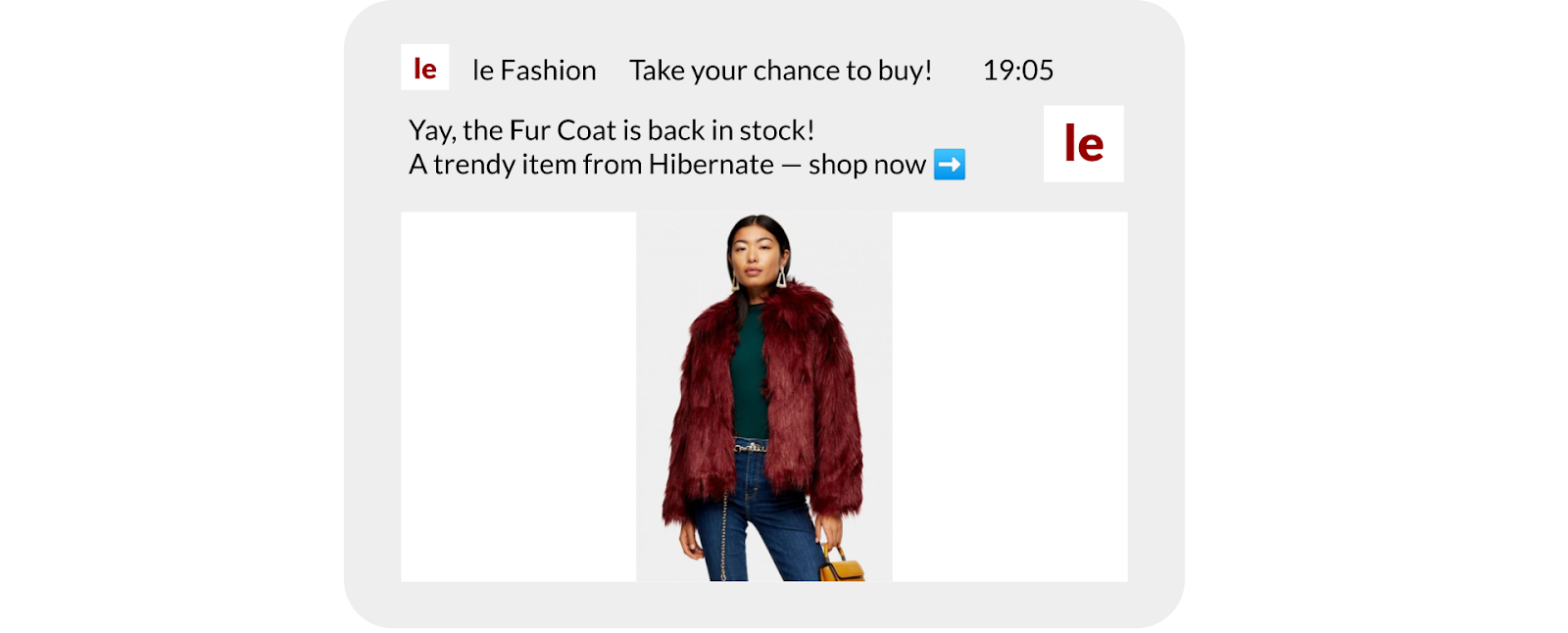
Personalized push notification
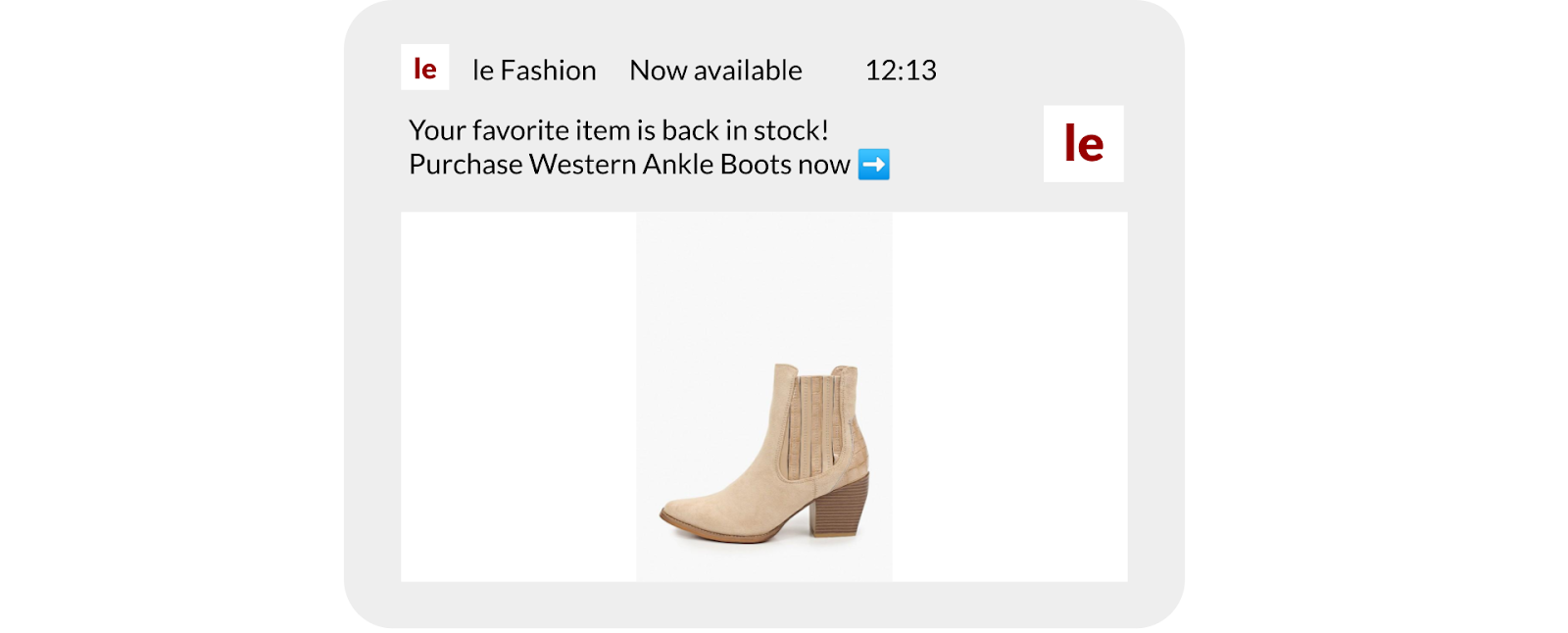
In this imaginary push inspired by a real-world example, a le Fashion e-commerce app notifies its customer of a back-in-stock item.
Personalized in-app message
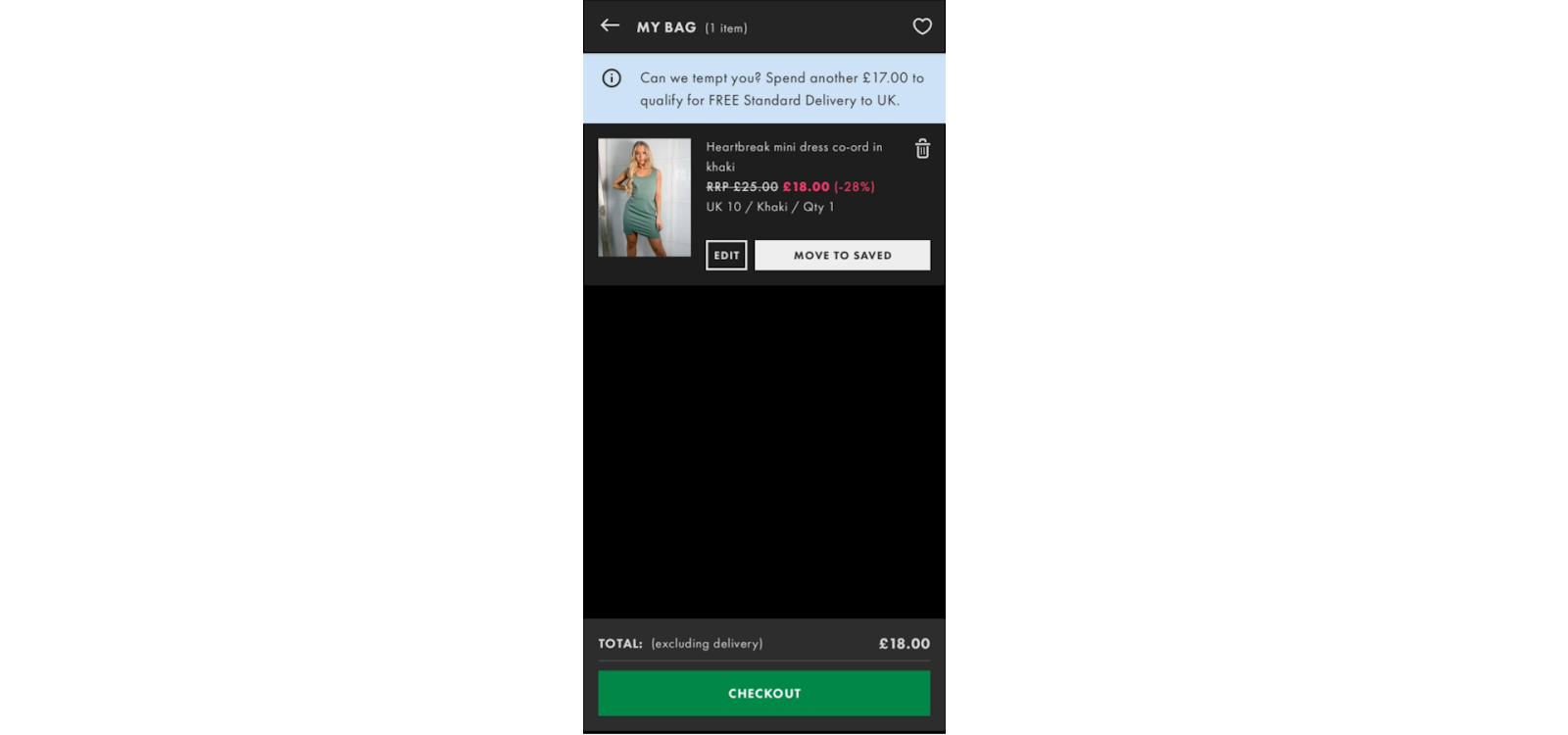
In a small inline in-app message, ASOS calculated precisely the sum a customer should add to qualify for free delivery.
Personalized email
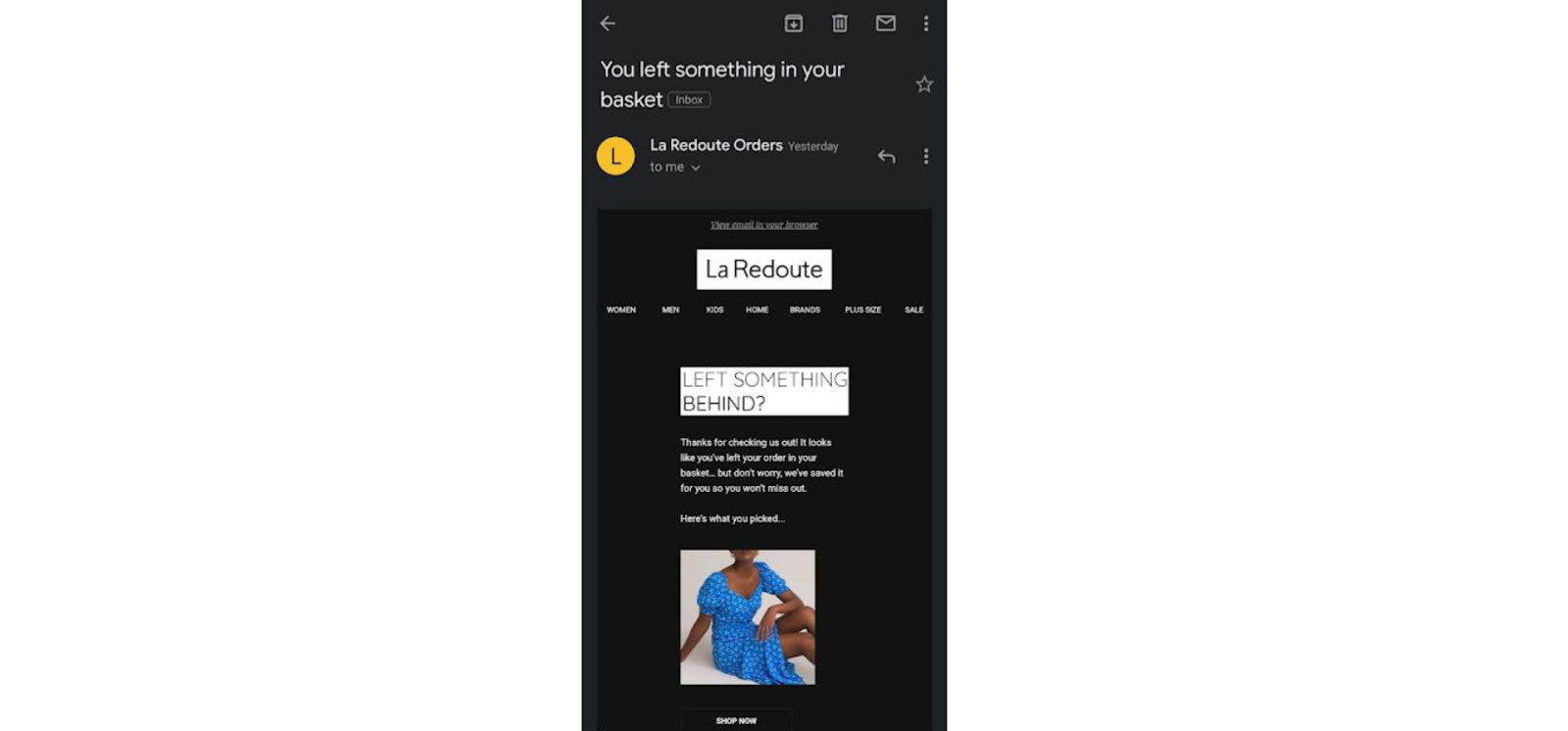
A classic example of an abandoned cart recovery email from La Redoute. It showcases the very product a customer has left unpurchased:
More examples await below.
6. Personalize in-app experience with Custom Data and Deep Linking
What happens after your customer has seen and clicked on a personalized message? You can:
- Take the customer to a personalized screen in your e-commerce app, where you’ll show them a set of recommended items.
- Embed a personal promo code inside your push. When a user opens the notification, the offer will be applied automatically.
- Provide exclusive access to a limited collection or pre-order for your opted-in or most engaged customers.
You can enable any of these special conditions smoothly and stress-free with Pushwoosh’s unique Custom Data Builder. Please refer to the dedicated blog post or get advice directly from our team.
7. Provide Personalized Checkout Assistance
A minor user experience issue at the checkout can lead to cart abandonment. How do you avoid that?
Baymard Institute calculated that UX improvements at this bottom stage could increase conversions by more than 35% and recover $260 billion for e-commerce companies.
To mitigate cart abandonment, e-commerce apps can anticipate checkout issues with event-triggered in-app messaging.
Here are a few examples:
- Your customers may struggle to find the “Add a payment method” button and you know that, for a reason, your development team can’t improve it any time soon. As a solution, launch a small in-app tooltip pointing at the needed button. You can do it quickly and easily without developer resources and profound technical skills.
- If a customer hesitates to press the “Proceed to checkout” button, analyze their journey. Have they only added premium or budget items? Is their total lower than the sum needed for free delivery? Have they put a lot more items that they order, on average, and this makes them hesitate?
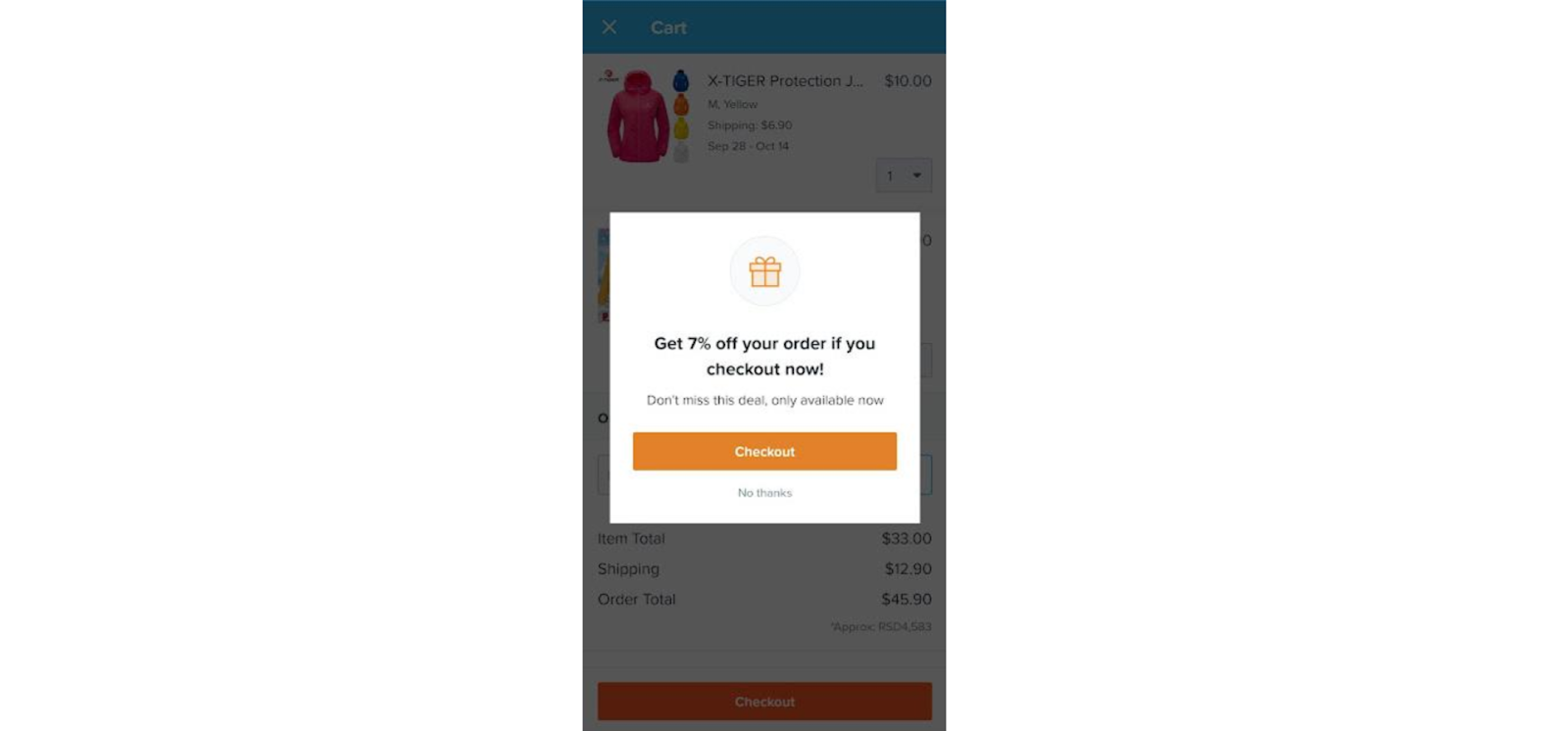
Gain these insights from the events triggered in your app and entice your customers with relevant offers. For one shopper, it may be “a discount if you checkout now” (see the example from Wish below); for another, it will be “a promo code for free delivery today only”.
8. Leverage geo-location data
If your online store has an offline location where your app users can shop from you too, use location data to your advantage. Approach customers with personalized special offers:
- Send them special offers reserved for [their city or region] you can indicate in the message via Dynamic Content;
- When some time has passed since their last offline purchase, suggest they buy something online. How do you make it happen?
One way is to upload a list of your offline customers via .csv and target them with your messaging.
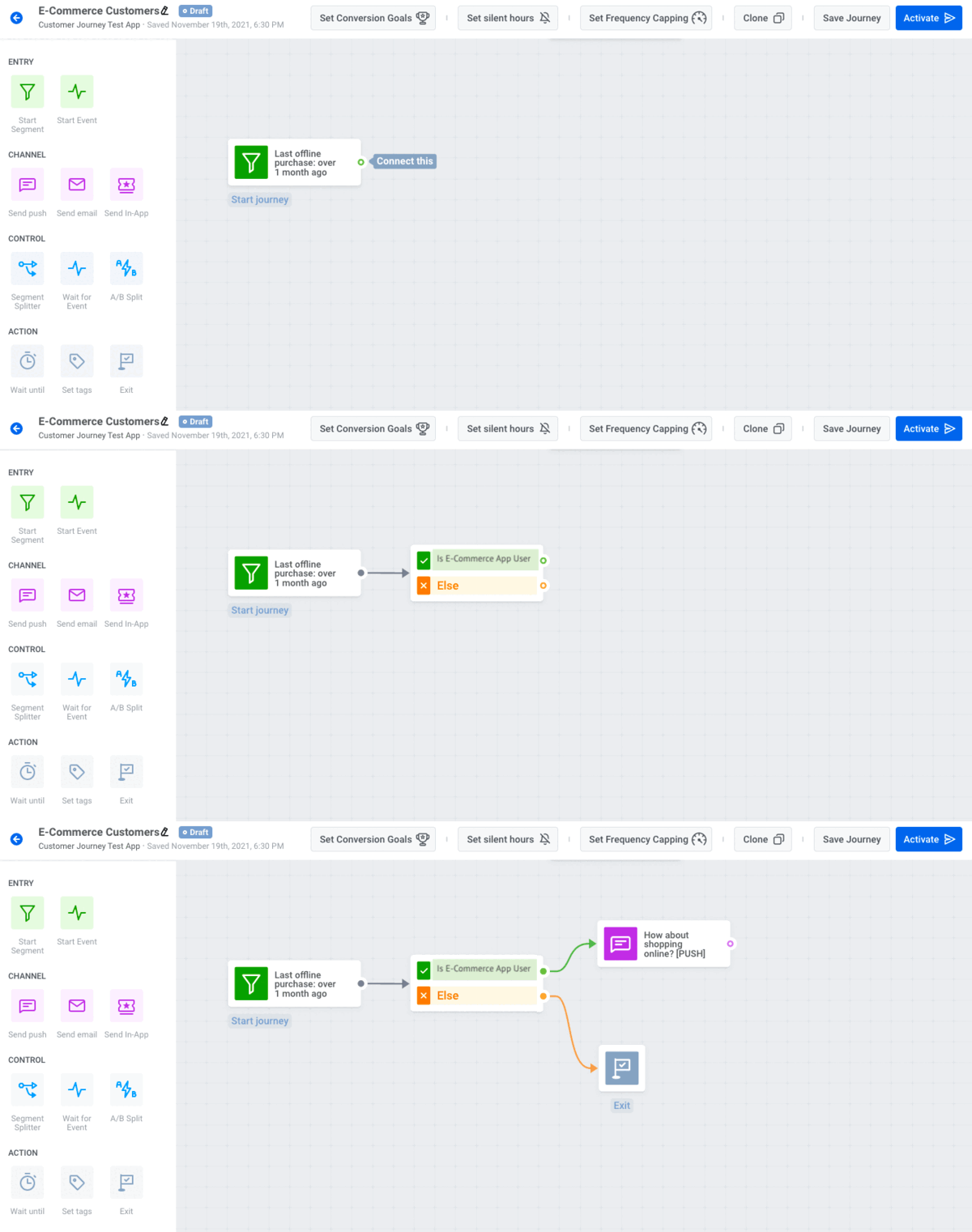
How to target offline customers with mobile messaging
How do you get the list of offline purchasers, in the first place? As an option, have your customers present dynamic QR codes at your physical store checkout — this way, their purchase history will be accessible from your mobile app messaging platform account.
9. Personalize your messaging content for the customer’s stage in the sales funnel
You want to capture your app visitors before they leave. What kind of message can you show them apart from a “complete a purchase” in-app? Here are our suggestions:
😮 Awareness
At this stage, you have a new audience that has just discovered your brand. In your e-commerce mobile app, you’ll detect them by the triggered “App Install” event.
- Move these customers to the next stage by encouraging them to opt in for your push notifications and emails.
- Explain the future benefits for opted-in users: exclusive discounts, special offers, and personalized shopping recommendations.
- Reward users with promo codes and bonus points for opting in.
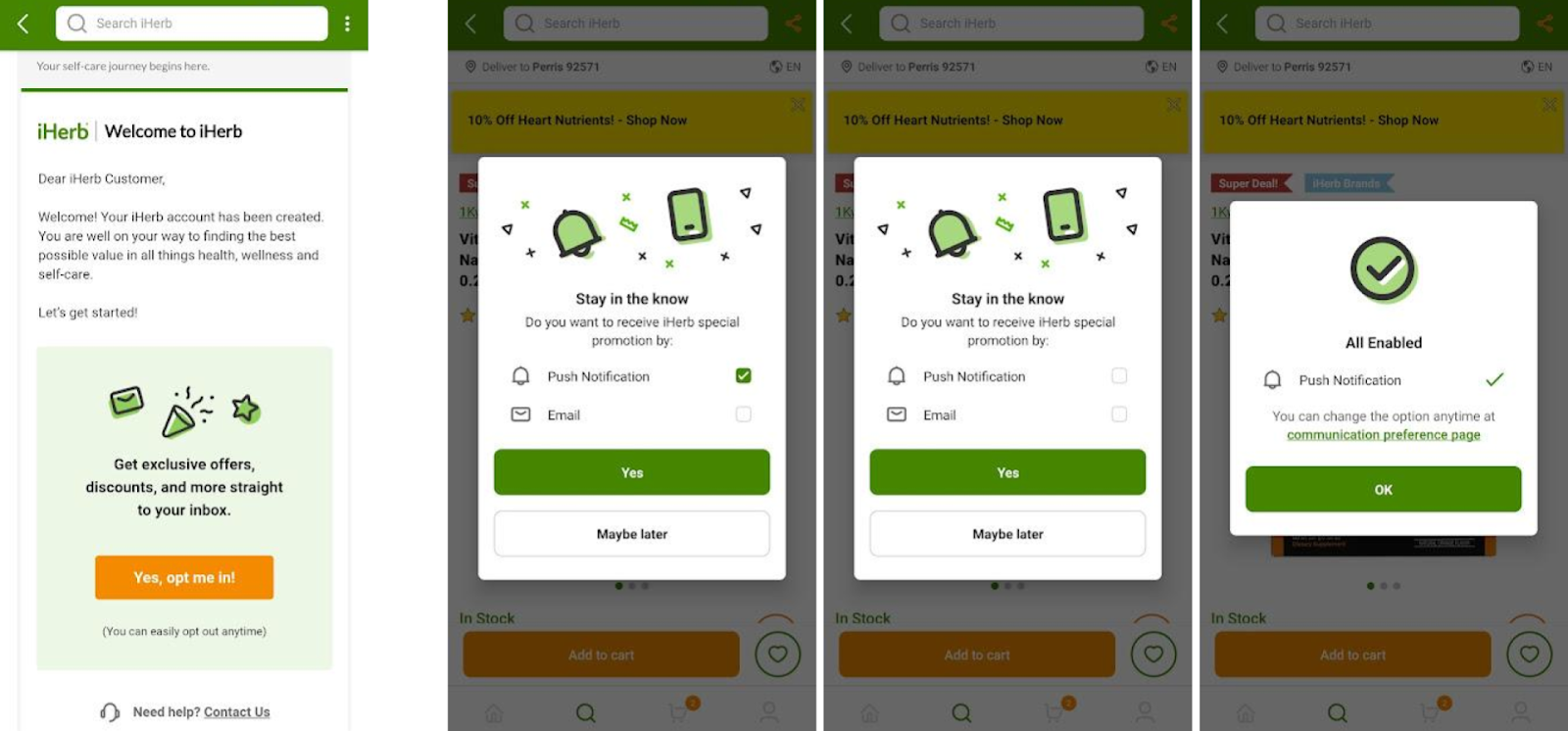
Two examples of how the iHerb app promotes opting in for their messages
🤔 Consideration
Customers at this stage have already browsed a number of product categories in your app. They may have even added some items to favorites or to cart. How do you get them closer to the purchasing decision?
- Send them a push notification highlighting the product they have viewed or even selected as a favorite. Rely on mobile marketing automation software to ensure the right product is displayed to the right customers.
🤓 Decision
Now, the customer is one step to conversion.
- Help them make up their mind with an abandoned cart reminder, a discount offer, or a reduced shipping cost.
Have a look at ASOS enticing the shoppers who have already browsed a sales section of the app:

😎 Retention
Here, you want to thank your customers for completing a purchase and encourage them to make a repeat one. Besides sending a direct “Shop again” message, you can:
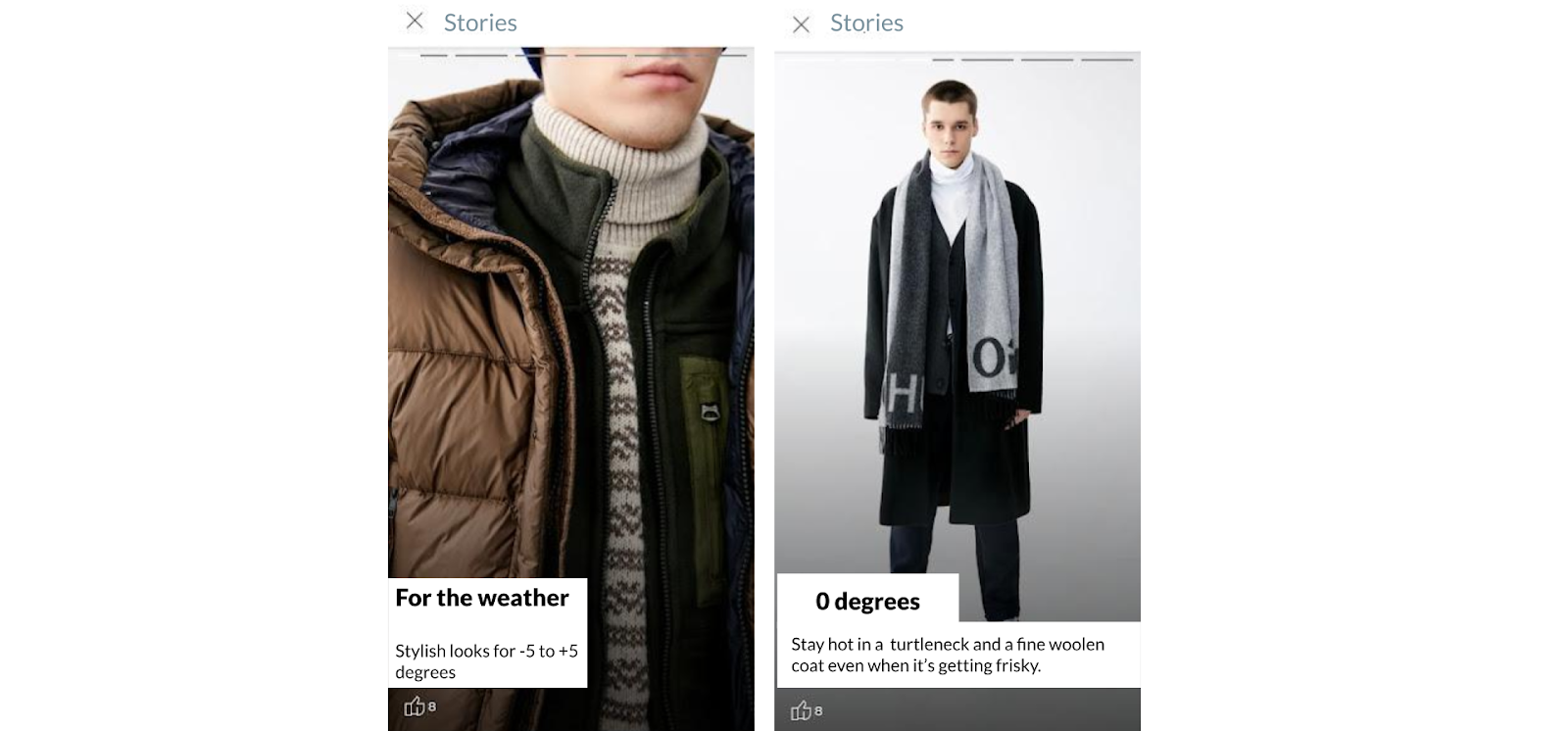
- Take a step back from selling and try to connect with your customer through some brand image content. Anything less salesy and more practical will do—like a seasonal lookbook in a fashion e-commerce app, for example:
10. Keep your offers straight across the channels
As a busy marketer, you can easily get caught in numerous personalized offers you make to different customers. This is risky because one wrong communication can destroy all the trust your brand has gained through previous campaigns. Here are a few points to note:
- See the fine line between “having multiple touchpoints” and “overspamming customers”
Although having multiple touchpoints with a customer is a viable marketing strategy, you want to ensure it’s your intentional choice and not just an act of desperation. Your customers may unsubscribe from receiving your marketing messages if you overspam them
If you use Pushwoosh Customer Journey Builder for your omnichannel mobile marketing campaigns, make the best use of Frequency Capping, Tags, and Segment Splitters. These features help you orchestrate multiple campaigns at once.
- Synchronize the offers you promote across the channels
Ensure the customer doesn’t receive two contradictory messages.
Let’s say you send a personalized push notification with “A special offer only for you, John”. And then, you send an email to John that announces “Sales for all the loyalty program members”. John might feel cheated and stop trusting your brand. And there may be multiple johns to receive such messages.
You can avoid this mistake by setting Tags and using Segment Splitters in your messaging flows.
- Avoid promoting deals to those who have paid full price
Imagine that a customer has paid full price for an item, and then you notify them of a 30% discount on the same product. The customer won’t be very happy about it and might stop engaging with your brand altogether.
To avoid it, make sure to exclude those who bought the promoted product before the sales began.
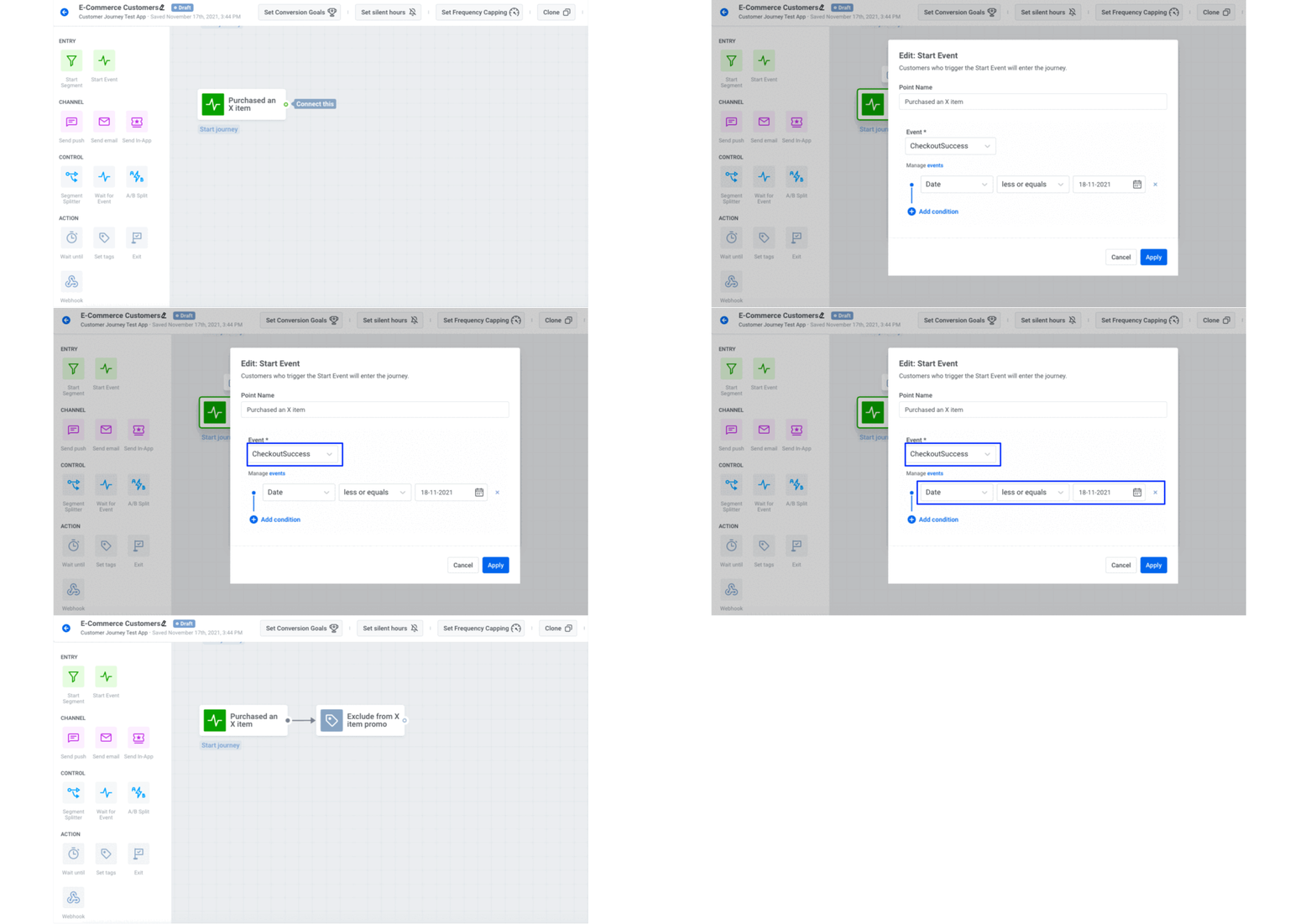
An example of segmentation done in Pushwoosh Customer Journey Builder
11. Don’t rely on best practices—trust your customers (and A/B/n testing)
Personalization is all about understanding your customer. You may try various best practices recommended by industry experts, but none of them will tell you what works best for your audience. It’ll be your own unique segment that will indicate your most engaging messaging with their clicks.
So whenever possible, split your event-triggered flows into quick and sweet A/B/n tests.
Customer loyalty is sourced from personalization
All the steps we put together in this post make up the perfect recipe for increasing your customer lifetime value.
When you cater to customer needs and show your care in every detail, customers get engaged and find a reason to return to your online store whenever they need to do shopping. 84% of customers actually state that personalization brings them closer to a brand, building loyalty and trust. This, in turn, is a way for a one-time purchaser to become a repeat customer.
Get prepared to win every marketing battle in 2024 and beyond. Equip yourself with the right tools for personalized messaging, all on one platform: Pushwoosh.