As we’re approaching the end of 2022, most of us are looking back at our achievements. Pushwoosh Team has revised its major product updates too. From new segmentation and more advanced personalization features to improved UI/UX and statistics — let us guide you through the top and hot tools that are meant to better connect your brand with its audience and drive business results.
Scheduled & Event-triggered campaigns
Omnichannel messaging
The year data privacy restrictions affected even Android push notifications, it became evident you can’t rely on one channel anymore. In-apps, emails, SMS, and WhatsApp messages take the stage as supporting (or even leading) acts in well-orchestrated communications strategies. And Pushwoosh enables their brilliant performance for you with:
Reachability Check
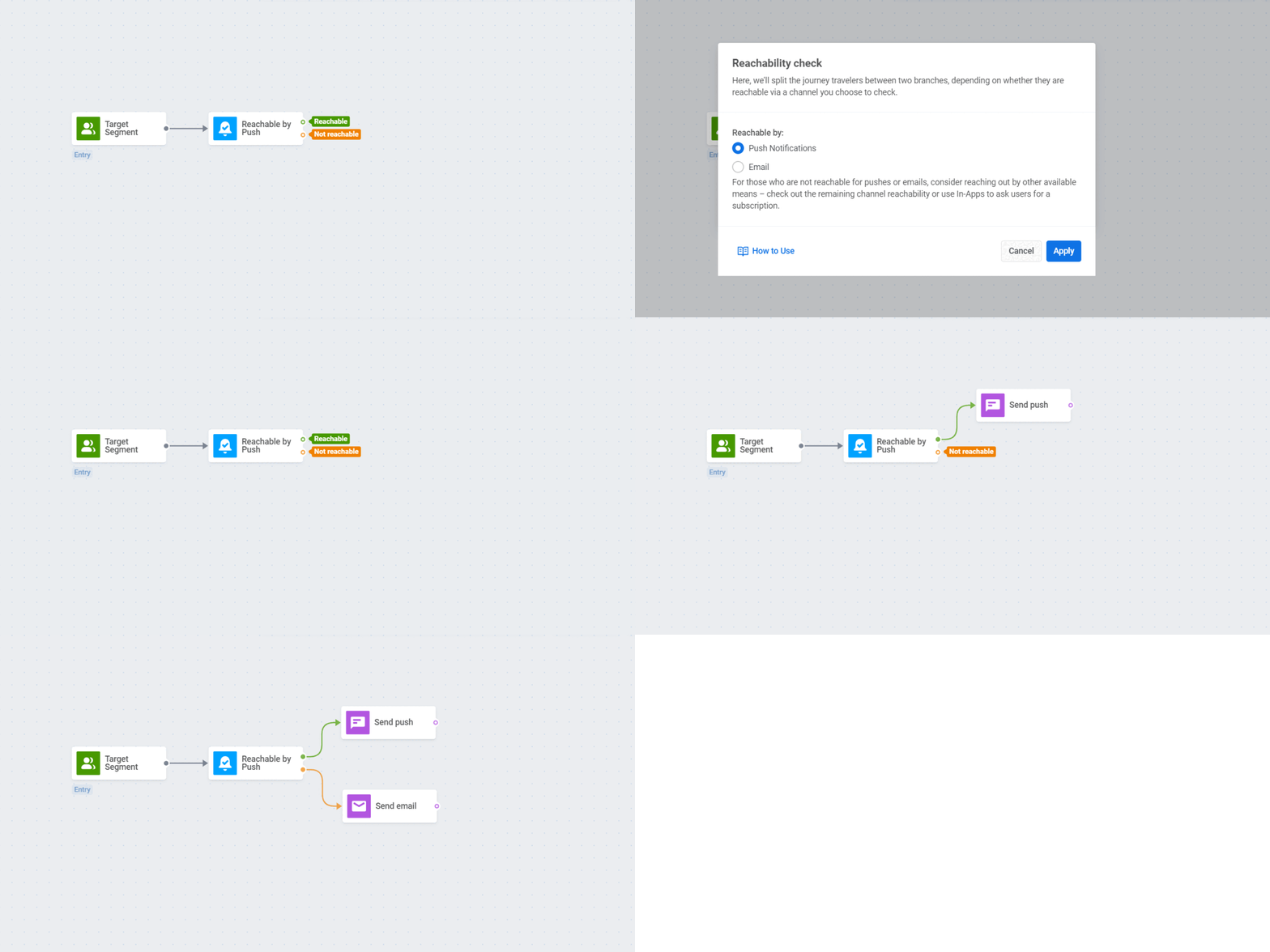
Before sending a push notification or an email into the unknown, you’d better confirm that it is even possible to reach your customers on these channels. Pushwoosh now allows you to do that.
When planning to send a push or an email, precede your message with a Reachability Check element in Pushwoosh Customer Journey. If a user is unavailable on one channel (because they’ve opted out or unsubscribed, for example), try contacting them via another means of communication.
or study its use cases first
New in-app message templates
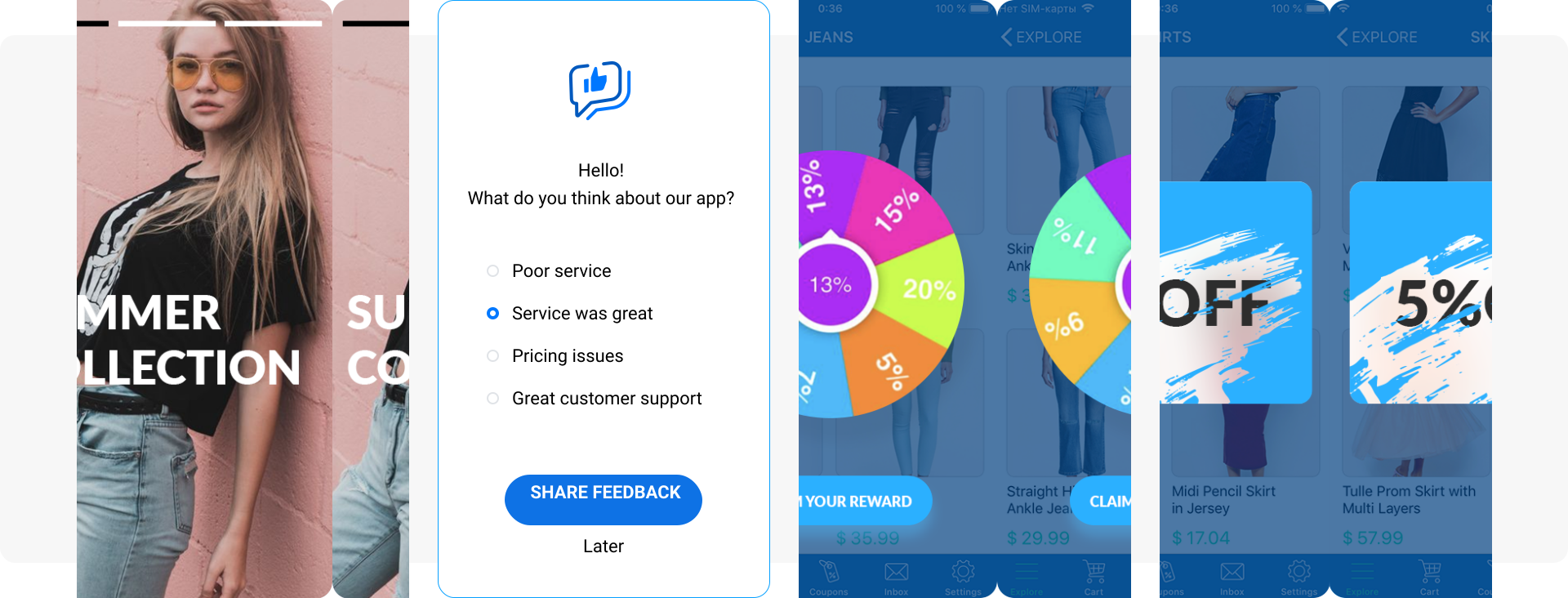
Gone are the days when in-app messages were static popups with one button that even marketers were not that excited about. In 2022, we surfed the wave of interest to engaging, interactive in-app content and served Pushwoosh customers with several new formats: in-app stories, feedback surveys, the wheel of fortune and scratchcards.
or request access to them from your dedicated Customer Success Manager
Scheduled & Event-triggered campaigns
Sometimes, the best time to send a message is the exact day and hour. In other cases, sending your communication in response to customer behavior is better. Knowing this, Pushwoosh Team keeps developing features for both scheduled and event-triggered messaging, including this year’s novelties:
Scheduled campaign launch for repeating notifications
For those of our customers who have embraced the power of daily, weekly, and monthly offers, we have enabled their automated sending with the selected frequency.
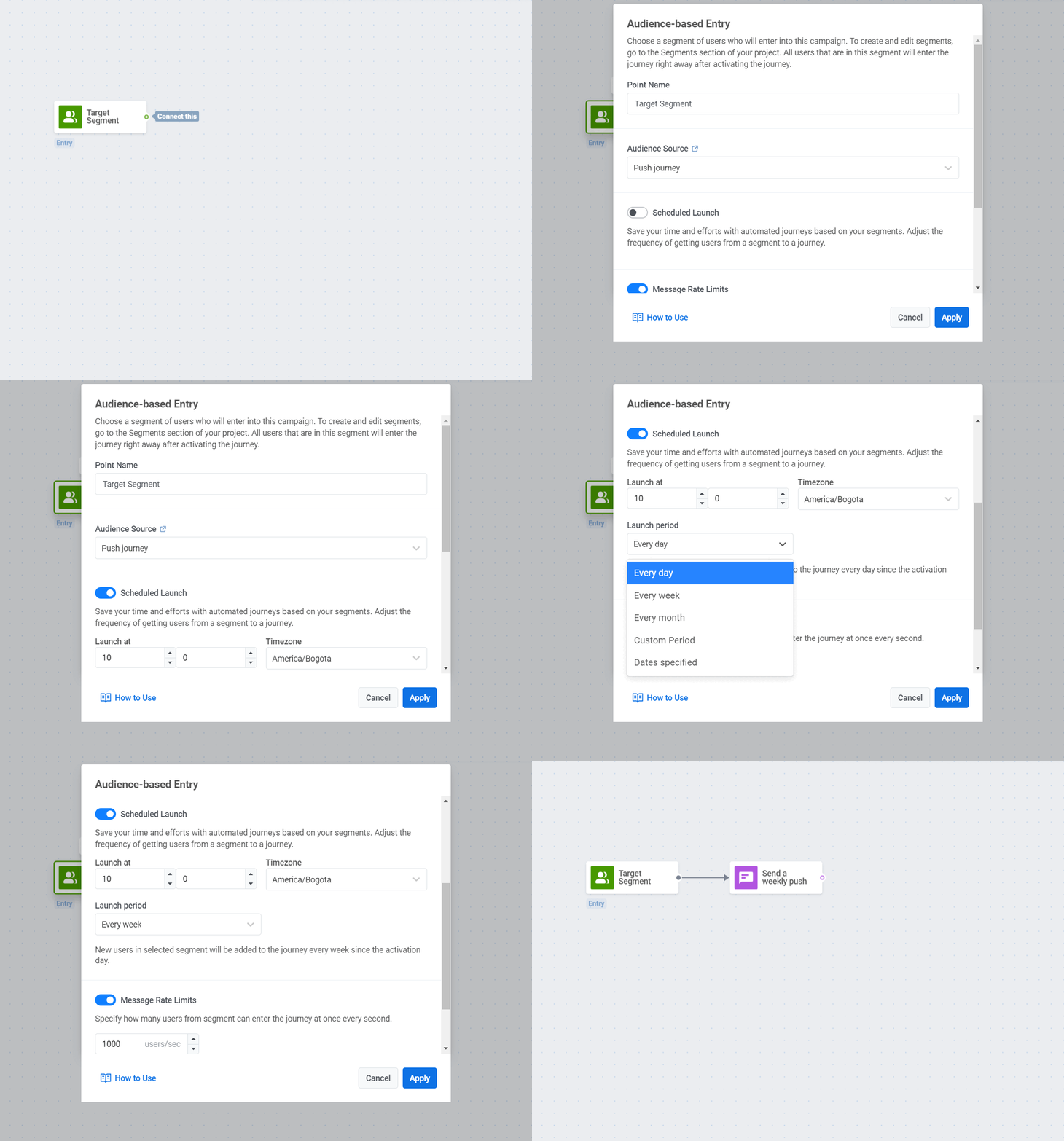
The marketers who have leveraged the Scheduled Launch feature now experience less fatigue from the routine of scheduling the same type of campaigns over and over again. At the same time, their campaigns enjoy a boost in CTRs, DAU, MAU, and even revenue — check out Bladestorm’s success story as proof.
Send repeating offers on a schedule
Explore more detail in the blog post
Track & React to iOS in-app purchases
Keeping your highest-value customers in the loop is the fast track to greater CLV, revenue, and retention. Tracking their in-app purchases is a way to get your paying users on the radar. Pushwoosh now allows doing it on iOS out of the box.
Learn more about iOS in-app purchases tracking
Android app owners, please don’t rush to feel like you’re missing out on something — we’ve got a solution for you, too; get in touch with us.
Segmentation
Content or targeting: who is the king? In mobile marketing, it might be the latter. The right choice of the audience segment you’re going to target ensures higher relevance of your offers and, therefore, higher click-through and conversion rates. With this in mind, Pushwoosh Team run the extra mile with enhancements in the segmentation department, adding:
RFM Segmentation
A major customer engagement platform can’t go without RFM segmentation — because its clients can’t. So now, e-commerce and gaming apps can precisely differentiate users by the classic recency, frequency, and monetary metrics.
Other businesses may enjoy the new functionality, too, as we suggest the RFM criteria might be used for segmenting audiences based on non-purchase (but still valuable!) activity.
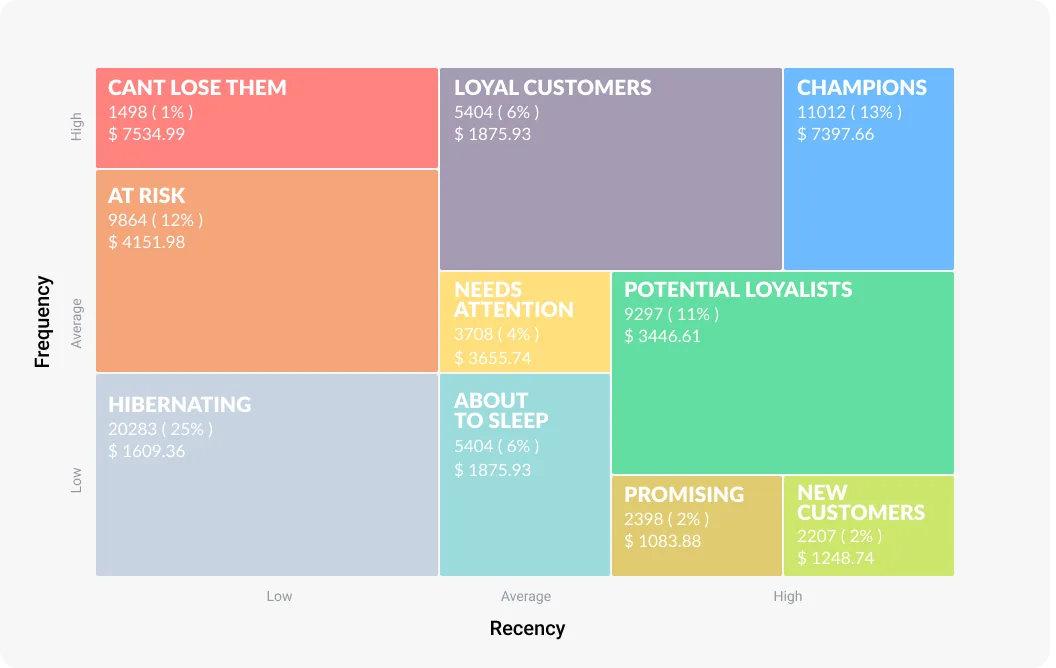
The next step will be to create effective communications for each pattern of consumer behavior — grasp some ideas from this blog post:
Learn how to approach different RFM segments
Segmentation by browser type and platform
Great customer experience is the cornerstone of effective marketing today. You want to cater to your audience with the best possible interactions with your brand, whatever device or browser they use.
Pushwoosh understands the importance of CX and UX like no other, so we’ve added two new string Tags: BrowserType and Platform. They allow you to differentiate your communication with desktop vs. mobile and iOS vs. Android users, for example, and avoid even the slightest risk of irrelevance or imperfection of your targeting and content.
Discover all the Tags available in Pushwoosh
Integration of the year: Mixpanel
While we haven’t drifted away from the topic of segmentation, let’s remember the key integration Pushwoosh has secured this year: the one with Mixpanel. The much-anticipated connection between the platforms allows for sophisticated customer segmentation, on-point context-based messaging, and state-of-the-art personalization.
Learn how to integrate Pushwoosh + Mixpanel
Personalization
As your audience expects to receive personalized product recommendations and timely reminders of their scheduled events, Pushwoosh serves you with the features that enable all that:
Dynamic Content
In a push notification or an email you’re sending, mention the level a game player has achieved, the exact product a customer has added to the cart or that very in-app achievement a user has unlocked. This will hit the recipient right in the heart and make them click on your message and with your brand.
Such spot-on personalization based on event attributes can now be done easily with Pushwoosh Dynamic Content — one of the unique features that Pushwoosh offers as a customer engagement platform.
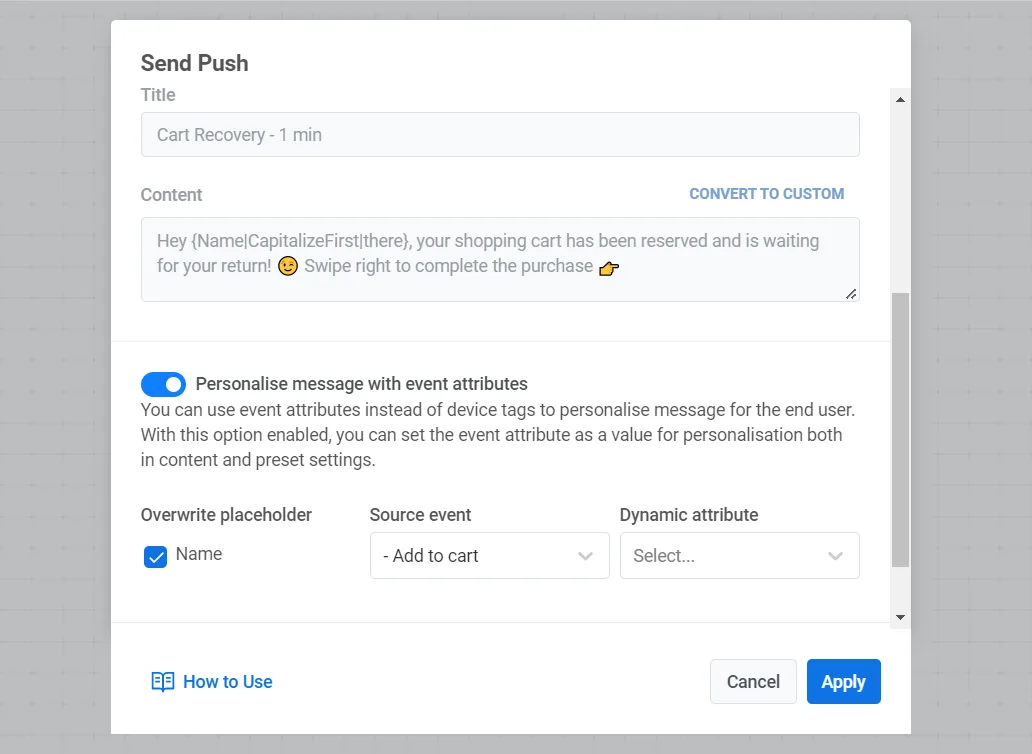 Learn how to personalize your message content
Dynamic Time Delay
Time your communications to your customers’ real-life appointments and in-app events:
- Send personal reminders of scheduled visits, classes or concerts;
- Ask for feedback afterwards;
- Suggest they plan their next appointment;
- Make special offers on your customer’s birthday;
- Congratulate them on their in-app achievements.
Any business can send these kinds of personalized messages if they use the Dynamic Time Delay in Pushwoosh and see higher conversion into repeat purchases/orders and better customer retention.
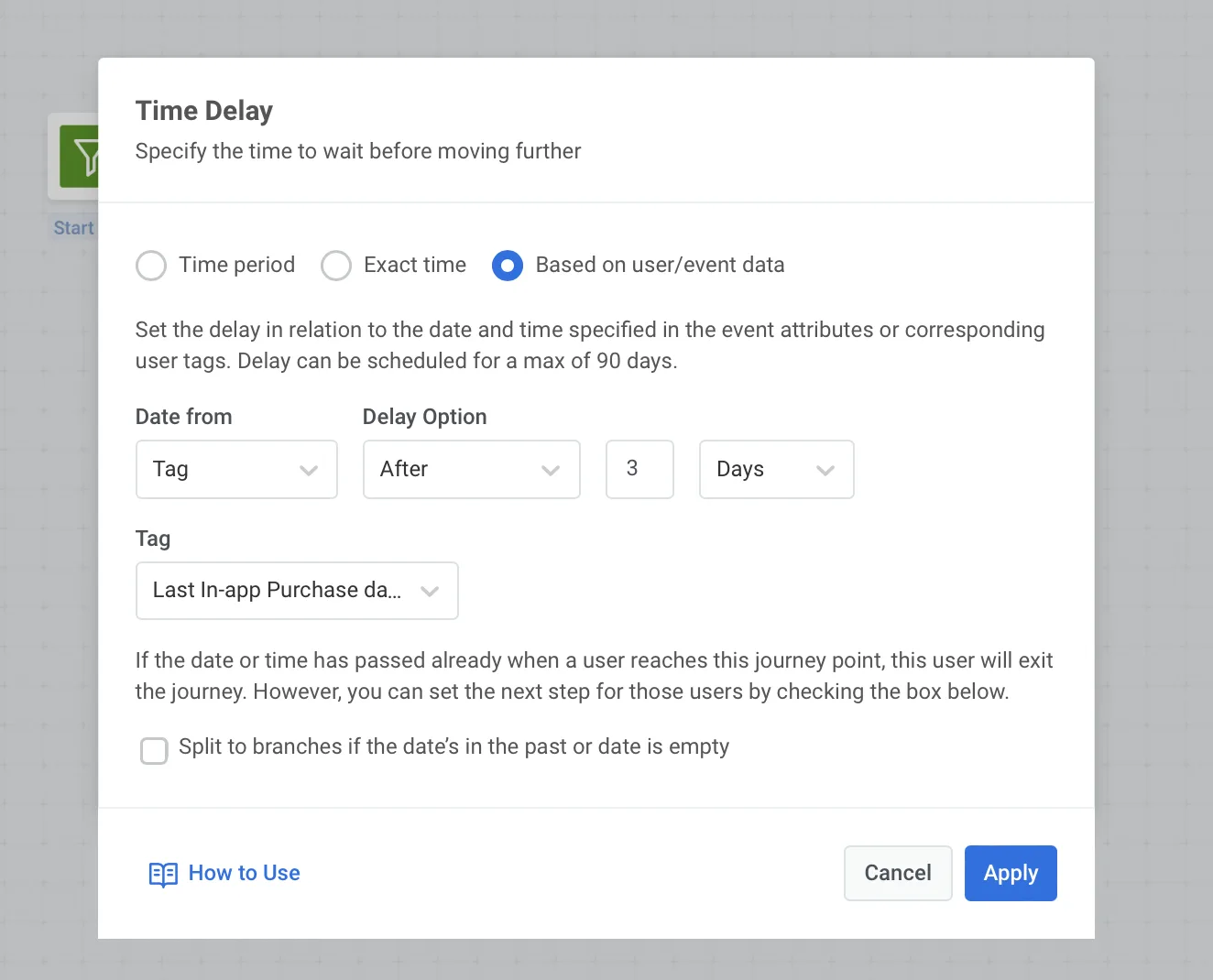 Learn what Dynamic Time Delay requires from your side
Statistics
Calculating your performance metrics precisely is as important as doing all the preceding jobs properly. So in 2022, we made a leap with our statistics & analytics capacities, presenting:
Project Overview report
The crown of creation in Pushwoosh’s statistics this year is the hottest visualization of your communication project performance now displayed in the interface.
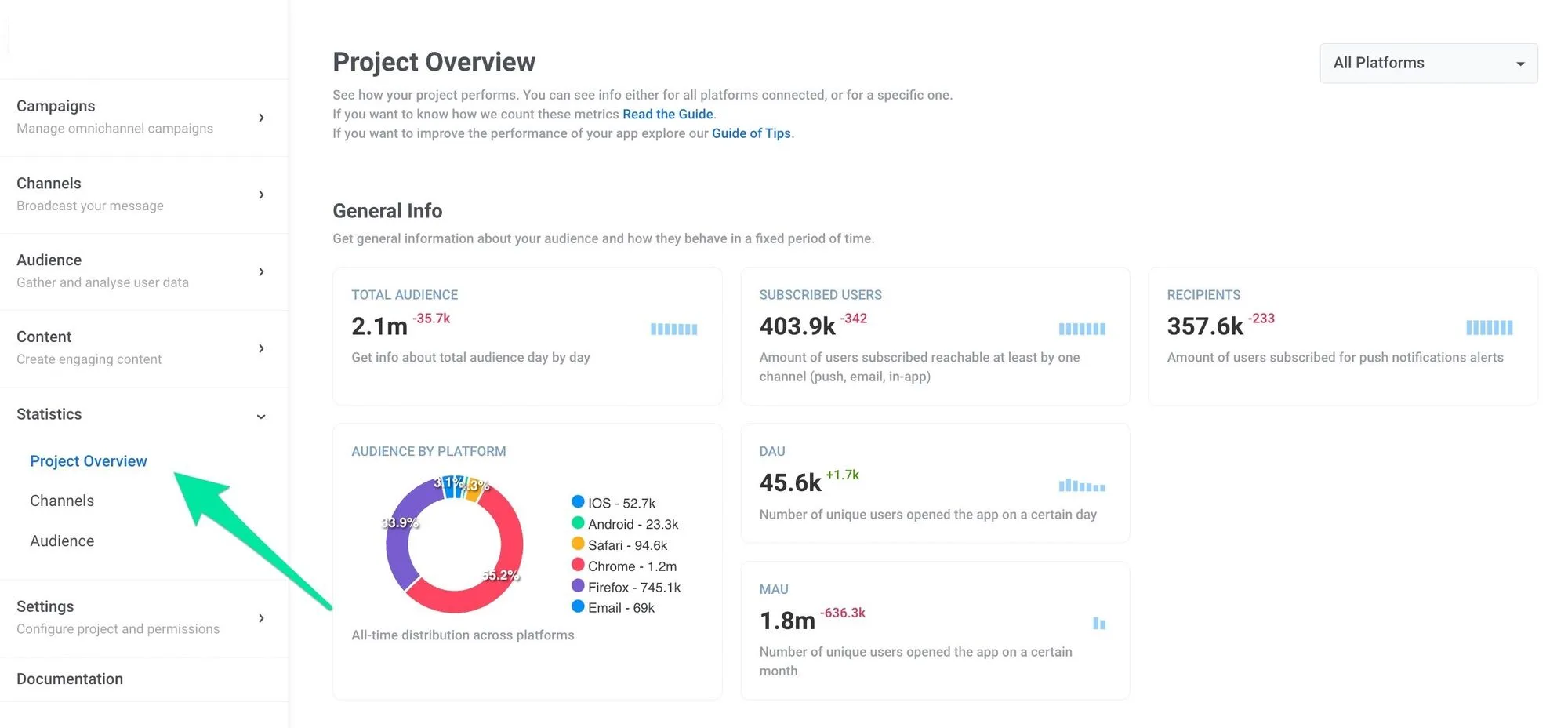
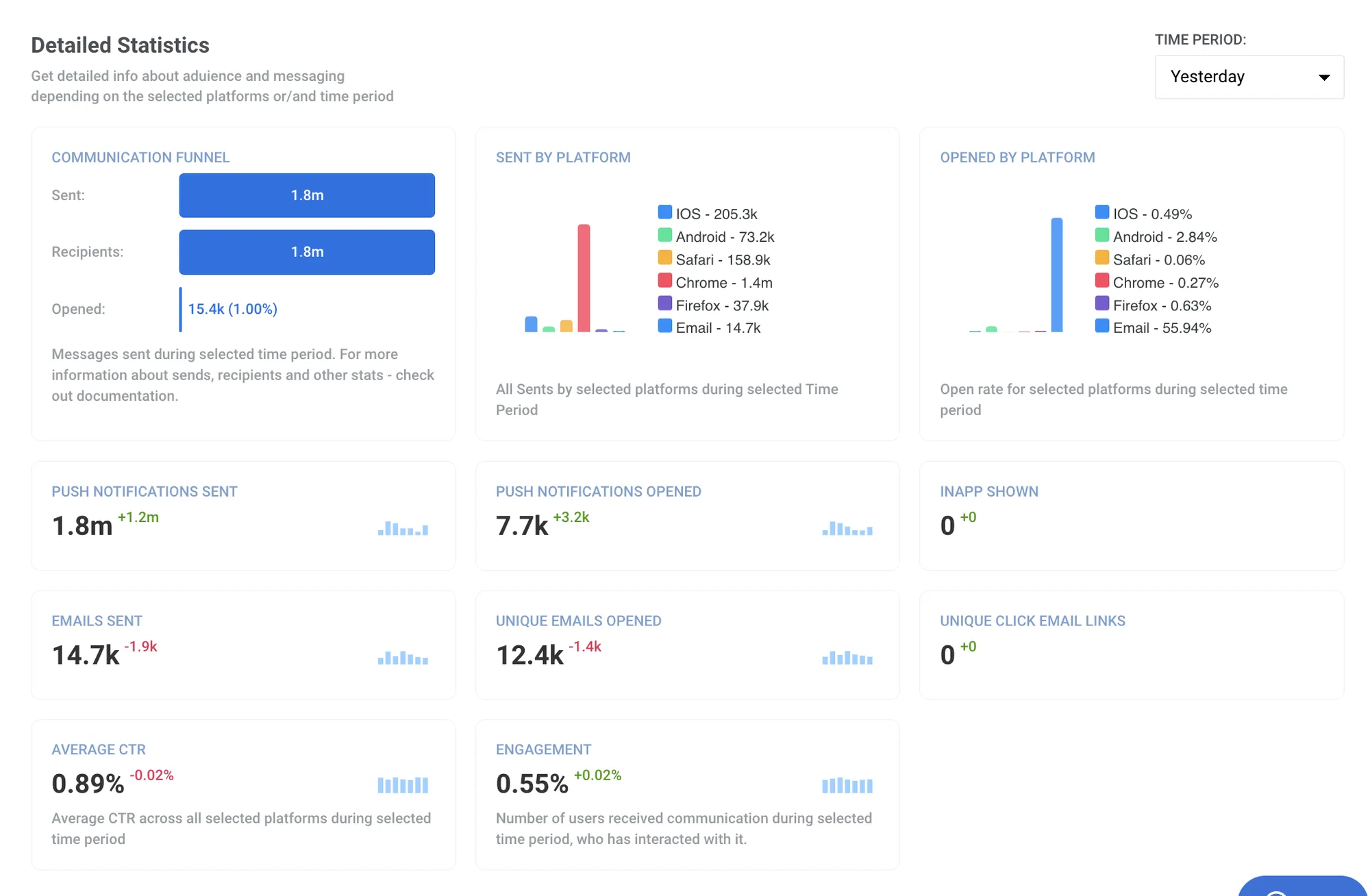
The style of the report allows marketers to grasp the state of their play at a glance: all the essential metrics, from audience numbers to aggregated stats on all the messaging channels, are gathered in one place.
And presenting the results of your work is now a breeze as you can simply take a screenshot of the report in Pushwoosh and paste it into the slides for your management and team.
Get your Project Overview report
or see what’s new in it and how to read it first
New stats in Pushwoosh Customer Journey Builder
Enjoy the smoothest experience of planning, executing, and monitoring your campaign performance in one place: on the canvas of Pushwoosh Customer Journey Builder.
- Gain insight into the number of users that have entered a given campaign
- Pinpoint the messages that received the highest CTRs and analyze why

Download your messaging statistics via API: feat. Tracking Log
Another improved option for obtaining your messaging statistics: getting them via API. This news consists of two parts:
- You can export the results of your campaigns made in Pushwoosh Customer Journey Builder via API;
- You can see which users opened (or didn’t open) particular messages and vary your further communication depending on their reaction (or lack thereof). To gain such insights, you need to access the Tracking Log via API. Note that this feature is only available for Pushwoosh Custom plan clients, and oh, they enjoy it!
Discover how to access the Tracking Log
UI/UX improvements
2022 might rightly be called the year of customer experience, when many global and niche brands paid extra attention to their audiences’ needs, demands, and convenience. Pushwoosh, too, made an effort to improve your day-to-day experience with the platform:
Improved UI/UX in Pushwoosh Customer Journey Builder
New and renowned features of our campaign builder have a new look and feel.
If you hesitated (or didn’t know how to use) some of the features, you can get help from our prompt Assistant and even check if your entire campaign is ready for launch.
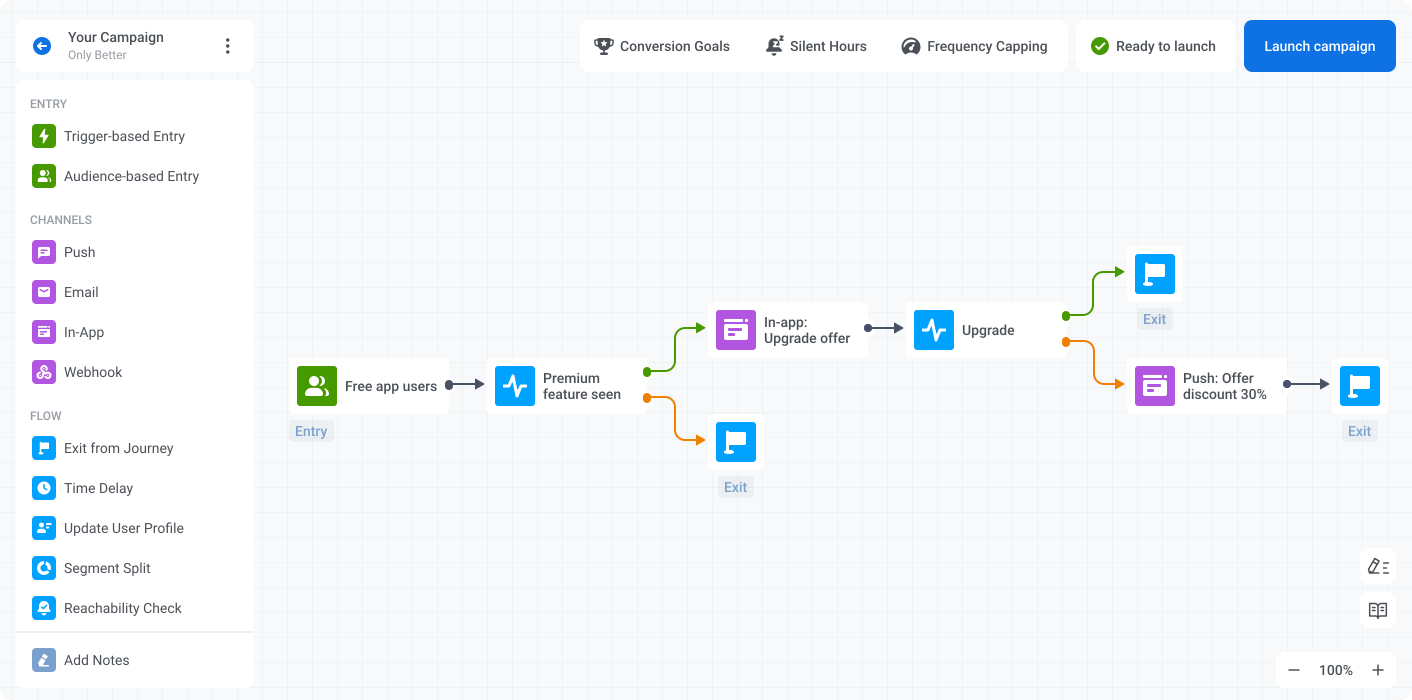
To reintroduce you to the tool, we’ve made a very well-structured blog post covering the use cases of every little element you will find in Pushwoosh Customer Journey Builder. Feel free to use it as your walkthrough guide:
Meet the improved campaign builder
A single UI for omnichannel and single-channel campaign planning
Going back and forth from working on the canvas of Pushwoosh Customer Journey Builder to sending one-time pushes or checking statistics in the Control Panel was not fun at all. We acknowledged the problem, and we resolved it. Now whatever job you have to do in the Pushwoosh interface, you can do it… right, in one interface. Switch between the tools and tasks easily!
Edit active campaigns in Pushwoosh Customer Journey Builder
This one might look minor compared to other improvements: you can now modify the campaigns you’ve already set to run in Pushwoosh Customer Journey. This means you can now proofread and optimize your communications in real time — sounds not that minor, huh?
If this is the feature you’ve always dreamed of, make sure to read the details in this blog post:
Learn more about campaign editing
Pushwoosh SDK is open-source
To finish this product updates recap on a really high note: Pushwoosh SDK is open-source (again). We took this step to reassure our dear customers that using the platform is 100% safe and secure in terms of data privacy regulations and norms. If you ever have the slightest doubt, you can always access our SDKs on GitHub and see the code with your own eyes.
Read our comment on going open-source
Thanks for being with us in 2022! We hope this year’s updates and improvements will serve you a good job in 2023 and help you face any challenges that may occur.
To prepare you even better for the new year, we have talked to the top experts in the mobile marketing world and gathered their advice in one blog post. Check it out if you want to stay ahead of the curve and set your business up for success in the coming year.
Pushwoosh Team stays there for you to help your business thrive. So here’s to an amazing 2023!