Style the push that lands while your app is open
When a push lands while your app is open, iOS leaves the moment to you. The Pushwoosh iOS SDK draws it as an animated banner in your own colors and fonts, with Apple's Liquid Glass material on iOS 26.
Trusted by 80,000+ companies to scale their engagement
The format, in full
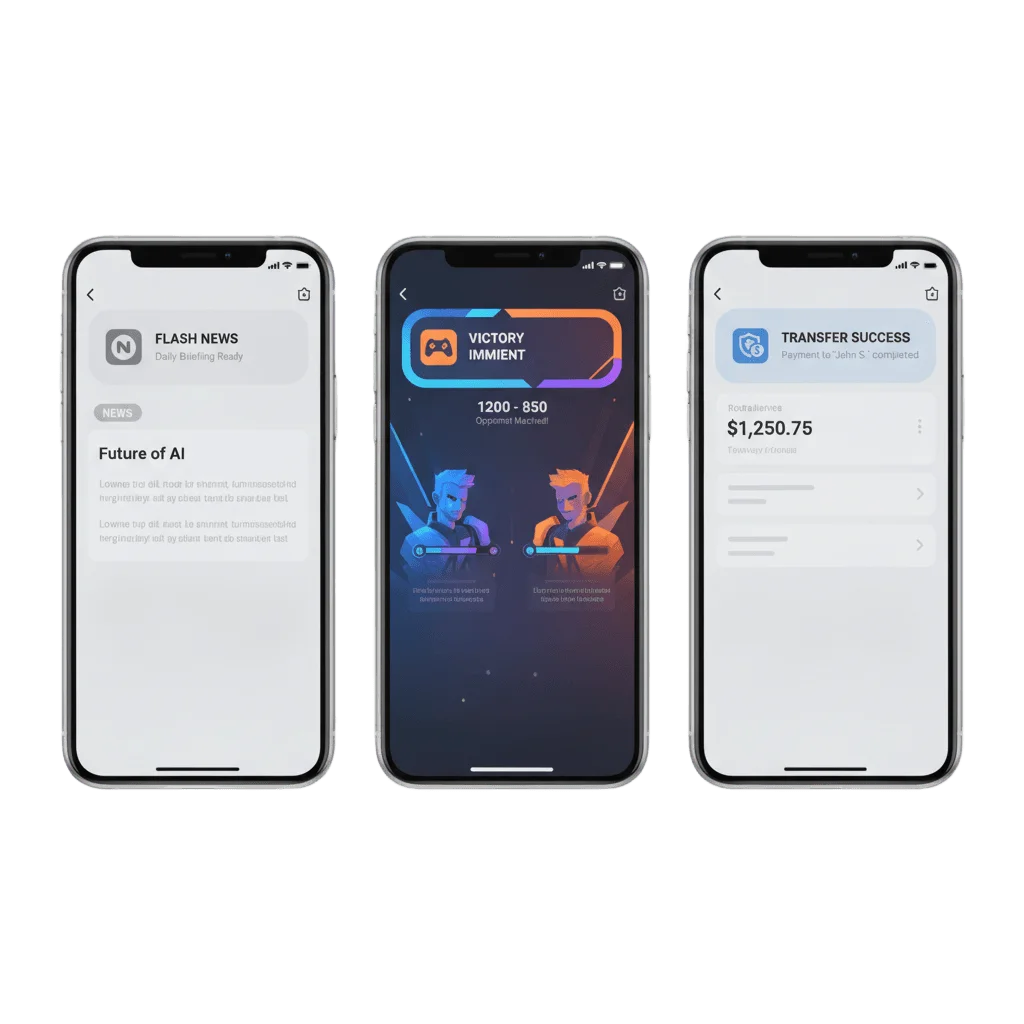
A push that arrives while your app is in the foreground is your app’s problem to solve. iOS will put its plain system banner over your interface, or nothing at all, and a message you built a whole Journey around lands as gray chrome. The PushwooshForegroundPush module renders that same payload as a banner you own.
Liquid Glass (iOS 26)
Switch on useLiquidView and the banner is drawn in Apple's Liquid Glass material, so it reads as part of iOS 26 rather than as a layer pasted over your screen.
A standard banner (iOS 13 to 25)
Below iOS 26 the same call renders a solid banner in your gradient and colors, and older Swift toolchains fall back to a blurred effect view. One configuration covers all three.
Card image and GIF
Title, message, a card image and an animated GIF, all read from the payload the push already carries.
Motion, haptics and a dwell time
An entry animation, a balls or regularPush dismiss, a haptic on arrival picked from seven levels, and a duration in seconds before the banner clears itself.
What you control
| Property | What it sets | Values |
|---|---|---|
useLiquidView | The Liquid Glass material on iOS 26 | Bool, false by default |
gradientColors, backgroundColor | The surface the banner is drawn on | Your brand colors |
titlePushColor, messagePushColor | Text color for the two lines | Your brand colors |
titlePushFont, messagePushFont | Typefaces for the two lines | Any font your app ships |
usePushAnimation | The entry animation | Bool, true by default |
duration | How long the banner stays before it clears | Seconds |
vibration | The haptic fired on arrival | none, light, medium, heavy, soft, rigid, notification |
disappearedPushAnimation | How the banner leaves the screen | balls or regularPush |
style | The built-in layout | style1, the only one available today |
useLiquidViewfalse by defaultgradientColors, backgroundColortitlePushColor, messagePushColortitlePushFont, messagePushFontusePushAnimationtrue by defaultdurationvibrationnone, light, medium, heavy, soft, rigid, notificationdisappearedPushAnimationballs or regularPushstylestyle1, the only one available todayWhere you set it
One call at launch
foregroundNotificationWith(style:duration:vibration:disappearedPushAnimation:) in didFinishLaunchingWithOptions, plus the appearance properties. Configured once for the whole app.
One call on arrival
showForegroundPush(userInfo:) from your PWMessagingDelegate.onMessageReceived callback renders the banner straight from the message payload.
One delegate for the tap
PWForegroundPushDelegate.didTapForegroundPush(userInfo:) hands you the full payload, so a tap deep-links exactly where the campaign intended.
The job it does, inside a journey
One push, three renderings
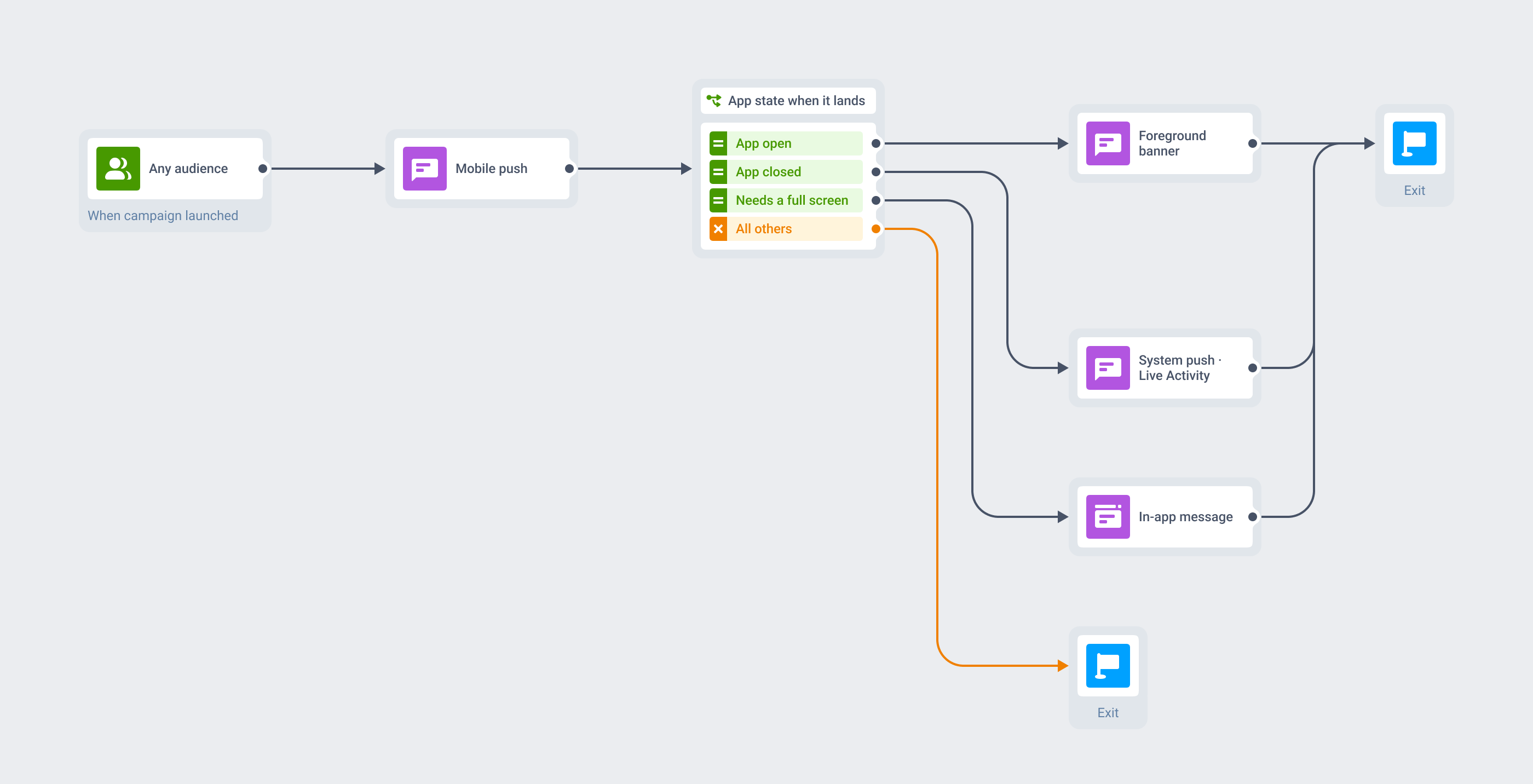
The foreground banner is a render mode of a message you are already sending. Same segment, same trigger, same payload, same step in the same Customer Journey. What changes is what the device does with it on arrival.
With the app closed, the message lands as an ordinary system push or updates a Live Activity. With the app open, the SDK draws this banner. When the moment deserves a full screen with an offer or a form, the same Journey escalates to an in-app message.
A story breaks while the reader is mid-article
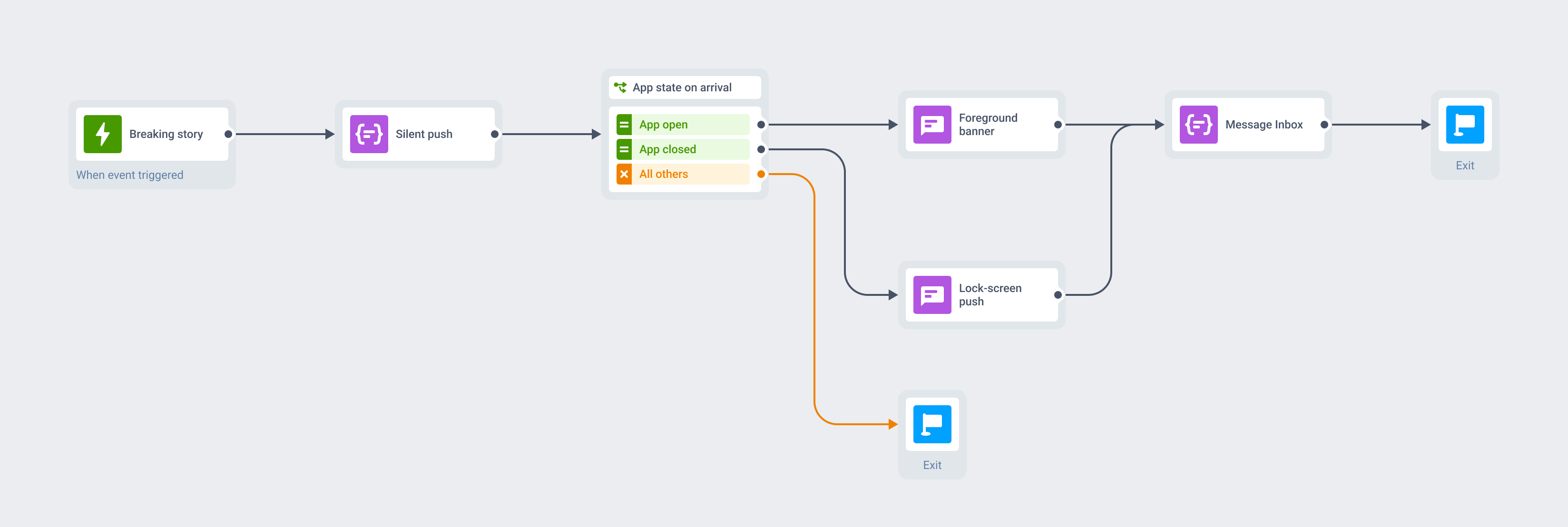
An editorial event fires the Journey. A silent push warms the article in the background, invisible to the reader, and the alert follows a second behind it.
Readers with the app closed see the system push on their lock screen. Readers already inside see the masthead’s own banner slide over the article they were reading, thumbnail attached, and one tap deep-links them to the new story. Message Inbox keeps the alert waiting either way.
What to use it for
The banner can only fire while someone is inside your app, so its value tracks in-session density: how much of your sending lands on a screen that is already open. Apps with long sessions get the most from it, and apps whose messages arrive to a pocketed phone get very little.
| Moment | What the message says | Why the banner fits |
|---|---|---|
| Media & news · a story breaks during a reading session | The verdict is in | The reader is already in the app, and the system banner interrupts the masthead's own design |
| Streaming · a release lands during an episode | Season 3 is live | The alert can carry the show art instead of arriving as system chrome |
| Mobile games · an event or reward during a match | Your turn · The raid starts in 5 | Long sessions mean most pushes land in-play, and an art-matched banner fits the game UI |
| Creator & subscription apps · a new drop or a trial nudge | New from an artist you follow | A carefully designed app should not hand this one moment to the system, and the tap deep-links to the paywall |
| Live sports · a goal while the user watches in-app | 1-0, 68 minutes | The user opened the app for the event and is watching it when the push lands |
| E-commerce & marketplaces · a price drop while they browse | Back in stock in your size | A styled banner mid-scroll reads as part of the store rather than as an interruption |
| Fintech · a confirmation during an in-app task | Transfer sent | A branded confirmation feels native at the moment the user is watching for it |
When another surface is the right one
The banner is the glanceable middle rung between a plain system alert and a full in-app takeover. Plenty of moments sit on either side of it.
- The moment lands with the app closed: a courier at the door, a gate change, a fraud alert. That is a plain push, an interruption level or a Live Activity.
- The state is ongoing rather than instantaneous: an order in progress, a ride en route, a running score. That is a Live Activity.
- The message needs a full screen: an offer, a form, a paywall. That is an in-app message, which is richer and composed no-code.
- You want to change who receives the message or what it says. This changes how it looks, and reach stays with mobile push.
Platform & technical coverage
The module is an iOS one. Android governs foreground behavior through notification channels, which the Pushwoosh SDK creates from the push payload rather than your app registering them in code, and the web has no comparable surface. The last column says what actually draws the banner, because most of this lives in your app rather than on the server.
| Capability | iOS | Android | Web | Delivered by |
|---|---|---|---|---|
| Custom foreground banner | iOS 13.0+, Pushwoosh SDK 6.10.0+ | – | – | The PushwooshForegroundPush module in your app |
| Liquid Glass material | iOS 26 with Swift 5.13+ | – | – | Apple's material, switched on with useLiquidView |
| Solid banner fallback | iOS below 26, Swift 5.13+ | – | – | A standard view drawn by the SDK |
| Blurred banner fallback | Any iOS, Swift below 5.13 | – | – | A blurred effect view drawn by the SDK |
| Title, message, card image, GIF | Yes | – | – | The push payload, unchanged |
| Brand colors, gradients and fonts | Yes | – | – | Static appearance properties on the module |
| Haptics, entry and dismiss animation, duration | Yes | – | – | foregroundNotificationWith at app launch |
| Tap handling and deep link | Yes | – | – | PWForegroundPushDelegate.didTapForegroundPush |
| No-code configuration of the look | – | – | – | Not available today, the styling lives in app code |
| The comparable in-session surface elsewhere | In-app messages, Live Activities | In-app messages | In-app messages | Separate products, composed no-code in the Control Panel |
PushwooshForegroundPush module in your appuseLiquidViewforegroundNotificationWith at app launchPWForegroundPushDelegate.didTapForegroundPushSecurity & hosting
Pushwoosh runs on its own hardware in the US and Germany, under GDPR and BDSG.






How it works
This one asks for engineering time and says so. There is no Control Panel composer for the foreground look, so a developer wires it once in the app and everything after that is the sending you already do.
-
Add the module and hand the foreground to your app (developer)
Add
PushwooshForegroundPushalongsidePushwooshFramework,PushwooshCore,PushwooshBridgeandPushwooshLiveActivities, then setPushwoosh_SHOW_ALERTtofalseinInfo.plist. That stops iOS drawing its own alert, because the banner replaces it rather than joining it. -
Configure the look once (developer)
Call
foregroundNotificationWith(style:duration:vibration:disappearedPushAnimation:)indidFinishLaunchingWithOptionsand set the appearance properties for colors, gradients and fonts. Render each message withshowForegroundPush(userInfo:)fromonMessageReceived, and handle taps indidTapForegroundPush. -
Send exactly as you do today (no-code)
Same audience, same Customer Journey, same payload, whether the campaign comes from the Control Panel or the Messages API. The banner is how that push renders when it finds the app open.
Limits worth knowing
Explore related products
Mobile push notifications by Pushwoosh — every-device reach, rich content, precise targeting, cross-channel Journeys and 99% uptime. Turn notifications into loyal, paying users.
In-app messaging by Pushwoosh — onboard, upsell, announce and collect feedback right when app users are paying attention. No-code editor, native SDK layouts, per-element analytics. Free to start.
Add labelled action buttons to the push you already send, so users accept, claim, approve or track in one tap. Build the iOS button sets no-code in the Pushwoosh Control Panel and send them from the same campaign and Journey.
Live Updates put an order, a ride or a delivery on the Android 16 lock screen as one card that refreshes itself. Pushwoosh starts, updates and ends it from the server, from the same campaign and Journey as any other push.
Put several images in one iOS push and let users swipe through them in the expanded notification. Pushwoosh ships the notification content extension, and the carousel sends from the same campaign and Journey as any other push.
Message Inbox adds an in-app notification center to your app and website. Silent delivery reaches every user, including the ones who declined push, and saved messages stay available on their own time.