The updates in Android 12 go perfectly in line with the ubiquitous trend for user privacy. Apparently, end users will have all the means to protect themselves from ‘disturbing’ push notifications. But as for app marketers, will they have to adjust their communication strategies significantly to break through to their audience?
Read on to make sense of the risks that Android 12 new features bring and craft your counterstrategy based on the recommendations from Pushwoosh Team.
App Hibernation: Keep Your Cross-Channel Messaging on Alert
The feature: If an Android 12 user doesn’t interact with your app for a few months, the system sets your app in a hibernation state that withdraws any notification permission granted before. (Think of a similar Android 11 feature, only stricter).
Even if the user begins to engage with your app again, you will have to take them through the same opt-in process, asking for permissions and explaining the value of your notifications.
The problem: Android 12 apps will fail to use notifications for re-engagement. Pushes will only be useful to win back the users who have been active in the app somewhat recently.
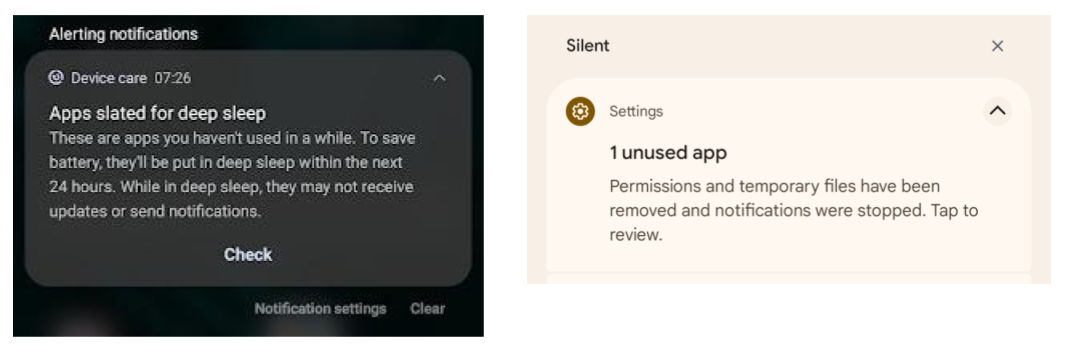
Left: In Android 11, an alerting notification on the apps going to deep sleep would appear 24 hours in advance. Right: In Android 12, a silent push will arrive when notification permissions have already been removed.
What type of apps will be affected: This Android 12 update is critical for any type of app that sends push notifications.
In particular, e-commerce apps may be affected: from those that sell slow-moving consumer goods such as electronics and furniture (whose customers don’t have a lot of reason to always be on the lookout for a new blender or sofa) to those distributing consumables (and facing high competition in their app niche).
Travel apps may also be hit: one part of their audience may have ceased to search for tickets, tours, and accommodation because of the pandemic. And for another part, referring to a travel app would always be associated with an annual leave which implies using the app less frequently than every few months.
Solutions:
1. Re-engage the users who approach entering the App Hibernation phase
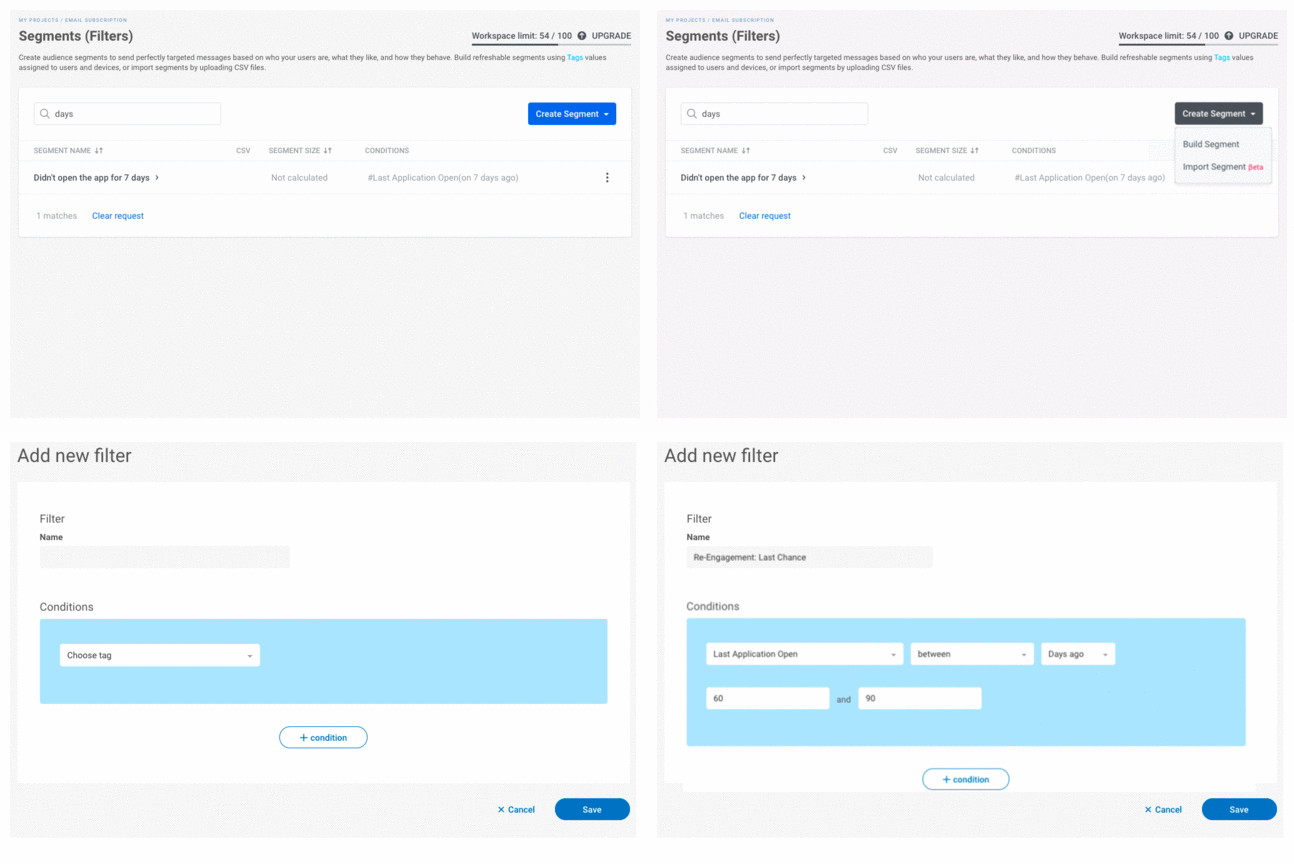
In Pushwoosh, you can segment out the soon-to-hibernate devices and target your communications to them while they are still awake.
1️⃣ Create a segment by the Last Application Open event being between 60 and 90 days.
It is not yet known exactly for how many days a user should stay away from the app for it to hibernate, but we presume the 60 to 90 days period will be accurate.
2️⃣ Send a re-engaging push to the chosen segment.
2. Engage and retain users before they abandon your app
To avoid falling into the hibernation state, your app should — you guessed it! — keep users opening it at least once every few days or weeks. Right, but how do you achieve it?
Auto-send regular communications to your audience. To make your messages engaging and effective, tie them to specific events or user attributes that you keep up-to-date.
📲 A good option is to target a segment with a more recent Application Open date — say, within three last days. Pushwoosh Customer Journey Builder has a useful new feature for this case: Repeated Entry by Segment. With its help, you can auto-send a push notification every time another user stops opening your app for a few days.
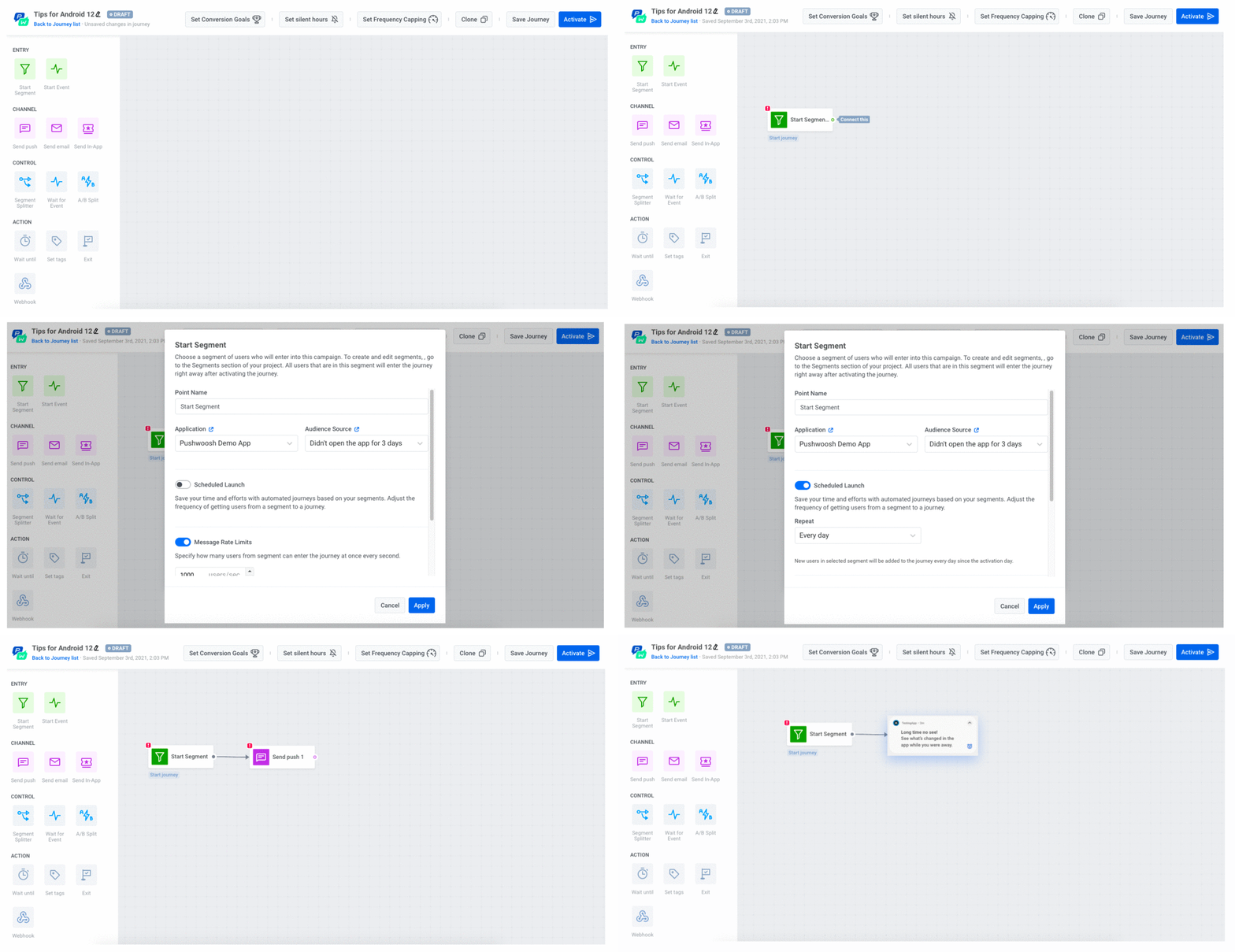
📲 You can also set dynamic Tags to detect the users who have triggered a series of events in your app. For example, you can filter out those who have used three features in your app and target this segment with your communications. This way, you may keep users engaged before they abandon your app.
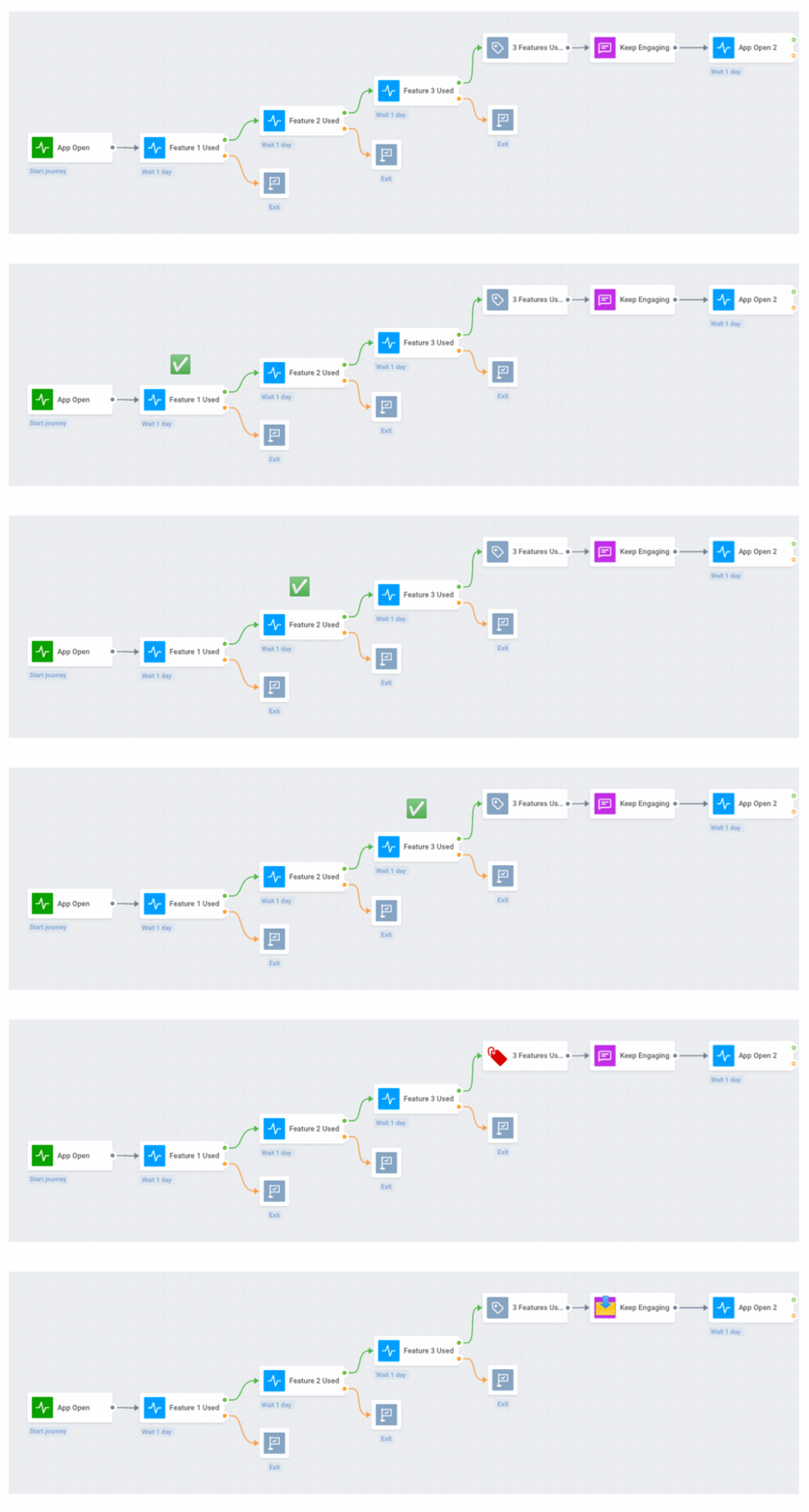
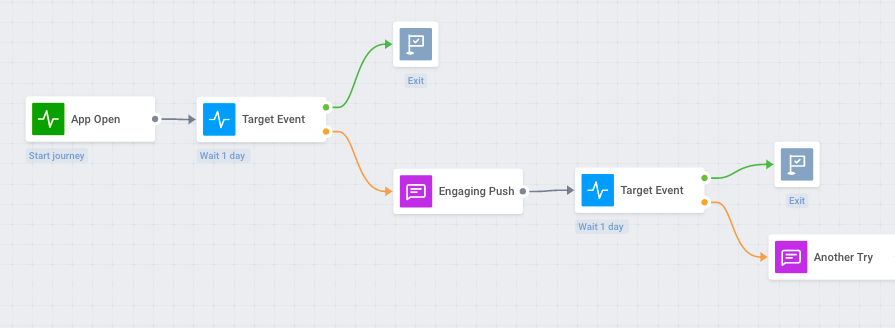
📲 Or you may specify a period of time you will wait until a user triggers the needed event after opening your app. If they don’t, you’ll send them a triggered messaging sequence.
3. Reach out via other channels
When Android 12 makes push notifications ineffective for old users’ re-engagement, you simply utilize other channels.
If a user happens to open your app after a long while, you welcome them back with an in-app. If not, you send them a warm email. You can even try SMS if you have it connected via Webhooks in Pushwoosh Customer Journey Builder.
4. Request users to disable hibernation
Finally, you can be straightforward and use these other channels to explain what your users are missing out on while they are not receiving your notifications. This will be similar to getting them to opt-in, except for several more technical explanations.
Approximate Location: Get Into the Permitted Geozone
The feature: From the technical standpoint, accessing your users’ precise and approximate locations is done in two different ways. And from a user’s perspective, these are two different levels of privacy.
Android 12 puts the difference on display for app users and marketers. Now you will have to request either fine or coarse location sharing — and it will be your audience to choose how close you may get to them.
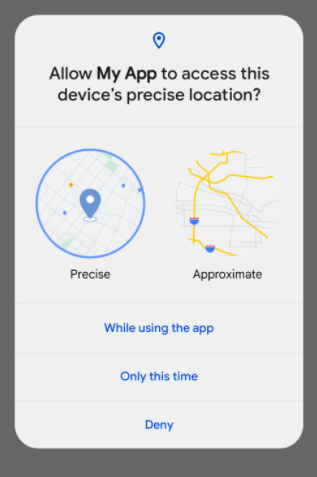
The problem: With no access to precise location data, geo-based targeting may be challenged. Communications may become less effective. Apps may even lose a part of their engaged audience.
Requesting approximate location sharing (as Android recommends to most apps) looks precarious. As the new feature draws extra attention to the privacy aspect of geo-position sharing, users may become more alert and prefer not to grant access even to their coarse location.
What type of apps will be affected: All apps sending geo-based pushes — with reservations. For a user, sharing their precise location with an emergency or taxi app may be critical and well-justified. Sharing it with an e-commerce app may be convenient — provided the application can send a reminder in a geo-based push right at the moment when a customer passes by a pickup point. But when a dating app requests access to precise location tracking, a user may refuse it, thinking those extra 100 meters won’t help them find a better match.
Solutions:
1. Consider which level of preciseness will be sufficient for your app
Android 12 will show two different location-tracking request messages when you ask to be admitted to precise and approximate geo-data. You want to be certain about how much information your type of app really needs for proper communications.
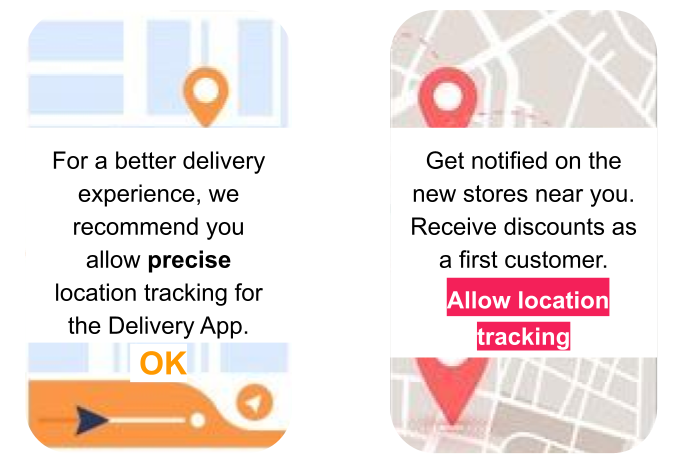
2. Anticipate a location-tracking prompt with an explanatory in-app
If it is imperative for your app to have access to users’ location (and users themselves are not totally aware of it), give them your reasons and highlight the value for them.
Surely, a pizza restaurant wants to lure more visitors that are just passing by their place. But will a customer receive a neighborly discount for today’s lunch in the nearby pizzeria? Will the in-app loyalty program remember them as a regular in this particular place? If so, location sharing may be worth the benefits.
3. See if the number of users sharing their geos will actually increase
Let’s look on the bright side, for once in a marketer’s life. We have a hypothesis that customers may be willing to share their approximate location with apps.
Earlier, if an app user wanted to benefit from geo-based recommendations and features, they would have no other choice but allow both precise and approximate location tracking. If a customer preferred to protect their privacy, they had to refuse the app’s access to geo-data and cut themselves off from any related benefits.
Now, they may choose to share their approximate location and stay confident about their privacy while enjoying all the geo-based benefits an app can offer.
Will it result in more users allowing approximate location tracking? It may, especially if Android educates its users well enough on this version 12’s feature.
4. Make do with approximate location data in your targeting
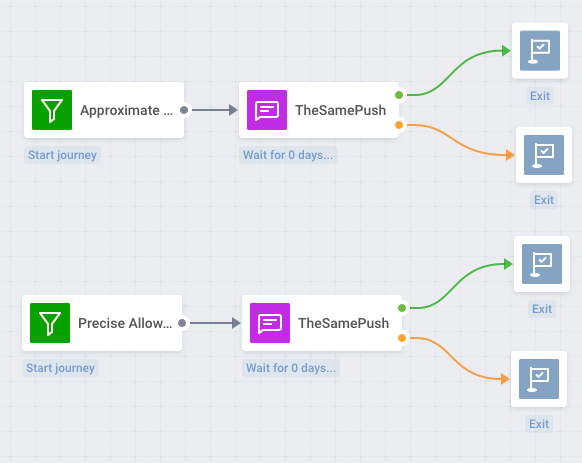
You may discover that delivering a geo-targeted push with a 100-meter accuracy is as effective as doing it with pinpoint accuracy. Here is how you can make it certain:
1️⃣ Get your developers to create Custom Tags for your Android 12 users who have allowed precise or approximate location tracking. Put them into corresponding Segments.
2️⃣ Schedule a geo-push to these two Segments.
3️⃣ See if there is a visible gap in engagement between the two Segments.
5. Experiment with more sophisticated segmentation
In any case, it will be useful to combine geo-based targeting with other kinds of customer segmentation. Even approximate location-based pushes may hit the mark if, in addition, you:
- Adjust the notification content you target at your most and least frequent customers, those who have just installed your app and those who have been using it for months;
- Personalize the message according to the events users trigger in your apps and the attributes they hold — if you Set Tags properly, your segmentation can be as granular and effective as you need.
Fast Notification Snooze: Give Your Pushes a Second Chance
The feature: This is a double-layer one. First, users will get to snooze the notifications they prefer to view later. Second, users will get to snooze all the notifications for specific apps. Unlike the Do Not Disturb mode, the Notification Snooze feature allows choosing particular apps whose notifications will not be shown in the notification center until the app is awakened.
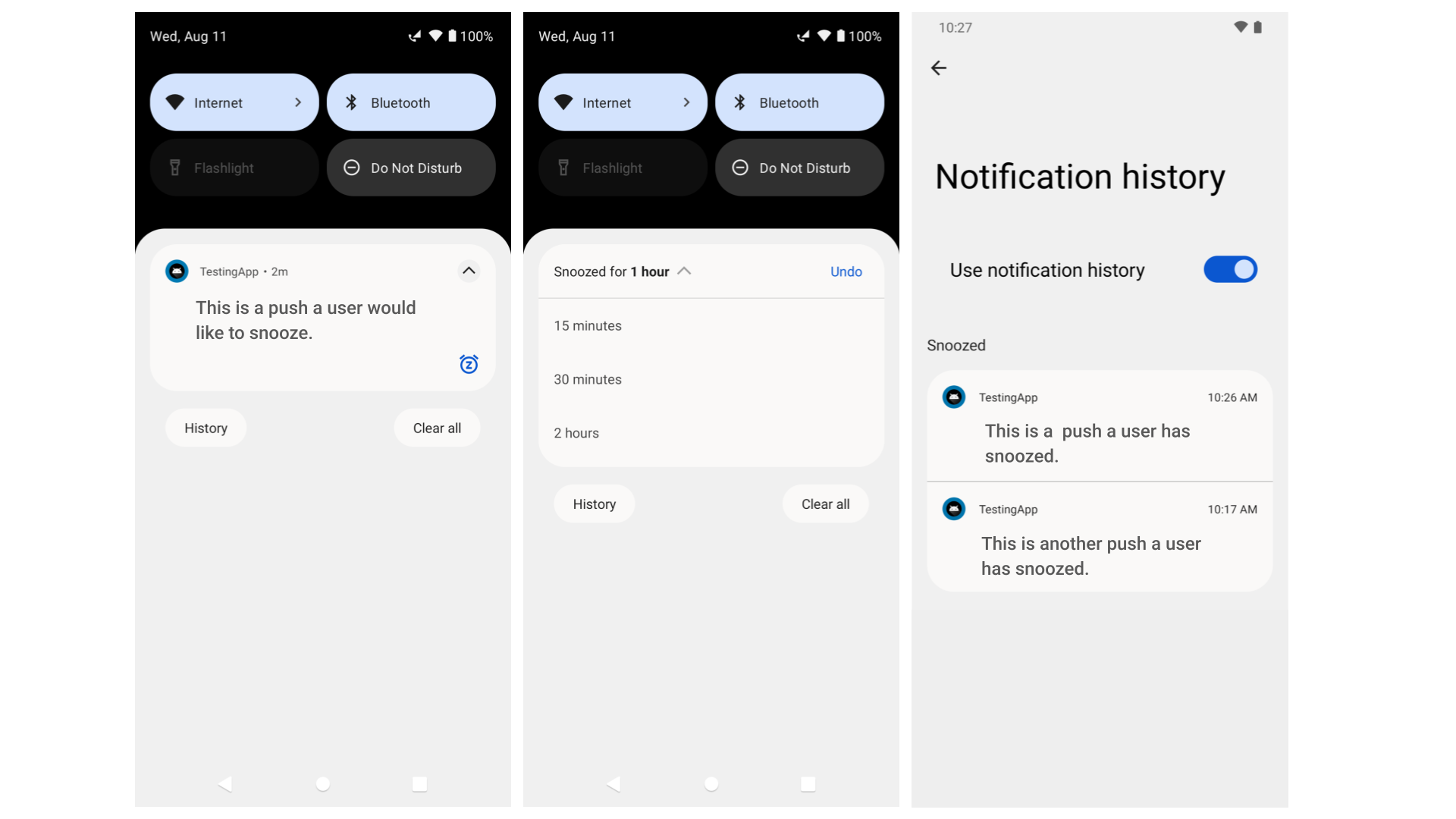
The problem: For push notification senders, there could actually be no problem at all as, by default, Notification Snooze is off. A user has to go to their phone settings to activate it. But the problem is, all the snoozed pushes go to Notification History — another new Android 12 feature
Moreover, app marketers may view the feature as a second chance for their push to be seen instead of being swiped off immediately.
The problem arises when a user snoozes your app’s notifications for good, and on top of that, silences other apps’ pushes too. In the best-case scenario, apps would face the same competition issue as in iOS 15 with its Notification Summary. In the worst case, all the snoozed pushes stay buried in Notification History, well-hidden from users’ eyes.
What type of apps will be affected: Apps sending pushes without any CTA requiring a quick response.
Solutions:
1. Experiment with the delivery time
Even a slight change within those 15 minutes that Android 12 suggests for snoozing a notification may result in higher CTRs.
2. Use clear CTAs that require an immediate user reaction
Whenever possible, promote the sense of urgency in your pushes. Try to convince users their only chance to benefit from your offer is now, and if they snooze your notification, they will miss out on something important.
3. Win users with the content they won’t want to snooze
Sorry for stating the obvious: high-quality content, relevant, personalized, and well-targeted will always go a long way. Aim for fitting your users’ needs, and no system update will keep them from taking the target action.
Notification History: You’ll Still Need a Message Inbox
The feature: It could resemble an embedded message inbox for all the Android 12 apps, but it’s not.
The problem: The feature is not the most evident to discover for the end user. Most likely, the majority of Android 12 phone owners will have a problem even finding this feature, let alone using it.
In addition, the tests conducted by Pushwoosh Team show that Notification History doesn’t display any silent pushes or rich media pushes. Custom Actions, if used in the originally delivered notification, become unavailable as soon as the messages get into Notification History.
And even more so, Pushwoosh Team hasn’t discerned any clear logic behind the hierarchy of pushes displayed in Notification History.
What type of apps will be affected: If used by a decent share of the Android audience, the feature will concern all types of apps, starting with the ones that send numerous pushes per day which stay unseen.
Solution:
Consider adding a Message Inbox to extend the lives of your pushes
If your notification content includes some long-span offers that users may want to revisit later, our team will be more than happy to create a custom Message Inbox for your app. Contact us to learn more about an effective solution that will make your app a priority.
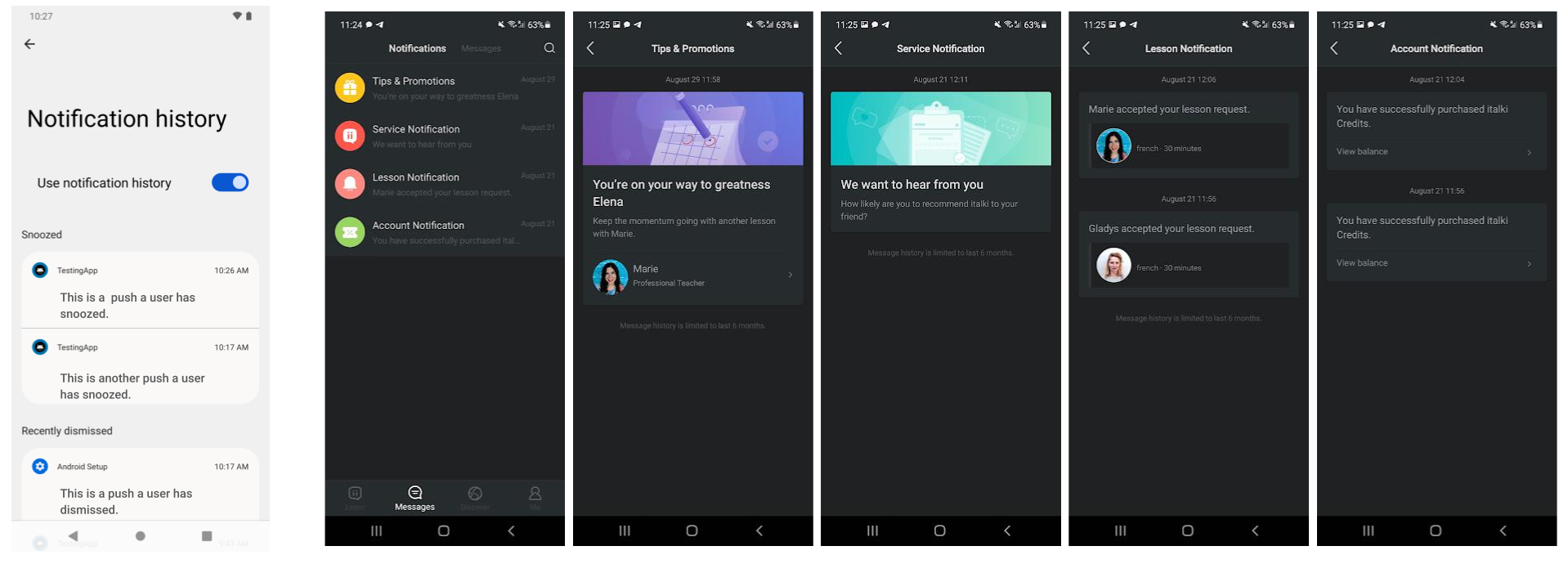
The look of Android 12 Notification History is incomparable to a full-scale Message Inbox customized to the needs of your app.
Checklist: How to Counteract Android 12 Restrictive New Features
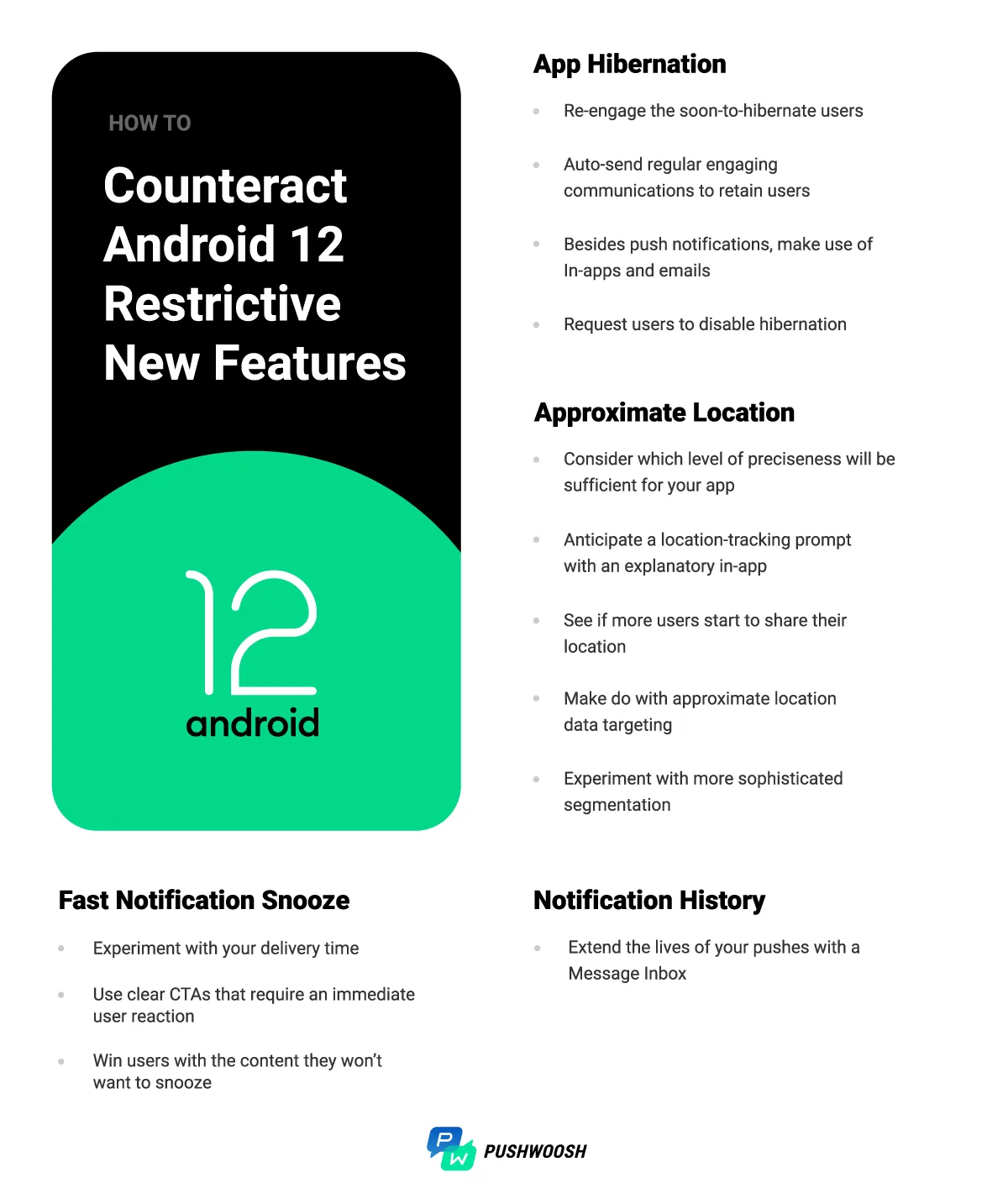
Save & use this checklist to tweak your push notification marketing strategy for Android 12
Prepare for the Android 12 Release — and Whatever Comes Next
By the end of 2021, we won’t recognize push notification marketing, it seems. There used to be a reliable channel for user engagement and retention. Now it is turning into an unsteady platform where businesses have to navigate between the restrictions of operating systems, customer demands, and their own interests.
Marketers’ life is not getting any easier, but, as usual, with the new challenges come new opportunities. We at Pushwoosh are more than happy to help you seize them. Contact us to discover the ultimate solution to your push notification marketing issues.